Advice on side case fans

blaaislaai

New member
Hi All

I have the HAF 932 case, summer is approaching soon and I need to do some cooling upgrades for my case.

I currently have the standard 230mm blue LED fan on the side, running at 700rpm:
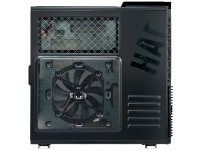
23_Product_top3.jpg

I want to upgrade this with a higher flowing fan, but i dont seem to get anything more than 900rpm and not sure if that extra 200rpm will make any difference.

My PC is running 24/7, mining ethereum so my 2x RX480 are getting quite hot with 100% GPU activity and the current side fan is not really helping temperatures

The side of the panel also supports 4x 120mm fans, should I replace the current 230mm fan with maybe 2x 120mm fans, should that be a better alternative?
 
Is the fan Push or Pull? Do you have any other fans in the case? What are your actual temps of the cards?

Additionally you could always drop the total voltage of the two RX480's a little bit. This will lower it's power draw, effectively reducing heat generation.
 
Is the fan Push or Pull? Do you have any other fans in the case? What are your actual temps of the cards?

Additionally you could always drop the total voltage of the two RX480's a little bit. This will lower it's power draw, effectively reducing heat generation.

Side fan is currently pushing air into the case.
1 fan in front pushing as well
and one exhaust fan pushing out, obviously :)

Both my cards are both undervolted a bit to make them power efficient. They are both running at 90w average compared to a stock card @ 115 - 120w under load, according to GPU-z
 
So your case fan currently will push ~120CFM taking the speed up by 200rpm will increase your CFM to ~140

Depending on the rpm of the 120mm fans you can get between ~21CFM @ 600rpm all the way to ~80CFM @ 2000rpm

At a nominal ~50CFM when going ~1000rpm using 4 x 120mm will push in more air.

Now, do you have 3x 120mm fans at the top of your case pushing air out? Do you have the rear 120mm fan?
 
So your case fan currently will push ~120CFM taking the speed up by 200rpm will increase your CFM to ~140

Depending on the rpm of the 120mm fans you can get between ~21CFM @ 600rpm all the way to ~80CFM @ 2000rpm

At a nominal ~50CFM when going ~1000rpm using 4 x 120mm will push in more air.

Now, do you have 3x 120mm fans at the top of your case pushing air out? Do you have the rear 120mm fan?


Nice info there, thanks!

Currently have no fans on top of the case, even though there is space for them.

Only have the rear 120mm pushing out.

Planning to get at least 2x 120mm @1200rpm fans, noise is not a concern :)
 
Last edited:
Get exhaust fans at the top. Makes the worlds difference. never been a fan of fans on the side of a case. In my experience causes more dust than anything else, and disrupts the airflow from front to back.
 
Get exhaust fans at the top. Makes the worlds difference. never been a fan of fans on the side of a case. In my experience causes more dust than anything else, and disrupts the airflow from front to back.

Dankie, will do!

I ordered a few 120mm fans, will see how temps drop after i get them maybe next week.

The side fan is mostly to cool down my GPU's they're running extremely hot
 
Air blowing like that will not improve it by much in my opinion. That is why the GPU has its own cooling. The main point of case fans is to get the hot air out effectively with enough fresh and moderately cool air coming in. All that fan on the side is doing is most likely spraying the GPU full of dust if its blowing in
 
Thanks, I will rather upgrade my front, back and top fans and leave the side fan for now.

I'm gonna do some 24h average temp tests to see what works best :)
 
Thanks, I will rather upgrade my front, back and top fans and leave the side fan for now.

I'm gonna do some 24h average temp tests to see what works best :)

The simplest thing to keep in mind is the air flow direction. Hot air rises. So you essentially just want to ensure that your intake fans are as low as possible and as much to the front of the case as possible. Keep your exhaust fans at the top and back.

In, up and out. With regards to side fans, I generally just use them as intake fans and they can be slow. It's just really helping a little. To be honest, getting more air into the case is a lot less important than getting hot air out. You want hot air out of your box ASAP.
 
I use side fans whenever i can and it always made a big difference whenever i used it, especially when using 2 GPU's in SLI. Top fans make a big difference too.
 
I use side fans whenever i can and it always made a big difference whenever i used it, especially when using 2 GPU's in SLI. Top fans make a big difference too.

On what case? How many fans in total? And in what directions? Look a bit at how many modern cases have side fans. Almost none
 
The simplest thing to keep in mind is the air flow direction. Hot air rises. So you essentially just want to ensure that your intake fans are as low as possible and as much to the front of the case as possible. Keep your exhaust fans at the top and back.

In, up and out. With regards to side fans, I generally just use them as intake fans and they can be slow. It's just really helping a little. To be honest, getting more air into the case is a lot less important than getting hot air out. You want hot air out of your box ASAP.

Agree yeah
 
Thanks for the input so far all.

Gonna be making some changes next week and keep track of my temps before and after changes
 
On what case? How many fans in total? And in what directions? Look a bit at how many modern cases have side fans. Almost none

I've had many cases over the years, but generally preferred Coolermaster. Probably my hottest setup was an Intel i7 930 overclocked to 4GHz together with 2 NVidia GTX 580's in SLI driving a triple-screen config. Those were housed in a Coolermaster HAF 922 case, definitely with a side-fan (200mm). It also had all the other fans that came standard with the case (front 200mm, rear 120mm and top 200mm).

I always have front and side fans blowing in, with rear and top fans blowing out. I prefer the larger fans as they push the same or more air but at a lower RPM and are therefore quieter and cover a larger area. Unfortunately I didn't record temperatures with different fan configurations, but my gut feel says that a 230mm fan will be more efficient than two 120mm fans.

From what i read, the AMD graphics cards run quite hot and can easily reach 90°C or over, while still remaining stable. I think the only way to drop temps in summer is to go the water-cooling route, or leave the side of the case open and have one of those Dions floor fans blowing onto it and you :-)

I eventually did go the water-cooling route on my HAF922 setup (CPU and two graphics cards) and it dropped temps massively - easily 10-20°C, but it is costly, cumbersome and frustrating. Needless to say, my following build was back to air-cooling and simpler setups. Today I run an i7-4790K overclocked to 4.6GHz with one NVidia GTX 980 in a Corsair Carbide 200R case. The case has two side-mounting points for fans (120/140mm) but I only use the bottom one with a 140mm fan and don't think I even really need it unless I go SLI again. Will probably just go GTX1070/1080 instead of SLI.

I agree with you about modern cases and lack of side fans. I like a case to breathe with as many holes and fans as possible, but it is all about showing off hardware nowadays with LED lights and crap behind perspex windows.
 
Last edited:
I've had many cases over the years, but generally preferred Coolermaster. Probably my hottest setup was an Intel i7 930 overclocked to 4GHz together with 2 NVidia GTX 580's in SLI driving a triple-screen config. Those were housed in a Coolermaster HAF 922 case, definitely with a side-fan (200mm). It also had all the other fans that came standard with the case (front 200mm, rear 120mm and top 200mm).

I always have front and side fans blowing in, with rear and top fans blowing out. I prefer the larger fans as they push the same or more air but at a lower RPM and are therefore quieter and cover a larger area. Unfortunately I didn't record temperatures with different fan configurations, but my gut feel says that a 230mm fan will be more efficient than two 120mm fans.

From what i read, the AMD graphics cards run quite hot and can easily reach 90°C or over, while still remaining stable. I think the only way to drop temps in summer is to go the water-cooling route, or leave the side of the case open and have one of those Dions floor fans blowing onto it and you :-)

I eventually did go the water-cooling route on my HAF922 setup (CPU and two graphics cards) and it dropped temps massively - easily 10-20°C, but it is costly, cumbersome and frustrating. Needless to say, my following build was back to air-cooling and simpler setups. Today I run an i7-4790K overclocked to 4.6GHz with one NVidia GTX 980 in a Corsair Carbide 200R case. The case has two side-mounting points for fans (120/140mm) but I only use the bottom one with a 140mm fan and don't think I even really need it unless I go SLI again. Will probably just go GTX1070/1080 instead of SLI.

I agree with you about modern cases and lack of side fans. I like a case to breathe with as many holes and fans as possible, but it is all about showing off hardware nowadays with LED lights and crap behind perspex windows.

To each his own yeah. I on the other hand want controlled airflow and not just as many holes and fans as possible.
 
Back
Top