



The reviews are out for Microsoft’s Xbox One console, along with the new Xbox controller and the Kinect 2.0 camera module.
The console itself only launches on 22 November in 13 countries across the world, although South African gamers will have to wait until 2014 to be able to purchase one for themselves.
The early reviews are out from reputable publications, and it is worth noting at this stage that every Xbox One needs to be plugged into the Internet with the Kinect sensor active. The console on first boot requires a day one patch (500MB) to enable basic system functionality. Without it, the console is as useful as a shiny doorstop.
The day-one patch will add a number of features and functions, chief among them being the ability to play games offline, use the Snap functions and installed applications and connect to the Xbox Live servers. The patch is essentially a complete re-write of the console’s OS following Microsoft’s back-pedalling on their mandatory DRM that was introduced at E3 2013.
So what have the international press got to say about Microsoft’s next-gen console? Below is a summary.
The redesigned controller

Xbox One controller
Kotaku found that some of the changes to the controller were welcome, with the redesigned D-pad buttons feeling more premium than the Xbox 360’s version of the controller. However, their experience was let down by the need for a proprietary headset adapter (only coming in 2014) and the fact that audio from in-game chat is still the only thing piped into the headset.
Engadget found that the D-pad was their sticking point if you were keen on playing fighting games. Because the design is now a cross, that makes hitting directions not on the cardinal points much more difficult. The buttons also have a click action to them and give little feedback for use in fighting games or future platformers that will appear on the system.
The Escapist Magazine noted that the use of the new rumble triggers wasn’t that good in most launch games and that it wasn’t noticeable that much had changed. They didn’t like the fact that the batteries were recessed into the controller’s back, which meant that changing the non-rechargeable Duracells that the controller ships with required more fiddling.
Furthermore, a wireless controller with a rechargeable Lithium-Ion battery pack installed is available, but is a separate purchase.
The One’s shapely design

Xbox One console
Kotaku felt that the design of the one echoed Microsoft’s ambition that the console was to overtake every other device connected to your TV in the living room. Its not feasible to stand it under something, as the console vents heat upwards from the grille on the right. Despite this, it’s a functional piece of kit that is about the same size as the Sony Betamax video player you threw out twenty years ago.
Polygon admitted that the console’s design lacked flair of any kind and wasn’t particularly eye-catching apart from the Xbox logo. However, they say the omission of the power supply inside the console and the large fan and heatsink internally allows the One to stay relatively cool under load and remains quiet in all scenarios.
The Verge was also one of the few reviewers who pointed out that the three USB 3.0 ports on the Xbox One are not completely functional. For now, all they can do is charge your controllers. External drive functionality is only coming later date in a system update.
Play while you install
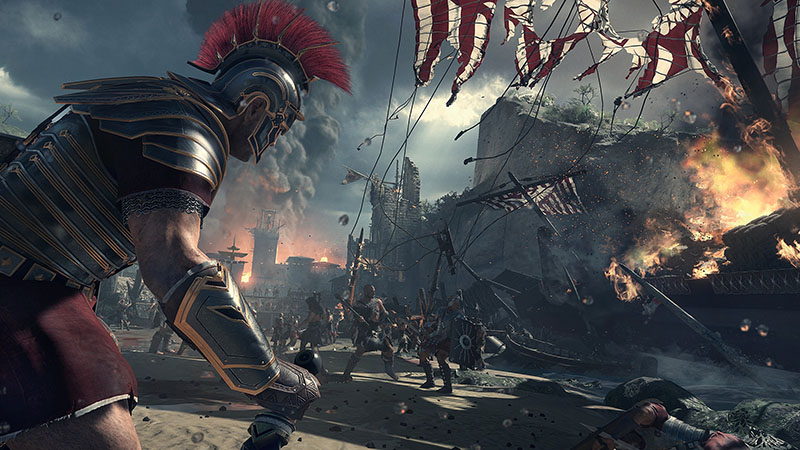
Ryse – Son of Rome
The Xbox One and the Playstation 4 share similar features and one of them is the ability to play your games while you install them. The time taken to get to a point where you can actually play the games does vary considerably from title to title.
Overall, though, most games do support the feature, reducing the waiting time before you can jump in and play. Along with that, the Xbox One’s hard drive is also 500GB in size – it fills up very quickly with game installs and may require some attention once you own and regularly play six or more games.
However, initial game loading times aren’t so hot. Engadget found that when starting up a game from a cold boot, Dead Rising could take up to two full minutes to load, Forza 5 took around one minute and thirty seconds (1:30), and Killer Instinct could stay at the loading screen for up to a minute.
While it’s true that app switching is responsive and almost immediate on the One, only one game at a time can be running and the loading times are pretty long.
Kinecting to your world

Xbox One image 6 – Kinect side
Kinect was a bone of contention for many reviewers. In many cases the Kinect sensor will only pick up the words you say and interpret them properly half the time, and only if you speak the entire command clearly and loudly.
“Xbox go to Forza” doesn’t work as the console requires you to say “Xbox go to Forza Motorsport 5.” This is the same case with “Xbox turn off”, “Xbox snap Internet explorer”, “Xbox record that”, or “Xbox answer Skype call.” The sensor struggles with strong accents and doesn’t always work with other languages.
I found it amusing that most reviewers discovered that the command, “Xbox go to Bing” does not work. Instead, Microsoft wants Bing to become a verb as has been the case with Google, so you use the command, “Xbox Bing.”
Gestures are also supported on the Xbox One, but only barely. Navigation using your palm and closes fists ends up in frustration for most reviewers and its nowhere near the smooth swipes and animations that Yusuf Medhi demonstrated using a pre-rendered and pre-recorded video during the Xbox One reveal in May 2013.
TV-in works only with specific hardware

Xbox One TV Guide UI
Many people wanted to know about the cable TV functionality, but this may not be available in South Africa on launch because we only have four set-top TV providers – StarSat (formerly Top TV), DStv, FreeVision, and OpenView HD.
When MyGaming approached DStv about functionality with the newly announced Xbox One in May, the company replied that they were not in discussion with Microsoft about any integration.
In the US though, you hook up your cable box, select your provider, select the brands for your cable box and TV, and the Xbox One becomes a voice-controlled universal remote.
However, as Wired discovered, not only does this mean that all TV functions are now taken up by the console through Kinect (because it becomes an IR blaster), it also means that the console now controls all your TV programming, so you can’t watch TV without the Xbox One turned on.
Wired also noted that with more than four people in the room, voice commands did not function properly even if no-one else was speaking.
The Verge was one of the few sites to call the TV functionality “clunky.” Because despite the work that’s gone into making the One interact with your TV and cable box, for a brief moment while switching channels you’ll see the UI of your regular cable box, breaking the user experience.
App switching and UI performance

Xbox One Dashboard UI
The Verge, Engadget and Kotaku all liked the Xbox One’s UI and noted that there is a lot of scope and space for improvements to be made over the course of the next decade that Microsoft expects the One to remain in operation.
Pins of your favourite games, apps, movies, music and series are all put on the left, hidden from view when you first log in. The maximum number of tiles for the Pins category appears to be set at eighteen (18).
The Verge noted that third-party applications could arrive for the One via a separate app store in the future, while Polygon found that the games store will become cramped once more than a dozen titles are available for the console. As with the rest of the console’s features, almost everything in the UI is navigable using voice commands, resulting in frustration and picking up the controller when they didn’t work.
Power-saving features while using Kinect
Polygon figured this out while other reviewers seem to have overlooked it, but it’s an important feature that deserves more attention. When Kinect identifies that you have put down the controller and walk out of view of the sensor, it puts the controller to sleep, extending the battery life.
When you walk into the room with the Xbox One still on and you pick up the controller, Kinect can also turn it back on remotely once it knows what you’re doing. I’m not sure if this is an option that can be turned on in the settings menu, but it’s certainly a time-saver.
Remote Play and Smartglass

Xbox 360 SmartGlass
Xbox One can theoretically do a similar thing to Sony’s Remote Play feature with the PS Vita and Vita TV, but Microsoft chooses instead, as Engadget points out, to put more resources into SmartGlass instead, where games can take advantage of the second screen to become yet another way to interface.
However, it’s currently not possible to play on your Xbox One remotely on local WiFi or through the internet. Microsoft is exploring such a feature.
Overall, it appears that while Microsoft’s hardware offering is more or less complete, the software is still a work in progress. Your Xbox One at launch will behave very differently to newer versions coming out a year or two later. For now, Microsoft is ready to sell their product and do what they can to make it better in the long run.
Reviews: Kotaku, The Verge, Polygon, Wired, Engadget, Joystiq, Eurogamer, PC Perspective
More Xbox One news:
PS4 reviews – the early verdict
Xbox One Live streaming not available at launch
Killer Instinct: Combo breaker money maker?






 Loading ...

Anyone importing a xbox one