1000gb ssd

Before I bother the Joker can somebody tell me how these cables look. Say for instance I want to buy them from RebelTech, how do I identify the correct power and sata cables. There are so many different cables on their website http://www.rebeltech.co.za/161-cables that I am not sure which will be the correct cables to buy.

This is what a SATA cable looks like SATA Cable

and this is a Molex to Sata power cable Molex to SATA power cable

This is a better angle of the same cable (SATA power plug on the left and Molex on the right)
25xPiecesSata4c3176ed30bd1_1367996833.jpg


Do keep in mind that generally the SATA power cable comes out of the PSU. You can't buy extra. If you have free Molex cables though, then you can buy some of these molex to Sata cables.
 
[MENTION=6280]Blazzok[/MENTION] - After scrutenising the inside of my computer with my untrained eye, I see only 2 Sata Ports on my motherboard (AsRock Z97 Pro4).

They are situated precisely right underneath where the graphics card is fitted. I traced the one Sata cable to my DVD Rom and the other clips into the SSD.

I cannot see a third Sata Port so it looks like a buggerup. I would still like to have the smaller SSD as a backup disk so the only solution will be to disconnect the Sata cable of the DVD Rom from the motherboard. It is seldom that I use it.

Right, lets have a look at the power cable:
1. The power cable to my DVD Rom consists of 5 small wires.
2. The one to my SSD have only 4 small wires. Nowhere in my PC can I see a Molex plug.
3. Maybe the 4Pin Molex to SATA Power Cable is what I am looking for.

Hope this gives you some info. What is funny for me is that the mother boards specifications (schetches and so forth) look different from what is actually in my PC.
 
[MENTION=6280]Blazzok[/MENTION] - After scrutenising the inside of my computer with my untrained eye, I see only 2 Sata Ports on my motherboard (AsRock Z97 Pro4).

They are situated precisely right underneath where the graphics card is fitted. I traced the one Sata cable to my DVD Rom and the other clips into the SSD.

I cannot see a third Sata Port so it looks like a buggerup. I would still like to have the smaller SSD as a backup disk so the only solution will be to disconnect the Sata cable of the DVD Rom from the motherboard. It is seldom that I use it.

Right, lets have a look at the power cable:
1. The power cable to my DVD Rom consists of 5 small wires.
2. The one to my SSD have only 4 small wires. Nowhere in my PC can I see a Molex plug.
3. Maybe the 4Pin Molex to SATA Power Cable is what I am looking for.

Hope this gives you some info. What is funny for me is that the mother boards specifications (schetches and so forth) look different from what is actually in my PC.

If you have the Z97 Pro4 you definitely have more than 2 SATA ports; you should have 6 of them right next to one another. Download this http://www.cpuid.com/downloads/cpu-z/cpu-z_1.72-en.exe and install it. It will give specifics about your CPU, RAM and Motherboard.
It will look like this. As you can see I have a Sabertooth P67. So report back when you have the model of your motherboard.
btP1eIH.png


As the power cables, can you post the make and model of your PSU? Or take pictures and post them here.
Your PSU should give you more than just the two power cables though, so I'm sure you have extras somewhere.
 
I am too stupid to insert the image. I must insert it "From Computer' and for that I must click "Browse" and nothing happens when I click that.

On top of the PSU it says "Cooler Master V550". Recently installed.

Anyway this is what appears on the CPU-Z for the Mainboard:
AsRock
Z97Pro
Intel
Haswell
06
Intel
Z97
00
Nuvoton
NCT6776
American Megatrends
P1.70
12/17/2014
PCI-Express
x16
x16

The 2 Sata ports I can see are raised in the air. In other words they look thick. Mayby there are 2 ports underneath them. It does not make sense. As I said what I see when I look at the motherboard is not the same as in the illustrations.

I cannot post pictures because I haven't got equipment for that.
 
Last edited:
I am too stupid to insert the image. I must insert it "From Computer' and for that I must click "Browse" and nothing happens when I click that.

On top of the PSU it says "Cooler Master V550". Recently installed.

The 2 Sata ports I can see are raised in the air. In other words they look thick. Mayby there are 2 ports underneath them. It does not make sense. As I said what I see when I look at the motherboard is not the same as in the illustrations.

I cannot post pictures because I haven't got equipment for that.

For the PSU, this is what the website says:

MB 20+4 Pin x 1 (the main Motherboard power cable)
CPU12V 4+4 Pin x 1 (a cable that would go to your GPU depending on what you have)
PCI-e 6+2 Pin x 2 (also a cable that would go to your GPU)
SATA x 6 (SATA power cables)
4Pin Peripheral x 3 (Molex power connectors)
4Pin Floppy x 1 (Floppy power connectors)

So you should have 6 SATA power cables. Some of them might just not be plugged into your PSU (which is modular).

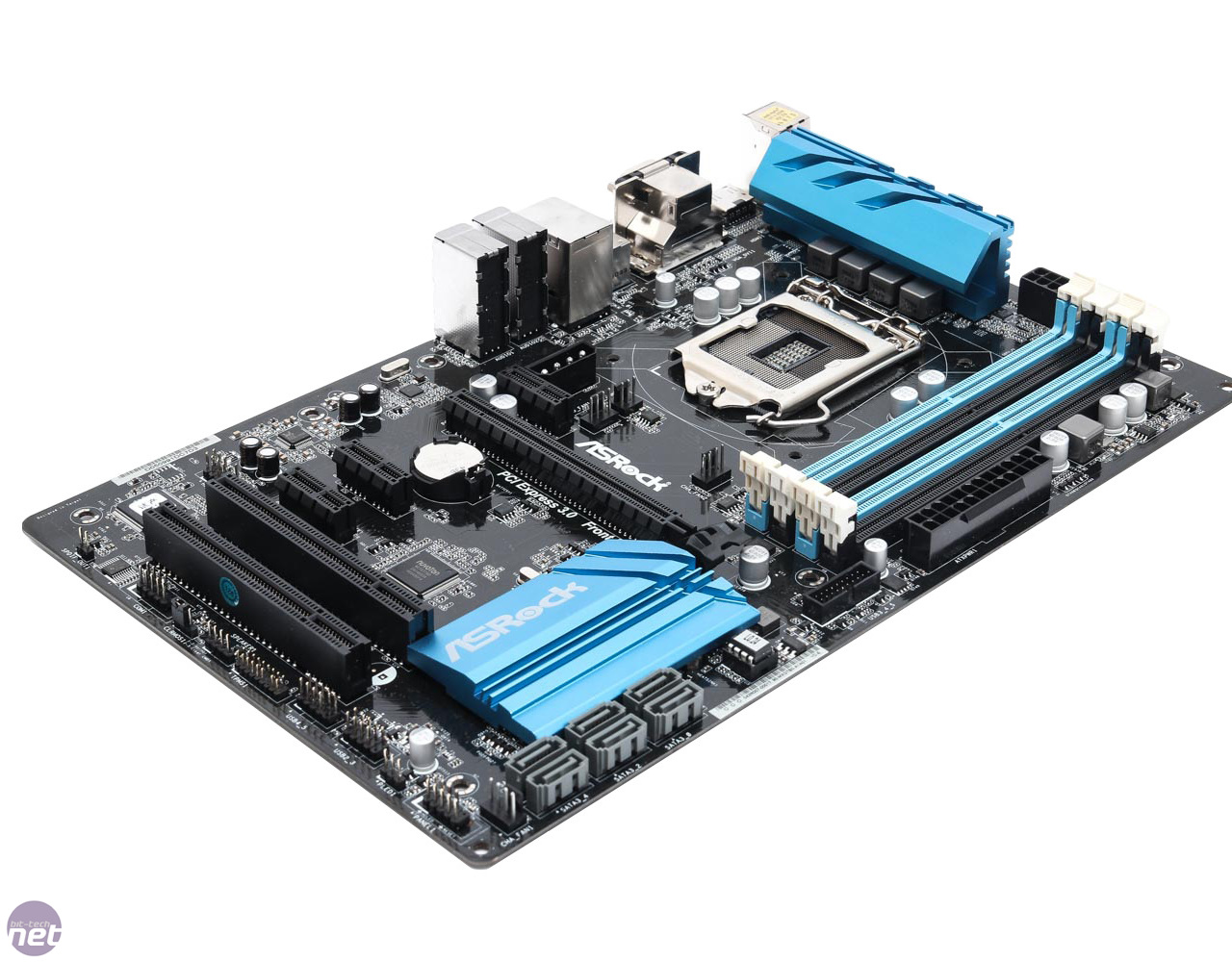
The Z97 Pro4 looks like this (you can see the 6 SATA connectors).

8Q2A0083b.jpg


The Z97 Pro3 looks like this. The main difference (atleast for what we are talking about) is that the one has "vertical" SATA ports and the other has "horizontal" SATA ports.

z97-pro3-2-1280x1024.jpg
 
What I can see with the help of a torch is that underneath the 2 raised SataPorts is a flatter one, and next to it I can read "SATEA1". These ports are all next to the blue block (with Asrock on top) on the right hand side. When I scrutinise the top picture it is clear that there are SataPorts beneath the connections on my own motherboard. If remove them I should be able to see the ports underneath them (as in the top picture). I think there are also ports behind the graphics card which I cannot see.

Ok, can I now accept that I must buy the 4Pin Molex to SATA Power Cable for the new SSD http://www.rebeltech.co.za/cables/2...ix-alchemy-multisleeved-bfa-msc-msa45sk-.html
 
What I can see with the help of a torch is that underneath the 2 raised SataPorts is a flatter one, and next to it I can read "SATEA1". These ports are all next to the blue block (with Asrock on top) on the right hand side. When I scrutinise the top picture it is clear that there are SataPorts beneath the connections on my own motherboard. If remove them I should be able to see the ports underneath them (as in the top picture). I think there are also ports behind the graphics card which I cannot see.

Ok, can I now accept that I must buy the 4Pin Molex to SATA Power Cable for the new SSD http://www.rebeltech.co.za/cables/2...ix-alchemy-multisleeved-bfa-msc-msa45sk-.html

Oky, so it sounds like you do have the Pro4, which means you have 6 SATA data ports on your motherboard. The flatter one next to them is a SATA Express port (don't worry about it for now). Having 6 SATA ports means you can have 6 SATA devices at the same time. You already have a DVD Rom and 1 SSD (as far as I know), so you should have four more ports which you can use for HDD's or SSD's.

As for the 4pin Molex to SATA Cable, I would say no, don't buy it. Your PSU should have sufficient SATA Power Cables of its own. Check in your case for loose (unused) SATA power cables.
 
OK here is the position:

1. The PSU have 4 connection points.
2. Two are connected as follows:
a) a 4wire cable that connects to different components and switches.
b) a 5wire cable that goes directly to the SSD and splits from there to the DVDRom.
3. OK, there are still 2 open connections on the PSU. Seeing that the SSD get its power from a 5wire cable, I presume that an additional SSD will also need a 5wire connection which can go into one of the PSU's open connections. Right or wrong? All the cables (4 or 5 wires) in the PC are connected. I have also checked the box in which the PSU came, but there are no lose cables.
4. The Molex 4pin appears then to be the wrong cable. What we want here is a 5pin (because of the 5 small wires which are together).
5. Hopefully we are getting now closer to a solution.
 
Last edited:
I am not so conversent with the hardware area of PC's that is why so much thinking has gone into this thread. I must give Blazzok kudos for doing his best to help me.

The last thing I want to know is:
Am I right when I say I need a 5pin (5 wires) Sata Power Cable for the additional SSD.

If so where do I find it? I have searched RebelTech and many other online shops, but zilch. They mostly have 3pin (3wires), 4pin (4wires) and 6pin (6wires) cables.

It does not make sense that it is not available.
 
I am not so conversent with the hardware area of PC's that is why so much thinking has gone into this thread. I must give Blazzok kudos for doing his best to help me.

The last thing I want to know is:
Am I right when I say I need a 5pin (5 wires) Sata Power Cable for the additional SSD.

If so where do I find it? I have searched RebelTech and many other online shops, but zilch. They mostly have 3pin (3wires), 4pin (4wires) and 6pin (6wires) cables.

It does not make sense that it is not available.

Trying to recall from memory, but all power cables have 4 wires. When it has a fifth wire, it is because there is another power plug after the first one. The SSD will take power from any SATA power cable.
 
Last edited:
[MENTION=6280]Blazzok[/MENTION] - Seeing that I cannot find any loose or unused power cables inside my PC, do you now agree that when I order the SSD I must also place an order for the following:

1. 4pin Molex to SATA Cable http://www.rebeltech.co.za/cables/2...ix-alchemy-multisleeved-bfa-msc-msa45sk-.html
2. Sata Cable http://www.rebeltech.co.za/cables/2...nded-sata-cable-sata3g-sata6g-ready-50cm.html

Or do you have another power cable in mind?

Since [MENTION=21]The Joker[/MENTION] built your pc, he should know better what you have and don't have. It is odd that there aren't more SATA power cables (there should be).
As for SATA data cables, you get a couple with your motherboard. How many depends on the manufacturer. Once again Joker should know how many you have and if you should buy an extra one with a new drive.

Also, a 4pin Molex to SATA will only be useful if you have unused molex plugs currently inside your case. If you don't have an unused molex in your case, the molex to sata adapter will be useless.
 
[MENTION=6280]Blazzok[/MENTION]
Thanks for all you have done for me.
I did send the Joker an Email yesterday and I am still waiting for his reply.
Maybe I should also send him a PM.
Thanks again!
 
[MENTION=6280]Blazzok[/MENTION]
Thanks for all you have done for me.
I did send the Joker an Email yesterday and I am still waiting for his reply.
Maybe I should also send him a PM.
Thanks again!

It's a pleasure. Sorry I couldn't be of more assistance, it is difficult to help with these kinds of things with only text. :)

Hope Joker gets back to you and you can sort it out. Good luck!
 
[MENTION=6280]Blazzok[/MENTION]
Thanks for all you have done for me.
I did send the Joker an Email yesterday and I am still waiting for his reply.
Maybe I should also send him a PM.
Thanks again!

Yeah unfortunately it was mothersday and I spent the day with my family visiting my dad in hospital.

I really don't understand why you guys put so much thought into something this simple.

The psu has enough power connectors.
High end ssd's generally come with a sata cable included.
The pc can easily accommodate another ssd.

Edit: I've emailed you all the relevant info.
 
Last edited:
Back
Top