New Rig

Flex

Will lift for boobs!
I am busy building my new rig. Worked last night till like 12 the evening.
I have very excited to get it up and running. But seems like something is not working lekker. not getting power at all for some reason.
So going to be working on it some more today and hopefully get it sorted asap!
IMG-20150622-WA0026.jpeg
 
Nice!

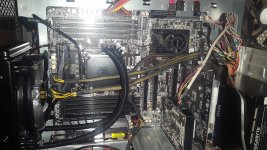
Looks like you need some more RAM to fill those empty, lonely slots! :D

Why is there a molex power connecter plugging into your motherboard, or is the angle of the photo playing tricks on me?

Not getting power at all, or it does not switch on? Make sure you connected the leads from the power button the motherboard correctly, I know that caught me one time.
Also seems like you can be glad you have a flat CPU cooler, those power cables don't look like they would have reached the motherboard otherwise :p
 
Nice!

Looks like you need some more RAM to fill those empty, lonely slots! :D

Why is there a molex power connecter plugging into your motherboard, or is the angle of the photo playing tricks on me?

Not getting power at all, or it does not switch on? Make sure you connected the leads from the power button the motherboard correctly, I know that caught me one time.
Also seems like you can be glad you have a flat CPU cooler, those power cables don't look like they would have reached the motherboard otherwise :p

Those Power cable confused me for the motherboard as well. As it has 2x 8 pin. So I don't think all those power cable need to be plugged in. only need to plug in 2 of them i think. And then yes Theres a molex slot on the mobo, don't think i need to plug it in though. For SLI I think. So i plugegd everything out and going to reassemble once I get home.

The lan lights go on. So it got power to a certain extent. But that was it. lights on mobo and everything else was dead like a drol
 
Nice!

Looks like you need some more RAM to fill those empty, lonely slots! :D

Why is there a molex power connecter plugging into your motherboard, or is the angle of the photo playing tricks on me?

Not getting power at all, or it does not switch on? Make sure you connected the leads from the power button the motherboard correctly, I know that caught me one time.
Also seems like you can be glad you have a flat CPU cooler, those power cables don't look like they would have reached the motherboard otherwise :p

Hahaha yeah those rams look very very lonely!
Update from my brother, IT IS ALIVE !
 
I have not built a PC in quite a while with so many new components.
The PC starts and goes into the bios, but does not boot up into windows from my SATA drive.
I have a feeling this is because the hardware change is too drastic and I will need to do a clean windows install again?
Am i right in presuming this?
 
I have not built a PC in quite a while with so many new components.
The PC starts and goes into the bios, but does not boot up into windows from my SATA drive.
I have a feeling this is because the hardware change is too drastic and I will need to do a clean windows install again?
Am i right in presuming this?

Make sure your hard disk is boot priority. if it basically boot loops, then find the SATA AHCI/Legacy setting (might need to google about its BIOS location depending on mobo) and swap it round. (If its IDE/Legacy, make it AHCI and vice versa). That little bugger is like 80% of mobo change headaches :)
 
Make sure your hard disk is boot priority. if it basically boot loops, then find the SATA AHCI/Legacy setting (might need to google about its BIOS location depending on mobo) and swap it round. (If its IDE/Legacy, make it AHCI and vice versa). That little bugger is like 80% of mobo change headaches :)

Ahh okay cool! Swapped it around a bit but did not try IDE yet. Will do that when I get home
 
Ahh okay cool! Swapped it around a bit but did not try IDE yet. Will do that when I get home

If thats the ASRock X79 Extreme9, then the setting you looking for is in BIOS > Advanced > Storage Configuration > SATA Mode.
It seems AHCI is on by default, and if you installed your windows on a possibly older machine, its likely its not AHCI, so swapping that to IDE would help if you getting bootloops (starts booting windows, and just resets).

Hope that helps :)
 
If thats the ASRock X79 Extreme9, then the setting you looking for is in BIOS > Advanced > Storage Configuration > SATA Mode.
It seems AHCI is on by default, and if you installed your windows on a possibly older machine, its likely its not AHCI, so swapping that to IDE would help if you getting bootloops (starts booting windows, and just resets).

Hope that helps :)

Damnit now I have to sit here and wait till I get home to try this. But it seems like that might definitely be the case as the default was AHCI yes. Thank you so much for the detailed help. Will keep you up to date!
 
Back
Top