
You are using an out of date browser. It may not display this or other websites correctly.
You should upgrade or use an alternative browser.
You should upgrade or use an alternative browser.
Windows 10 discussion thread
- Thread starter MetalSoup
- Start date

PsychoFish
New member
Big NB folks...apparently a very important update for Windows 10 was released and is strongly advised to be installed as this fixes some stability issues for some people somewhere...


mottamort
Bargain Hunter
Big NB folks...apparently a very important update for Windows 10 was released and is strongly advised to be installed as this fixes some stability issues for some people somewhere...
Cool, checking now. thanks for the headsup


GregRedd
New member
From PC World:Big NB folks...apparently a very important update for Windows 10 was released and is strongly advised to be installed as this fixes some stability issues for some people somewhere...
They aren't joking when they say the KB info page is long: https://support.microsoft.com/en-us/kb/3081424 - looks like 100s of files getting updates of one sort or another.What’s known as “KB3081424†is a cumulative or “rollup†patch, tying together all of the major incremental updates that have already been applied to Windows 10 since the “release†version went live last week. The page listing the downloads goes on and on, though what you’ll actually receive varies with how up-to-date your PC already is.
The patch downloaded in the background on my machine sometime during the day, without me noticing it happening at all. First I knew about it was when I got a notification in the Action Center telling me that a restart was required. Checking the Updates & Security settings confirms that Windows 10 will force an automatic Restart on my machine to apply the patch at a time when I'm not normally using the machine ("3:30AM tomorrow looks good")
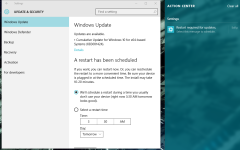
Despite the numerous gripes, whines and whinges about MS forcing these updates on users with no choice, I'm 100% fine with it. Makes my life a heck of a lot easier, and ensures my machine is as well patched and up to date as it can be. Like the man here says: Windows 10 automatic updates: Get over it!


shadowfox
Anime Junkie
They'll have to provide an updated ISO to include these updates in order for me to even try it since I can't even get past the installation. Hope they'll do that.
If you try installing with the ISO, it seems like it actually downloads updates before installing - or at least it tried to do that with me last night. I'm not sure though, because I had to stop the installation process - given the rate it was downloading at, there was no chance of it finishing before I got hit with loadshedding.
I'm kind of considering just leaving my machine on Windows 7 for the time being, but 10 is running like a dream on my laptop, so I want to get the upgrade done soon if at all possible.

Ichigo
New member
If you try installing with the ISO, it seems like it actually downloads updates before installing - or at least it tried to do that with me last night. I'm not sure though, because I had to stop the installation process - given the rate it was downloading at, there was no chance of it finishing before I got hit with loadshedding.
I'm kind of considering just leaving my machine on Windows 7 for the time being, but 10 is running like a dream on my laptop, so I want to get the upgrade done soon if at all possible.
it only does that if you are connected to the internet so don't connect.
PsychoFish
New member
Quick one for people having issues. Ensure that your drivers on Windows 7/8/8.1 is fully up to date and WHQL approved/certified BEFORE attempting the upgrade.

JudeC
New member
so i went ahead and upgraded to win 10 last night,
first thoughts - not happy
i can no longer access my network shares....
some folks online had the same issue and fixed it with regedit - but doing registry editing on day one of a new OS, drives me up the wrong way, and cause its so new, cannot find a workable fix for my issue.
colour me not impressed
first thoughts - not happy
i can no longer access my network shares....
some folks online had the same issue and fixed it with regedit - but doing registry editing on day one of a new OS, drives me up the wrong way, and cause its so new, cannot find a workable fix for my issue.
colour me not impressed
Ichigo
New member
so i went ahead and upgraded to win 10 last night,
first thoughts - not happy
i can no longer access my network shares....
some folks online had the same issue and fixed it with regedit - but doing registry editing on day one of a new OS, drives me up the wrong way, and cause its so new, cannot find a workable fix for my issue.
colour me not impressed
Did you try redoing the network shares?
Mine seemed alright will check when I get home
JudeC
New member
Did you try redoing the network shares?
Mine seemed alright will check when I get home
yep, it's from my nas, and honestly i didnt have too much time to bugger around, it literally does not seem to find anything under network, and when i put the IP address in it comes back, cant be found - but i know the nas is still up and running
Ichigo
New member
yep, it's from my nas, and honestly i didnt have too much time to bugger around, it literally does not seem to find anything under network, and when i put the IP address in it comes back, cant be found - but i know the nas is still up and running
Mine works, but asks for a password (never use to) still trying to figure out how to get past it.

 .
.
AlphaJohn
New member
so i went ahead and upgraded to win 10 last night,
first thoughts - not happy
i can no longer access my network shares....
some folks online had the same issue and fixed it with regedit - but doing registry editing on day one of a new OS, drives me up the wrong way, and cause its so new, cannot find a workable fix for my issue.
colour me not impressed
Bet you have a pin logon active, for some reason some PC's networking dies the moment you have pin logon active,
1 fix and 1 workaround
Fix: Remove pin by clicking I forgot my pin and go through the steps till you need to enter a new one. Instead of a new one just click cancel. Then reboot. You will have no pin logon but your networking will be back up and running
Workaround: Use command lines to map network drives. ala "Net use x: \\system\share u:user password" Only problem with workaround is that you will need to do that at every reboot, but can be sorted with a simple bat file that you run at start-up with all the drives that you need.
shadowfox
Anime Junkie
been using it now for more than a week on my pc at work and at home. loving it.
so far some minor niggles but no major issues. win 10 pro here.
I'm going to try and upgrade my machine one more time - if it fails this time I'm going to format, do a clean install of Win 7, and try from there. If it still fails, then fuckit ... Win 7 still works and should tide me over for a while.