PC Chassis Airflow

Flex

Will lift for boobs!
Hi Everyone

Okay So i want to try play around with my airflow in my case. I am actually looking for a windowed panel with no fans on the side (PS. If you know of any1 selling a clean second hand case, nudge nudge, wink wink), as I feel my current case has too many fans, creating a dust problem. I have 7 Case fans on my pc. A large one in front, 2 on the side panel, 1 at the bottom, 2 on top (1 Radiator) and 1 at the back. (This excludes my GPUs 3 Fans)

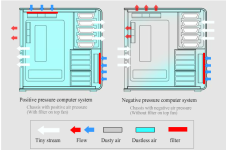
I currently have a Negative pressure system, meaning that I am pulling more air out of my case that pumping into it.
I have my side fans, bottom fan and front fan blowing in, with my back and top fans blowing out.

I want to change it to a Positive system. Just changing my top fans blowing down and not up.
Founds this diagram explaining it nicely. What are your thoughts?
Are the side fans necessary?
44527-ss_airflow.png
 
Hi Everyone

Okay So i want to try play around with my airflow in my case. I am actually looking for a windowed panel with no fans on the side (PS. If you know of any1 selling a clean second hand case, nudge nudge, wink wink), as I feel my current case has too many fans, creating a dust problem. I have 7 Case fans on my pc. A large one in front, 2 on the side panel, 1 at the bottom, 2 on top (1 Radiator) and 1 at the back. (This excludes my GPUs 3 Fans)

I currently have a Negative pressure system, meaning that I am pulling more air out of my case that pumping into it.
I have my side fans, bottom fan and front fan blowing in, with my back and top fans blowing out.

I want to change it to a Positive system. Just changing my top fans blowing down and not up.
Founds this diagram explaining it nicely. What are your thoughts?
Are the side fans necessary?

View attachment 18625

Firstly, the diagram is wrong. Cooling and airflow is easy. Cold air in, hot air out...having more intake fans (Positive Pressure) than exhaust can lead to stagnant air. Stagnant air leads to higher internal temperatures since there aren't enough fans removing the heated air from the inside of the case. In general, positive pressure doesn’t cool as well as negative pressure will. That said, one of the benefits of Positive Pressure is that less dust will enter the system. Exhaust Out the Top and Rear, Intake Through the Bottom and Front. One of the most important things to remember about cooling: heat rises. That said, it makes the most sense to place your exhausting fans near the top of the case while your intake fans stay near the bottom.

Secondly, you don't need side fans; If you do have the need for side fans think about their location and the components it covers. generally you'd want them as exhaust fans.
 
Firstly, the diagram is wrong. Cooling and airflow is easy. Cold air in, hot air out...having more intake fans (Positive Pressure) than exhaust can lead to stagnant air. Stagnant air leads to higher internal temperatures since there aren't enough fans removing the heated air from the inside of the case. In general, positive pressure doesn’t cool as well as negative pressure will. That said, one of the benefits of Positive Pressure is that less dust will enter the system. Exhaust Out the Top and Rear, Intake Through the Bottom and Front. One of the most important things to remember about cooling: heat rises. That said, it makes the most sense to place your exhausting fans near the top of the case while your intake fans stay near the bottom.

Secondly, you don't need side fans; If you do have the need for side fans think about their location and the components it covers. generally you'd want them as exhaust fans.


Why do you say the diagram is wrong? It is correct as far as I can see. Negative= more outlets than in. Creating a negative pressure compared to the out side. Positive=More fans blowing in creating more pressure than outside. That is my dilemma, it is not just as simple as hot air rises, when you have a whole closed system it gets a bit more complicated than that. The side fans blow in on my GPU, so might think of turning them around as well, as my gpu has 3 of its own fans already and will not overheat
 
Why do you say the diagram is wrong? It is correct as far as I can see. Negative= more outlets than in. Creating a negative pressure compared to the out side. Positive=More fans blowing in creating more pressure than outside. That is my dilemma, it is not just as simple as hot air rises, when you have a whole closed system it gets a bit more complicated than that. The side fans blow in on my GPU, so might think of turning them around as well, as my gpu has 3 of its own fans already and will not overheat

Definitely not as simple as that. The cfm of each fan plays a role, as well as local pressure inlet and outlet side of each fan, and, to a degree (hehehe) the local temperature as well. I don't think that heat rising will have much of an effect when fans are in the system, but I've never tested the difference between pulling air at the bottom vs at the top, so that's up in the air (heeeeeehehehehe) for me.

I completely agree with [MENTION=6600]PsychoFish[/MENTION] on the second point, ditch the side fan if you don't have a specific component overheating.

I should really strip down a box and test all the configs some day, we've got some really nice thermometers at work.
 
Why do you say the diagram is wrong? It is correct as far as I can see. Negative= more outlets than in. Creating a negative pressure compared to the out side. Positive=More fans blowing in creating more pressure than outside. That is my dilemma, it is not just as simple as hot air rises, when you have a whole closed system it gets a bit more complicated than that. The side fans blow in on my GPU, so might think of turning them around as well, as my gpu has 3 of its own fans already and will not overheat

The diagram does not take into consideration the intake/exhaust of your GPU and CPU, neither does it take into consideration the PSU and the heat that generates.

Look at this...


This video has no FUD
 
The diagram does not take into consideration the intake/exhaust of your GPU and CPU, neither does it take into consideration the PSU and the heat that generates.

Look at this...


This video has no FUD

But you can't draw a custom diagram for every single setup. That is a basic diagram illustrating the basics. MY CPU fan is a radiator, so it is at the top and pulls out. So it is accounted for in that diagram. My GPU has such small fans, and is ontop of the PSU, so it will not have much of an influence on the fans on the case that are MUCH larger than the fans on the GPU. So that diagram is indeed a correct sample representation of Negative and positive pressure if all the fans CFM are equal.

@ Avatar, the side fans are currently blowing onto my GPU. But feel that it is creating more dust than anything else. I am going to experiment this weekend a bit. Will take down idle temps, as well as temps under stress of both positive and negative pressure systems
 
But you can't draw a custom diagram for every single setup. That is a basic diagram illustrating the basics. MY CPU fan is a radiator, so it is at the top and pulls out. So it is accounted for in that diagram. My GPU has such small fans, and is ontop of the PSU, so it will not have much of an influence on the fans on the case that are MUCH larger than the fans on the GPU. So that diagram is indeed a correct sample representation of Negative and positive pressure if all the fans CFM are equal.

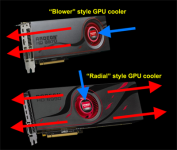
Ok, so let's put it this way; Your GPU's fans are facing downward towards your PSU which generates heat which rises naturally and in the direction of an exhaust fan unless affected by an intake fan. Your GPU fans suck up slightly warmer air than at your front intake fan (due to the PSU) and exhausts in a number of ways (see two examples below)

525x525px-LL-963a1292_vbattach216587.png

Knowing where your GPU exhausts to affects fan placement. Also you need to take into account airflow obstructions.
 
Ok, so let's put it this way; Your GPU's fans are facing downward towards your PSU which generates heat which rises naturally and in the direction of an exhaust fan unless affected by an intake fan. Your GPU fans suck up slightly warmer air than at your front intake fan (due to the PSU) and exhausts in a number of ways (see two examples below)

View attachment 18627

Knowing where your GPU exhausts to affects fan placement. Also you need to take into account airflow obstructions.

That makes total sense yes, but have not even gotten there. Was just talking about fan placement first. So does not make the first diagram incorrect at all :)
 
Back
Top