SSD Worth it or Not?

Flex

Will lift for boobs!
Okay everyone, as you know I have been very reluctant to jump onto the SSD Train.
Got myself a 128GB this weekend, and a decent Vertex 4. So it really is a fast SSD.

The First thing I did was install my OS onto it (Windows 10), and start up at the speed of lightning.
But then I found myself in a dilemma. I could only fit either SOME of my Steam games or SOME of my Origin games on my SSD.

So I went with Steam, and the 3 games i play the most. CSGO, Dota 2 and AA Proving Grounds.
My computer already loaded games fast, but this was on another level.

But then I remembered someone saying playing lots of games on your SSD it shortens the life span lots. Especially games like CSGO. I am not sure how much truth there is to this, so if you have some input to this please do give it!

And then hearing stories of SSDs lasting +- 3 years and then losing all of the data on it, not recoverable.... mmm...

So this made me wonder, is it really worth it? The Price tag especially. For a few extra seconds you have free in a day now.

What are your thoughts and experiences?
 
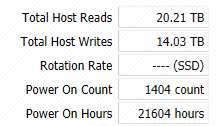
I use my SSD for windows as well as a few games including Dota 2 and CS GO. About the life span:

ssd.png

It's running quickly, so no problems there.

Worth it? To me definitely, while having a couple other games on a HDD it reminds me of the difference the ssd makes.
 
I use my SSD for windows as well as a few games including Dota 2 and CS GO. About the life span:

View attachment 19239

It's running quickly, so no problems there.

Worth it? To me definitely, while having a couple other games on a HDD it reminds me of the difference the ssd makes.

Sjoh lots of hours! What SSD do you have?
 
Okay everyone, as you know I have been very reluctant to jump onto the SSD Train.
Got myself a 128GB this weekend, and a decent Vertex 4. So it really is a fast SSD.

The First thing I did was install my OS onto it (Windows 10), and start up at the speed of lightning.
But then I found myself in a dilemma. I could only fit either SOME of my Steam games or SOME of my Origin games on my SSD.

So I went with Steam, and the 3 games i play the most. CSGO, Dota 2 and AA Proving Grounds.
My computer already loaded games fast, but this was on another level.

But then I remembered someone saying playing lots of games on your SSD it shortens the life span lots. Especially games like CSGO. I am not sure how much truth there is to this, so if you have some input to this please do give it!

And then hearing stories of SSDs lasting +- 3 years and then losing all of the data on it, not recoverable.... mmm...

So this made me wonder, is it really worth it? The Price tag especially. For a few extra seconds you have free in a day now.

What are your thoughts and experiences?
Where did you hear that gaming lowers SSD life? I've got my OS, csgo, bf3 and some others (PoE etc) on my ssd. All I've done is follow the usual advise of dont have hibernation file, have page file elsewhere, and move "my documents" location (including videos/music etc) to a mechanical drive. So minimal gets written to the ssd (unless you can tell me that csgo writes alot to the ssd), which means life span is improved :)
 
Where did you hear that gaming lowers SSD life? I've got my OS, csgo, bf3 and some others (PoE etc) on my ssd. All I've done is follow the usual advise of dont have hibernation file, have page file elsewhere, and move "my documents" location (including videos/music etc) to a mechanical drive. So minimal gets written to the ssd (unless you can tell me that csgo writes alot to the ssd), which means life span is improved :)

That is exactly the theory behind it. as CSGO has lots of info being sent and received on the clients side as well as the servers side. So not sure what effect that would exactly have. But from what I see here so far it seems to not be that at all.
 
I only use mine for my OS and big "performance heavy" games, but very few. I have only had it for about a year now, can you7 really tell a performance difference in games like CSGO ? It seems to run very smoothly on a normal drive.
 
I have a Vertex 460 128gb which i mainly use for gaming and windows. After about 8 months of daily use the life expectancy is down to 98%.

I have D3, Elite dangerous, Civ5 and WoW installed on it. All games with allot of disk activity.
 
Ok, so SSDs are awesome and amazing, but you need to use them right. 1st off, only install your OS on your SSD and a couple of apps that don't need to write constantly to their installation paths. Then for the love of all things, TURN OFF DEFRAGMENTATION TASKS ON YOUR SSD. Don't ever do a FULL FORMAT on your SSD (QUICK FORMAT is OK). Never EVER disable TRIM and ensure it's ON. Don't put your SWAP FILE on your SSD, in fact DISABLE that shit on your SSD.

Also, try moving your windows profile to a mechanical drive. Your profile is written to EVERY SINGLE TIME you boot your system, when you log on, when you open a file, when you change a program setting, your temporary internet files, bloody everything you do modifies files in your Windows profile. Yes, this will slow down your login process, but will extend the life of your SSD.

Do that...
 
I only use mine for my OS and big "performance heavy" games, but very few. I have only had it for about a year now, can you7 really tell a performance difference in games like CSGO ? It seems to run very smoothly on a normal drive.

SSD will not make any game perform better. Makes loading times less.
 
SSD will not make any game perform better. Makes loading times less.

Performance could appear to be better if assets are pre-loaded or side-loaded which may result in slight CPU spikes on older processors and drives with higher IO latency. But then again, getting a better CPU would solve that issue anyways.
 
Performance could appear to be better if assets are pre-loaded or side-loaded which may result in slight CPU spikes on older processors and drives with higher IO latency. But then again, getting a better CPU would solve that issue anyways.
True, but in general people will not get SSDs to get more FPS in a game or something like that
 
True, but in general people will not get SSDs to get more FPS in a game or something like that

Yup, I love these PC performance myths and fables. It mostly gets generated by people who don't fully understand how these magical electrically powered wizardry boxes work.
 
Yup, I love these PC performance myths and fables. It mostly gets generated by people who don't fully understand how these magical electrically powered wizardry boxes work.

Very true! What is your thought on certain games using the SSD more than it should. Like CSGO that has lots of information constantly being sent and received by the client?
 
That is exactly the theory behind it. as CSGO has lots of info being sent and received on the clients side as well as the servers side. So not sure what effect that would exactly have. But from what I see here so far it seems to not be that at all.

Yeah but it gets "loaded" into RAM and then all the data gets handled that way. It's not as though every time you click to shoot files get written to your hard drive :)

But the benefit of an SSD for CSGO is purely the difference once you get a BSOD in a comp. Its the difference between a 20 second starting-up-csgo-again or a 2-3 minute waiting-for-steam-to-open. Which in a comp might cost your team a few rounds.

I had the power trip once, and i basically only lost the round I was IN at the time :D
 
Yeah but it gets "loaded" into RAM and then all the data gets handled that way. It's not as though every time you click to shoot files get written to your hard drive :)

But the benefit of an SSD for CSGO is purely the difference once you get a BSOD in a comp. Its the difference between a 20 second starting-up-csgo-again or a 2-3 minute waiting-for-steam-to-open. Which in a comp might cost your team a few rounds.

I had the power trip once, and i basically only lost the round I was IN at the time :D

That does make sense.
Hahaha that is also the only reason that I put CSGO onto my SSD!
 
Very true! What is your thought on certain games using the SSD more than it should. Like CSGO that has lots of information constantly being sent and received by the client?

Not everything gets written to disk, as mottamort pointed out. In reality most of the network traffic and the resultant calculations will happen in memory. What may get written to disk is temporary files (for whatever reason) and this will almost always be written to the %TEMP% path, which by default will be C:\Users\<YOUR USER NAME>\AppData\Local\Temp\ so it's important that this directory is NOT on your SSD, however this will not affect your load times and/or overall performance.

%TEMP% is virtually used for everything. Take the example of printing a file (like say a PDF). The file will be opened by Acrobat Reader, which will create a copy of the file (either in the same directory or in the %TEMP% directory and open it from there. You then want to print it, so it gets formatted into a format your printer will support (generally a PostScript type file) which gets written to the TEMP directory for the print spooler to pick up. Some print drivers will then create further copies of the file for reading. All of these will get remove when no longer required.

Opening a website will also write files to the "Temporary Internet Files" location (C:\Users\<username>\AppData\Local\wherever); Every page will download images and script files to this directory and sub directories for your browser to read. To be honest, your browser almost NEVER reads data directly off a remote server, it almost always caches it to the temporary internet files directory and reads it from there.
 
Not everything gets written to disk, as mottamort pointed out. In reality most of the network traffic and the resultant calculations will happen in memory. What may get written to disk is temporary files (for whatever reason) and this will almost always be written to the %TEMP% path, which by default will be C:\Users\<YOUR USER NAME>\AppData\Local\Temp\ so it's important that this directory is NOT on your SSD, however this will not affect your load times and/or overall performance.

%TEMP% is virtually used for everything. Take the example of printing a file (like say a PDF). The file will be opened by Acrobat Reader, which will create a copy of the file (either in the same directory or in the %TEMP% directory and open it from there. You then want to print it, so it gets formatted into a format your printer will support (generally a PostScript type file) which gets written to the TEMP directory for the print spooler to pick up. Some print drivers will then create further copies of the file for reading. All of these will get remove when no longer required.

Opening a website will also write files to the "Temporary Internet Files" location (C:\Users\<username>\AppData\Local\wherever); Every page will download images and script files to this directory and sub directories for your browser to read. To be honest, your browser almost NEVER reads data directly off a remote server, it almost always caches it to the temporary internet files directory and reads it from there.

That makes 100% sense, thanks!
 
Just saw this, and wondered who has tried it.

"Move programs and games

You’ll probably want most of your programs on the SSD so they'll load lickety-split, although large programs you rarely use are well-suited to a slower mechanical hard drive.

When installing a program, choosing the destination drive for it is easy: Just select an install location on another drive.
choose steam library folder

Adding new folder locations for game installations is dead simple in Steam—just open Steam’s Settings, select Downloads, click the Steam Library Folders button, and add a new folder on a different drive.

Moving programs after the fact is often more difficult. Some programs can be moved easily—for example, you can just move your entire Steam folder to a new drive and run the Steam.exe file to launch it. However, most programs will display errors if you attempt to drag and drop their folder to a new location. You’ll either need to uninstall and reinstall the program to the new location, or use symbolic links.

Symbolic links (or "symlinks") will allow you to move a directory while “tricking” Windows into thinking it’s at its original location. This sort of trick allows you to move your installed programs and games without much trouble. Say you have a game installed at C:\Game. You could move the game folder to D:\Game and create a symlink that points from C:\Game to D:\Game. Whenever a shortcut, registry entry, or anything else looks up C:\Game, the system will transparently redirect it to D:\Game. The symlink is just a pointer that says “hey, look over there,” so the program won’t take up any space on your SSD. "
 
Back
Top