
Hagan
Check my new Avatar
Tried this method as well...


Tried this method as well...
Will try this...It sounds like they may be corrupt and that there's nothing you can do. You can rename them to .zip files and using something like 7-zip to test the archives. If that fails then I don't think there's anything that you can do.
Did you try FarligOpptredens method yesterday?

Will try this...
Still don't really understand the method he has mentioned.
rename the xl file
whateveritiscalled.xlsx to whateveritiscalled.zip
extract the contents and open the xml file (webpages and java apps also use xml files)
one of those files should have the text/data you are looking to recover
Renaming it does not change the extension, it make adds it to the file's name.


Renaming it does not change the extension, it make adds it to the file's name.
if you are using windows 7 go to tools, folder options, view, untick hide extensions for known file types
Using Windows 10.
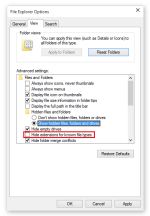

Using Windows 10.

go to control panel, Appearance and Personalization, file explorer options
Click on Show hidden files and folders option in File Explorer Options group.
View attachment 22609
In file explorer, click View, then uncheck File name Extentions thats sort of to the right.
Doch-WPs will work too

Thanks. I just opened it using 7 Zip Manager. Thanks for the assist.


Were my instructions really that unclear?
Did you know that Chrome has a neat little functionality, in that when you mouse your cursor over an inactive tab, only the parts directly behind your cursor will have a slight illumination, almost like your cursor is some kind of light or something. It's pretty neat.
Did you know that Chrome has a neat little functionality, in that when you mouse your cursor over an inactive tab, only the parts directly behind your cursor will have a slight illumination, almost like your cursor is some kind of light or something. It's pretty neat.