Hardware Upgrade Feasibility Study

DieGrootHammer

Daddy TK
So fellow forumites, I am thinking about upgrading my current PC. It has served me well for the times it actually was working, or I had access to it. For the past 3 years it's been pretty beaten from various aspects of life.

So, currently I'm sporting an i5 2500k on an ASRock mobo, with 8GB RAM of unidentified speed or classification, and an AMD RX470 GPU and a Corsair 650W PSU. Not too bad, but it's been showing its age, the HDD is slow and small, the case has fallen apart from moving and shipping, the mobo is on its last legs and will die any day now. In fact, both the mobo and my previous GPU pulled a Lazarus and awoke from the dead, twice.

So now I am thinking about doing some major replacement to the system. My screen is only 1080p, and won't be upgraded anytime soon, so I just need 1080p performance. I know the RX470 should be fine for that as long as it's got better equipment behind it.

The question is, which equipment should it be...

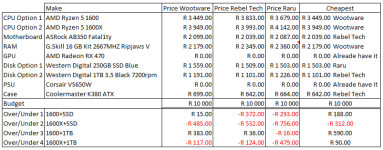
Here is a breakdown of what I've thought about upgrading, prices and combinations, as well as budget.
Upgrade Feasibility Study.PNG

it is clear that, if I want to upgrade to the above specs, I will need to either go with the 1600+1TB option or get a cheaper RAM upgrade and save some money through that avenue. Perhaps getting only 8GB to supplement what I currently got. I can probably get away with a cheaper board as well, but in the past 10 years I've not had the best of luck with mobo reliability due to buying cheap.

This is also a clear indication that you NEVER buy from one place only. Shopping around I can save anywhere from R100 to R500. Pretty interesting.

So what say you? Is this budget and upgrading direction feasible? Let me know your comments
 
What I noticed on wootware is that there will always be a shipping figure on top of everything. At least thats what led me to buy my screen on takealot instead of wootware.
 
get a cheaper RAM upgrade and save some money through that avenue. Perhaps getting only 8GB to supplement what I currently got.

wont your current ram be ddr 3 (incompatible, since your pc is a 2nd gen i5) and all new mobo's are ddr 4 ?
 
wont your current ram be ddr 3 (incompatible, since your pc is a 2nd gen i5) and all new mobo's are ddr 4 ?
That is a very good point.
It is indeed a very good point. Which is why I stated that I'm not sure what my current RAM is, but 98% chance that it is DDR3. This is why my initial choice was for the full 16GB kit and not just an upgrade.

Sent from my SM-G930F using Tapatalk
 
Thread Necro, somewhat.

Okay, so after careful consideration, I've decided to do the above-mentioned upgrade in a piece meal fashion, starting with the components I need rather urgently, then building from there.

This means I will start off with the Case and HDD/SSD.

My idea is to go with the selected case as per above, with Rebel Tech being the cheapest, thus getting my business.

Now, onto the HDD/SSD. My question is this if I get an SSD, would I be able to clone my current drive and move my Windows 10 installation to the new drive, or will I have to format? The internet tells me that cloning is possible, but difficult within Windows 10. Seeing as I don't have the installation media for Windows 10, I am skeptical to just go ahead and format.
 
Thread Necro, somewhat.

Okay, so after careful consideration, I've decided to do the above-mentioned upgrade in a piece meal fashion, starting with the components I need rather urgently, then building from there.

This means I will start off with the Case and HDD/SSD.

My idea is to go with the selected case as per above, with Rebel Tech being the cheapest, thus getting my business.

Now, onto the HDD/SSD. My question is this if I get an SSD, would I be able to clone my current drive and move my Windows 10 installation to the new drive, or will I have to format? The internet tells me that cloning is possible, but difficult within Windows 10. Seeing as I don't have the installation media for Windows 10, I am skeptical to just go ahead and format.

What do you mean by "difficult within windows 10". I don't think its at all possible to clone your OS from within the OS, regardless of which OS it is. Best way is to use something like Acronis Boot, or I think even its clone thing has the capability when cloning to just go "we need to restart your pc" and then it goes straight into cloning from there. When its done you just unplug your old drive and when you restart it'll boot straight into your new one :)

Also, AFAIK win 10 is pretty clever in knowing that you now have an SSD and it doesn't damage it by treating it like a HD.


This is how I did my work laptop. Straight clone to an SSD, didn't reinstall...
 
Thread Necro, somewhat.

Okay, so after careful consideration, I've decided to do the above-mentioned upgrade in a piece meal fashion, starting with the components I need rather urgently, then building from there.

This means I will start off with the Case and HDD/SSD.

My idea is to go with the selected case as per above, with Rebel Tech being the cheapest, thus getting my business.

Now, onto the HDD/SSD. My question is this if I get an SSD, would I be able to clone my current drive and move my Windows 10 installation to the new drive, or will I have to format? The internet tells me that cloning is possible, but difficult within Windows 10. Seeing as I don't have the installation media for Windows 10, I am skeptical to just go ahead and format.

I know Samsung's SSD's come with fantastic cloning software. I cloned my Win10 install without any issues and so did a friend, but I guess there is always the possibility that there can be an issue.

If your Windows install is on a drive which is bigger than the SSD you buy, I'm not sure if it will work; unsure if it only clones the windows install or the whole drive.
I know you are in JHB now, so someone there can probably help you out with a Windows install. I also have a Windows 10 install if you are coming this away again.
 
What do you mean by "difficult within windows 10". I don't think its at all possible to clone your OS from within the OS, regardless of which OS it is. Best way is to use something like Acronis Boot, or I think even its clone thing has the capability when cloning to just go "we need to restart your pc" and then it goes straight into cloning from there. When its done you just unplug your old drive and when you restart it'll boot straight into your new one :)

Also, AFAIK win 10 is pretty clever in knowing that you now have an SSD and it doesn't damage it by treating it like a HD.


This is how I did my work laptop. Straight clone to an SSD, didn't reinstall...

I know Samsung's SSD's come with fantastic cloning software. I cloned my Win10 install without any issues and so did a friend, but I guess there is always the possibility that there can be an issue.

If your Windows install is on a drive which is bigger than the SSD you buy, I'm not sure if it will work; unsure if it only clones the windows install or the whole drive.
I know you are in JHB now, so someone there can probably help you out with a Windows install. I also have a Windows 10 install if you are coming this away again.

Okay cool. Yes my noobness about such things have been incredibly apparent. I will research this cloning software. I want to do the clone next week when I'm on leave.

Also, at the moment I will be buying an SSD that is smaller than my current drive, but I can always remove some stuff currently on my PC. Still have like a 150GB backup of a previously failed extermal drive that I can move somewhere.
 
Okay cool. Yes my noobness about such things have been incredibly apparent. I will research this cloning software. I want to do the clone next week when I'm on leave.

Also, at the moment I will be buying an SSD that is smaller than my current drive, but I can always remove some stuff currently on my PC. Still have like a 150GB backup of a previously failed extermal drive that I can move somewhere.

I know with Acronis True Image (dodgy copies available where AAAARRRR's know where to look) as long as the DATA isn't bigger, than cloning from a larger to a smaller drive isn't an issue. I went from a 256gb HD to a 128gb SSD, i just had to make sure the data on my 256 was under 100 ( try keep your ssd under 75% full, helps with performance) and I could clone without issue
 
Okay cool. Yes my noobness about such things have been incredibly apparent. I will research this cloning software. I want to do the clone next week when I'm on leave.

Also, at the moment I will be buying an SSD that is smaller than my current drive, but I can always remove some stuff currently on my PC. Still have like a 150GB backup of a previously failed extermal drive that I can move somewhere.

Just don't get an SSD smaller than 240/250/256GB, you'll regret it later. Heck, I'm already wishing I had a 500GB one :)
 
Is there a reason you want to clone ?

I would rather do a nice clean install of windows 10 and copy whatever i want back over from the old drive, If its just a hdd upgrade win 10 will just re-activate itself afterwards so don't worry about the licence, and creating the USB install for win 10 is as easy as using this tool.

https://www.microsoft.com/en-gb/software-download/windows10

if it give you hassles use it to rather download the iso and then use Rufus to make a bootable USB
 
Back
Top