Post your Unigine Heaven Benchmark scores

Run Windows 7 64 bit firstly. 32bit shouldn't really be your bottleneck, but it's not impossible, as it can only physically use 3.2GB of ram and that could be limiting your performance.
 
Run Windows 7 64 bit firstly. 32bit shouldn't really be your bottleneck, but it's not impossible, as it can only physically use 3.2GB of ram and that could be limiting your performance.

32bit can run 4Gb ram. Made up of dedicated ram and your gpu ram.

32 bits to refer to the location of each byte of memory:
2^32 = 4294967296

4294967296 / 1024 / 1024 = 4096MB = 4GB ram

There is no reason not to go 64bit unless you have devices/software that specifically don't support 64bit.

My problem is that there is no reason for win8 to be 128bit:

2^128 = 3.4028236692093846346337460743177e+38

3.4028236692093846346337460743177e+38/ 1024 / 1024 / 1024 = 316912650057057350374175801344 GigaBytes.

But as Frank007 says: Future-proof :P
 
32bit can run 4Gb ram. Made up of dedicated ram and your gpu ram.

32 bits to refer to the location of each byte of memory:
2^32 = 4294967296

4294967296 / 1024 / 1024 = 4096MB = 4GB ram

There is no reason not to go 64bit unless you have devices/software that specifically don't support 64bit.

My problem is that there is no reason for win8 to be 128bit:

2^128 = 3.4028236692093846346337460743177e+38

3.4028236692093846346337460743177e+38/ 1024 / 1024 / 1024 = 316912650057057350374175801344 GigaBytes.

But as Frank007 says: Future-proof :P

hahaha. that is correct yes. lol
 
Decent score. Can you post more of your system info?

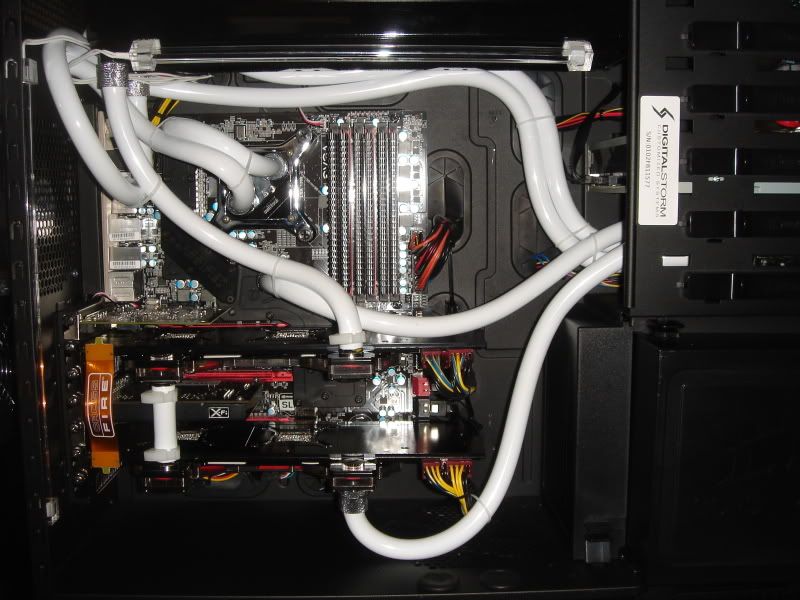
Sure i acquire my system from digitalstorm.com a year ago back than i had 2 5970 but i got upgrade to 2 GTX590 i did the replacement by myself with no experience what so ever that's why im afraid i did something wrong installing the cards i have no experience with benchmark the reason why im asking is because when i play Bad Company 2 (yea i know shittie game) my frames drop from 120 to 15 fps it happens randomly im running latest drivers i already try beta driver which didnt help at all just made it worse

DSC04544.jpg


DSC04571.jpg


DSC04572.jpg


a7390645.jpg


Processor: Intel Core i7 Extreme Edition 975 3.33GHz @ 3.96GHz
Motherboard: EVGA X58 Classified 3X SLI (Intel X58 Chipset)
System Memory: 12GB DDR3 1600MHz Corsair Dominator DHX
Power Supply: 1250W Enermax Galaxy EVO (Dual/Triple/Quad SLI Compatible) (Recommended)
Hard Drive Set 1: Operating System: 1x (300GB Western Digital VelociRaptor (10K RPM) (16MB Cache) (Extreme Speed)
Internet Access: Killer Xeno Pro (Optimized for Online Gaming) Lag and Latency Reduction
Video Card(s): 2x GTX 590 with Water Blocks
Sound Card: X-Fi Fatality Pro
Extreme Cooling: H20: Stage 6: Sub-Zero LCS Dual Loop: CPU & Quad SLI/CrossFire Video Cards & Chipset
H20 Tube Color: White Tubing with High-Performance Fluid (UV Lighting Reactive)
Enhancements: Touch 2000 Aerocool Temperature Display & Fan Controller (Requires Chassis Airflow Upgrade)
 
Last edited:
Sure i acquire my system from digitalstorm.com a year ago back than i had 2 5970 but i got upgrade to 2 GTX590 i did the replacement by myself with no experience what so ever that's why im afraid i did something wrong installing the cards i have no experience with benchmark the reason why im asking is because when i play Bad Company 2 (yea i know shittie game) my frames drop from 120 to 15 fps it happens randomly im running latest drivers i already try beta driver which didnt help at all just made it worse

DSC04544.jpg


DSC04571.jpg


DSC04572.jpg


a7390645.jpg


Processor: Intel Core i7 Extreme Edition 975 3.33GHz @ 3.96GHz
Motherboard: EVGA X58 Classified 3X SLI (Intel X58 Chipset)
System Memory: 12GB DDR3 1600MHz Corsair Dominator DHX
Power Supply: 1250W Enermax Galaxy EVO (Dual/Triple/Quad SLI Compatible) (Recommended)
Hard Drive Set 1: Operating System: 1x (300GB Western Digital VelociRaptor (10K RPM) (16MB Cache) (Extreme Speed)
Internet Access: Killer Xeno Pro (Optimized for Online Gaming) Lag and Latency Reduction
Video Card(s): 2x GTX 590 with Water Blocks
Sound Card: X-Fi Fatality Pro
Extreme Cooling: H20: Stage 6: Sub-Zero LCS Dual Loop: CPU & Quad SLI/CrossFire Video Cards & Chipset
H20 Tube Color: White Tubing with High-Performance Fluid (UV Lighting Reactive)
Enhancements: Touch 2000 Aerocool Temperature Display & Fan Controller (Requires Chassis Airflow Upgrade)

Super cool rig man.
 
Monitor setup? Drives? OS? Game settings used (vsync etc)?

I would clock everything back to standard if I were you to test it out. I know it says recommended psu but overclocking with that rig is maybe a bit much for the psu.

I would try reinstalling an older version of the drivers making sure that the current ones are uninstalled and when you install that only the physx and video drivers are installed.
 
Sure i acquire my system from digitalstorm.com a year ago back than i had 2 5970 but i got upgrade to 2 GTX590 i did the replacement by myself with no experience what so ever that's why im afraid i did something wrong installing the cards i have no experience with benchmark the reason why im asking is because when i play Bad Company 2 (yea i know shittie game) my frames drop from 120 to 15 fps it happens randomly im running latest drivers i already try beta driver which didnt help at all just made it worse

DSC04544.jpg


DSC04571.jpg


Processor: Intel Core i7 Extreme Edition 975 3.33GHz @ 3.96GHz
Motherboard: EVGA X58 Classified 3X SLI (Intel X58 Chipset)
System Memory: 12GB DDR3 1600MHz Corsair Dominator DHX
Power Supply: 1250W Enermax Galaxy EVO (Dual/Triple/Quad SLI Compatible) (Recommended)
Hard Drive Set 1: Operating System: 1x (300GB Western Digital VelociRaptor (10K RPM) (16MB Cache) (Extreme Speed)
Internet Access: Killer Xeno Pro (Optimized for Online Gaming) Lag and Latency Reduction
Video Card(s): 2x GTX 590 with Water Blocks
Sound Card: X-Fi Fatality Pro
Extreme Cooling: H20: Stage 6: Sub-Zero LCS Dual Loop: CPU & Quad SLI/CrossFire Video Cards & Chipset
H20 Tube Color: White Tubing with High-Performance Fluid (UV Lighting Reactive)
Enhancements: Touch 2000 Aerocool Temperature Display & Fan Controller (Requires Chassis Airflow Upgrade)

Dude that is a monster rig! Must have cost you quite a penny :)
 
Monitor setup? Drives? OS? Game settings used (vsync etc)?

I would clock everything back to standard if I were you to test it out. I know it says recommended psu but overclocking with that rig is maybe a bit much for the psu.

I would try reinstalling an older version of the drivers making sure that the current ones are uninstalled and when you install that only the physx and video drivers are installed.

thanks for pointing that out and thank uoy guys for trying to help im using this monitor

ASUS VK266H Black 25.5" 2ms(GTG) HDMI Widescreen LCD Monitor w/ Built in Speakers 300 cd/m2 1000:1 (ASCR 20000:1 ) w/ Component and SPDIF

and to be honest i dont know how to reset the motherboard everything came already setup from the company but i never had a problem with the 5970 crossfire dropping the fps or getting overheated about the driver the ones im running are the most stable drivers from nvidia (the first drivers were given black flashing screen)i have to say most of the double GPU cards they're not as stable like the single ones my idea is the drivers below im posting my in game setting and also my control panel setting

BFBC2Game2011-05-2421-06-23-67.jpg


sd1.jpg


sd.jpg
 
Pretoria-20110609-00257.jpg


Here are my results. Still tweaking so this is not the final score i hope.

I am also working on what the dedicated physx is doing in my machine. Tried a 9800GT in the rig and the performance difference in 3DMark06 between the GTX460 and the 9800GT is nothing. So probably gonna keep the 9800GT in there and use the GTX460 somewhere else.

Pretoria-20110414-00098.jpg

Pretoria-20110609-00260.jpg


Here is just a quick comparison in size between the GTX580 and the 9800GT. LOL

Pretoria-20110609-00258.jpg
 
Printscreen... very simple way of doing a screen capture :\

Edit: i also didn't realise you had the 1.5Gb gtx580. I heard they're bottle-necked with low ram, do you experience this?
 
Printscreen... very simple way of doing a screen capture :\

Haha. Know that. Thought i would just take a photo of the relevant area instead of editing the print screens. Also if i take a picture on my phone the phone comes with me to work and i can just upload it at work, don't want to remote connect etc. Get my point? Too much work now, stop tweaking, edit, transfer to phone or flash etc etc etc.
 
Printscreen... very simple way of doing a screen capture :\

Edit: i also didn't realise you had the 1.5Gb gtx580. I heard they're bottle-necked with low ram, do you experience this?

What do you mean low ram? Do you mean frequency? I don't have anything to compare it to until i can get the frequency up.
 
see the problem with that review is that the MSI GTX580 Lightning XE is an overclocked card and they are comparing it to a Standard GTX580 so the difference in FPS is probably the overclock and not the ram difference.
 
Back
Top