My pc build advice/opinions needed

Wanos

New member
So it's time to update my PC but first time round I didn't bother spending to much so most of the components will be replaced as the spec was entry to mid level 5 years ago:wtf:

I have a proposed spec list which I think would be decent for playing most games at a relative level of high settings I hope. Comments and opinions welcome. If you think I should change something speak up:p

Components in red are parts I'm going to use off of my current pc.

Asus P8Z77-M Pro
Intel Core i5 3570K
Corsair Vengeance 2X4GB DDR3 1600MHz
Seagate Barracuda 2TB HDD
Asus Eah 4870 512mb DDR5 gpu
Cooler Master eXtreme Power 650w psu

Cooler Master Hyper 212 evo cooling
Cooler Master Storm Scout case

Hopefully the build cost will add up to +-R6700

I am a bit budget conscious so I don't want to go too expensive.
This would be my main form of gaming as I'm trying to move away from console gaming.
 
If i was you i would pay closer to 10K,Everything looks good except for the graphics card.You should at least go for a 1024MB (1GB) GPU.

You should be able to play on Medium settings on the new games and high on new games using older engines.
 
Yeah that gfx card is pretty weak....for the most games that's the minimum required to run! 1 gb will do you wonders...
BUT if your going to game on a 1920x1600 res it will take a hit :)
 
Yea I know the gpu is old and not the best but I'm on a bit of a budget for now. Hopefully after all the x-mas expenditures, around Jan/Feb I'll be able to afford a new gpu, maybe a GTX 550Ti?? Or what would you suggest?
 
I presume since you are going for the k version and a proper after market cooling you are looking at doing some over clocking?
It would be advisable to put the prices there so we can see what you paying and recommend something better / cheaper where necessary.
To me I think R6700 would be able to get you a lot better items
Otherwise check in with the Joker, I am sure he can sort something better out for you
 
CPU vs GPU balancing is wrong. The GPU is definitely going to bottleneck it.

It does make sense though if you just want to postpone the GPU upgrade for a month or 3...seeing how you are carrying it over.
 
Parts pricing

Asus P8Z77-M Pro -R1878 (Rebel tech) or was thinking ASRock Z77 Extreme4 - R1643 (Rebel tech)
Intel Core i5 3570K - R2272 (PC international)
Corsair Vengeance 2X4GB DDR3 1600MHz - R540 (Rebel tech)
Seagate Barracuda 2TB HDD - R1040 (PC international)
Asus Eah 4870 512mb DDR5 gpu
Cooler Master eXtreme Power 650w psu

Cooler Master Hyper 212 evo cooling - R333 (Rebel tech)
Cooler Master Storm Scout case - R797 (PC international)

So the total with Asus mobo is R6860
with the ASrock it's R6625
 
CPU vs GPU balancing is wrong. The GPU is definitely going to bottleneck it.

It does make sense though if you just want to postpone the GPU upgrade for a month or 3...seeing how you are carrying it over.

LOL a gpu cant bottleneck a cpu. Everything goes through the CPU for pre processing before it goes to the GPU to actually process, so the gpu will perform at its best with that 3570k.

@ OP

Why do you need an aftermarket cpu cooler with that case? Look at this first and then re-consider.
Front: 140mm Red LED Fan x 1 (included)
Top: 140mm Fan x 1 (included) or 120mm Fan x 1 (optional)
Rear: 120mm Red LED Fan x 1 (included)
Side: Acrylic window; supports 120mm x 2 (optional)

Change the RAM frequency to 1866 , its like R70 more expensive. Also go for the Asrock mobo, I have the Asrock fatality (same as extreme 4 just with red colours :P) and it's really the best bang for the buck. What resolution are you planning on playing? Maybe save up about 2.5k and buy the KFA gtx 660.
 
@Lyt - Precautionary measures I guess?? do you think I'll be ok with the stock intel cooling? I'm also leaning toward the ASRock more just because of the price difference. At the moment I'm running on a 22" samsung syncmaster 2232GW at 1600x900
 
Last edited:
LOL a gpu cant bottleneck a cpu.
I never said that. Its going to bottleneck game performance - i.e. game performance is determined by the slowest involved component. i.e. It maxes out the slowest component & everything else sits mostly idle. That is bottlenecking in my books but you're welcome to look at it as using the GPU to its full potential.

Everything goes through the CPU for pre processing before it goes to the GPU to actually process
I'm unfamiliar with this pre processing you are referring to. I was under the impression that thanks to direct memory access, you can load a texture from the HDD into RAM and from RAM in GFX RAM with near zero CPU involvement.

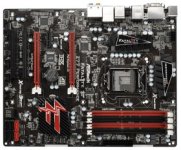
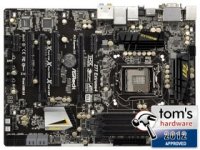
Asrock fatality (same as extreme 4 just with red colours :P)
They are certainly similar but the specs and layout do differ.

Fatal1ty Z77 Performance.jpgZ77 Extreme4.jpg
 
Last edited:
I never said that then. Its going to bottleneck game performance - i.e. game performance is determined by the slowest involved component. i.e. It maxes out the slowest component & everything else sits mostly idle. That is bottlenecking in my books but you're welcome to look at it as using the GPU to its full potential.


I'm unfamiliar with this pre processing you are referring to. I was under the impression that thanks to direct memory access, you can load a texture from the HDD into RAM and from RAM in GFX RAM with near zero CPU involvement.


They are certainly similar but the specs and layout do differ.

View attachment 4110View attachment 4111

You are a bit confused , are you talking about the GPUdirect? It is not available to the everyday user. (http://traxnet.wordpress.com/2011/07/18/understanding-modern-gpus-2/ , read this ) . The cpu handles the logic, computes physics , does the calculations and feeds it to the gpu .Probably Joker knows more about this.

About the mobos, you are right the size does differ , and the extreme 4 has 2 more sata6g bus and an extra PCI slot, other than that its the color that suits you best. I say buy the extreme 4 just for the freakin awesome golden capasitors


@Lyt - Precautionary measures I guess?? do you think I'll be ok with the stock intel cooling? I'm also leaning toward the ASRock more just because of the price difference. At the moment I'm running on a 22" samsung syncmaster 2232GW at 1600x900

I have used stock cpu coolers all my life and never had a problem. Just make sure its greased properly (with some quality thermal paste) and ensure good airflow in that case of yours (http://www.silverstonetek.com/techtalk_cont.php?tid=wh_airflow&area=en , read this, will help you arrange your fans ).
 
Last edited:
Ok

Please dont go for a M type board.. ITs too small and space is always better. So Look at the MSI G43 or G45. G45 only if you intend to SLI later on. The difference between the 550TI and your 470 is not mind blowing, So wait and save up and mid year buy a new GPU.

The rest looks ok .. make sure you get 1866 ram so you can overclocking later next year, You would need a Aftermarket cooler for this but of the abt you dont need it as your Cpou stock speeds will be more than enough to power any game.
 
You are a bit confused , are you talking about the GPUdirect?
_I'm_ the one confused? :wtf: No when I say direct memory access I meaning direct memory access, not GPUdirect.

You initially said :
Everything goes through the CPU for pre processing before it goes to the GPU to actually process
Which is not true since as I explained, the majority of the data bypasses the CPU entirely via Direct Memory Access....hence no "pre processing". My comment was phrased as a question simply because I didn't want to bluntly say you're wrong. That plus "pre processing" isn't really a technical term in this context so I couldn't really be sure what you're trying to say. I suppose some of the model mesh calculations are done CPU side, but realistically the majority of the graphics work is done in the graphics card.

The only reason anybody cares about the CPU at is because its so closely linked to the memory subsystem. That and the fact that the render loop is CPU bound.

*sigh* massive derail...apologies OP.
 
_I'm_ the one confused? :wtf: No when I say direct memory access I meaning direct memory access, not GPUdirect.

You initially said :

Which is not true since as I explained, the majority of the data bypasses the CPU entirely via Direct Memory Access....hence no "pre processing". My comment was phrased as a question simply because I didn't want to bluntly say you're wrong. That plus "pre processing" isn't really a technical term in this context so I couldn't really be sure what you're trying to say. I suppose some of the model mesh calculations are done CPU side, but realistically the majority of the graphics work is done in the graphics card.

The only reason anybody cares about the CPU at is because its so closely linked to the memory subsystem. That and the fact that the render loop is CPU bound.

*sigh* massive derail...apologies OP.

lol...just lol. GPUdirect is the only gpu dma technology and it is NOT AVAILABLE TO THE PUBLIC . Where the hell are you getting your info from?>?>? THe cpu works out calculations needed for a game to run. I just don't now what else to say...
 
Thanks for the GPU v. CPU discussion. Erm, to get back to the OP, I would say get a nice new monitor. I may be alone in this. But I think it would make a big difference for you. I recently bought one myself, so now I'm excited about gaming monitors. I used this very helpful review guide to the best gaming monitors to choose one. Make sure you get one that has a small enough input lag and a quick enough response time, both of which are discussed in the guide.
 
Thanks for the GPU v. CPU discussion. Erm, to get back to the OP, I would say get a nice new monitor. I may be alone in this. But I think it would make a big difference for you. I recently bought one myself, so now I'm excited about gaming monitors. I used this very helpful review guide to the best gaming monitors to choose one. Make sure you get one that has a small enough input lag and a quick enough response time, both of which are discussed in the guide.

Are you stupid? The guy doesnt have enough money atm to buy a gpu and now you are suggesting for him to buy a new screen? You must be joking...
 
GPUdirect is the only gpu dma technology and it is NOT AVAILABLE TO THE PUBLIC .
GPUdirect applies to CUDA only...its entirely irrelevant for gaming (kinda hilarious, this being mygaming.co.za). Don't believe me?...go to Nvidia's dev page & see how many references to CUDA you can find. Here:

https://developer.nvidia.com/gpudirect

Besides, DMA has existed for a billion years already, so the notion that one company could cause an implementation of it to be "NOT AVAILABLE TO THE PUBLIC" is somewhat absurd.

Oh and DMA is enabled by default on ATI GPUs...so default in fact that you need 3rd party tools like ATI Tray Tools to disable it.: (Screenshot, my PC)

DMA.JPG

Hell I can even point you to the OpenGL function that *implements* DMA...on both ATI and Nvidia cards. Here is a code example...in the _official_ fckin OpenGL specs (ctrl-f DMA). Now OpenGL as you'd imagine is OPEN. Contrast that with your claim of "NOT AVAILABLE TO THE PUBLIC".

So your "GPUdirect is the only gpu dma technology" theory is looking kinda shaky.

THe cpu works out calculations needed for a game to run.
"Calculations"...right...I'll comment when you narrow it down a bit more.

I just don't now what else to say...
Well I've provided a screenshots, links and an actual fckin code example...you've provided absolutely nothing. Actually no, thats not right, you provided a link to a wordpress article that says "Current GPUs contain a DMA controller". I wonder why it doesn't say "only current Nvidia GPUs". Also wordpress article...not the best of sources. Code examples & official specs definitely ftw. I'd recommend hoisting a white flag.

And finally, there is a limit to:
I didn't want to bluntly say you're wrong.
 
GPUdirect applies to CUDA only...its entirely irrelevant for gaming (kinda hilarious, this being mygaming.co.za). Don't believe me?...go to Nvidia's dev page & see how many references to CUDA you can find. Here:

https://developer.nvidia.com/gpudirect

Besides, DMA has existed for a billion years already, so the notion that one company could cause an implementation of it to be "NOT AVAILABLE TO THE PUBLIC" is somewhat absurd.

Oh and DMA is enabled by default on ATI GPUs...so default in fact that you need 3rd party tools like ATI Tray Tools to disable it.: (Screenshot, my PC)

View attachment 4127

Hell I can even point you to the OpenGL function that *implements* DMA...on both ATI and Nvidia cards. Here is a code example...in the _official_ fckin OpenGL specs (ctrl-f DMA). Now OpenGL as you'd imagine is OPEN. Contrast that with your claim of "NOT AVAILABLE TO THE PUBLIC".

So your "GPUdirect is the only gpu dma technology" theory is looking kinda shaky.


"Calculations"...right...I'll comment when you narrow it down a bit more.


Well I've provided a screenshots, links and an actual fckin code example...you've provided absolutely nothing. Actually no, thats not right, you provided a link to a wordpress article that says "Current GPUs contain a DMA controller". I wonder why it doesn't say "only current Nvidia GPUs". Also wordpress article...not the best of sources. Code examples & official specs definitely ftw. I'd recommend hoisting a white flag.

And finally, there is a limit to:

You're the last person I would want to dis agree with.... :)
 
Back
Top