
You are using an out of date browser. It may not display this or other websites correctly.
You should upgrade or use an alternative browser.
You should upgrade or use an alternative browser.
Internet Issues
- Thread starter Kwaai
- Start date

Lycanthrope
New member
There's a nice thread about this on MyBroadband: http://mybroadband.co.za/vb/showthread.php/186156-Understanding-SNR-and-Attenuation-Rates
Essentially: Low attenuation and high SNR = good; high attenuation and low SNR = bad.
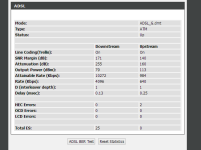
Your SNR is essentially 17.1dB and your attenuation is 25.5dB. Some routers neglect to use the decimal placer.
They seem perfectly fine.
What kind of lag issues do you have? Have you tested another ISP?
And what do you mean by "complete freezing in game?" Does the game completely freeze up (graphically) or is there just a massive lag spike?
Essentially: Low attenuation and high SNR = good; high attenuation and low SNR = bad.
Your SNR is essentially 17.1dB and your attenuation is 25.5dB. Some routers neglect to use the decimal placer.
They seem perfectly fine.
What kind of lag issues do you have? Have you tested another ISP?
And what do you mean by "complete freezing in game?" Does the game completely freeze up (graphically) or is there just a massive lag spike?

Kwaai
Finally Have An Avatar And Signature!
Thanks for the response, had a look at that and agreed those numbers seem fine. The problem occurred while playing dota 2, randomly my ping would shoot up to 950-1000 and continue spiking and at times the game would completely freeze. I can still click but nothing would happen for quite a while. Today I tried closing and reopening the game and the lag went away, so not sure what the actual problem could be.There's a nice thread about this on MyBroadband: http://mybroadband.co.za/vb/showthread.php/186156-Understanding-SNR-and-Attenuation-Rates
Essentially: Low attenuation and high SNR = good; high attenuation and low SNR = bad.
Your SNR is essentially 17.1dB and your attenuation is 25.5dB. Some routers neglect to use the decimal placer.
They seem perfectly fine.
What kind of lag issues do you have? Have you tested another ISP?
And what do you mean by "complete freezing in game?" Does the game completely freeze up (graphically) or is there just a massive lag spike?
Edit: I can still do things in game like look around the map and click here and there just nothing would happen, it's one massive delay. Up until yesterday I've never had a lag problem with this isp:telkom. I've tried many before.
Last edited:
Lycanthrope
New member
Thanks for the response, had a look at that and agreed those numbers seem fine. The problem occurred while playing dota 2, randomly my ping would shoot up to 950-1000 and continue spiking and at times the game would completely freeze. I can still click but nothing would happen for quite a while. Today I tried closing and reopening the game and the lag went away, so not sure what the actual problem could be.
Edit: I can still do things in game like look around the map and click here and there just nothing would happen, it's one massive delay. Up until yesterday I've never had a lag problem with this isp:telkom. I've tried many before.
The difficulty in diagnosing something like this is that it could really be anything. If your router says that it's fine then chances are the problem is on the exchange's side. It would be ideal if you could've used something like Routerstats with your router but it's compatible with very few. That way you would've been able to see if there is any dramatic change in your Attenuation/SNR by way of a graph being plotted in the background.
I had that problem before--things would be fine but then randomly there'd be major noise on the line and the router's connectivity would "dip" and re-establish itself.
I never managed to get it sorted and Telkom (being Telkom) don't consider it a problem. It's also difficult to replicate the problem for a techie to see for themselves because it doesn't happen at regular intervals.
You could try keep the statistics window open and when you have your next lag spike see what the stats say the SNR/Att are at.
Alternatively you can try the usual diagnostic attempts: try another router, try another ISP, unplug everything (phones, fax, etc) from all the sockets in your house except for the router and see if the problem reoccurs, etc.
But given what you've told, my money is on your exchange/connection to your exchange being problematic.
The unfortunate thing about that is that if that is the case... you're boned

Kwaai
Finally Have An Avatar And Signature!
That would be sad indeed :/, thanks for all of your help. I'll hope that it gets better soon(if it does).The difficulty in diagnosing something like this is that it could really be anything. If your router says that it's fine then chances are the problem is on the exchange's side. It would be ideal if you could've used something like Routerstats with your router but it's compatible with very few. That way you would've been able to see if there is any dramatic change in your Attenuation/SNR by way of a graph being plotted in the background.
I had that problem before--things would be fine but then randomly there'd be major noise on the line and the router's connectivity would "dip" and re-establish itself.
I never managed to get it sorted and Telkom (being Telkom) don't consider it a problem. It's also difficult to replicate the problem for a techie to see for themselves because it doesn't happen at regular intervals.
You could try keep the statistics window open and when you have your next lag spike see what the stats say the SNR/Att are at.
Alternatively you can try the usual diagnostic attempts: try another router, try another ISP, unplug everything (phones, fax, etc) from all the sockets in your house except for the router and see if the problem reoccurs, etc.
But given what you've told, my money is on your exchange/connection to your exchange being problematic.
The unfortunate thing about that is that if that is the case... you're boned
Lycanthrope
New member
That would be sad indeed :/, thanks for all of your help. I'll hope that it gets better soon(if it does).
It's a pleasure. Not much help, I know.
But I hope it gets sorted out. Unfortunately it's very difficult to get something like this dealt with if the problem isn't obvious
As I said, keep an eye on the SNR/Att when it happens again and see if you can catch a change in it. Alternatively, try rebooting your router when it happens and see if that helps stabilise it.
Good luck

Kwaai
Finally Have An Avatar And Signature!
Kwaai can you post a tracert so I can see if you not experience comgestion on your exchange causing high latency?
Since you in Cape Town are your dns' these:
196.43.46.190(Cape Town)
196.43.50.190(Pretoria)

Exchange looks normal...haven't tested gaming today though.
tracert google.com
Tracing route to google.com [173.194.127.73]
over a maximum of 30 hops:
1 <1 ms <1 ms <1 ms
2 15 ms 42 ms 57 ms
3 10 ms 12 ms 10 ms
4 53 ms 15 ms 12 ms
5 11 ms 10 ms 10 ms
6 155 ms 155 ms 168 ms
7 162 ms 155 ms 154 ms
8 159 ms 157 ms *
9 163 ms 165 ms 158 ms
10 232 ms 232 ms 248 ms
11 244 ms 242 ms 247 ms
12 297 ms 275 ms 252 ms
13 310 ms 305 ms 316 ms
14 395 ms 403 ms 428 ms
15 478 ms 399 ms 419 ms
16 471 ms 572 ms 610 ms
17 447 ms 445 ms 445 ms
18 452 ms 496 ms 457 ms
19 448 ms 445 ms 477 ms
Trace complete.
tracert bbc.co.uk
Tracing route to bbc.co.uk [212.58.253.67]
over a maximum of 30 hops:
1 <1 ms <1 ms <1 ms
2 9 ms 51 ms 9 ms
3 10 ms 10 ms 11 ms
4 29 ms 39 ms 18 ms
5 10 ms 12 ms 10 ms
6 156 ms 163 ms 166 ms
7 187 ms 200 ms 186 ms
8 * * *
9 196 ms 192 ms 200 ms
10 188 ms 189 ms 188 ms
11 206 ms 198 ms 198 ms
Trace complete.
tracert mybroadband.co.za
Tracing route to mybroadband.co.za [41.203.21.137]
over a maximum of 30 hops:
1 <1 ms <1 ms <1 ms
2 12 ms 28 ms 10 ms
3 13 ms 10 ms 10 ms
4 10 ms 17 ms 14 ms
5 35 ms 12 ms 10 ms
6 22 ms 30 ms 10 ms
7 10 ms 10 ms 14 ms
8 33 ms 65 ms 79 ms
9 11 ms 18 ms 26 ms
10 23 ms 56 ms 12 ms
11 34 ms 45 ms 35 ms
12 43 ms 35 ms 41 ms
13 36 ms 34 ms 61 ms
14 36 ms 36 ms 36 ms
15 37 ms 78 ms 60 ms
16 39 ms 36 ms 38 ms
17 38 ms 36 ms 34 ms
18 42 ms 85 ms 46 ms
Trace complete.
Last edited:
Kwaai
Finally Have An Avatar And Signature!
The 2nd hop looks unstable shouldn't be spikes like that so there could be a problem on your line, since it doesnt seem like congestion.
Are you using wireless or a lan cable since wireless can also cause problems too?
I'm using a lan cable-->switch-->router

Ichigo
New member
I'm using a lan cable-->switch-->router
unless theres a problem with the switch its probably a line fault then if your cabling/pots filters check out.
Have you tried plugging your pc straight into the router without any telephones or any other devices connected to the line like alarm, fax or electric fence etc.
Kwaai
Finally Have An Avatar And Signature!
unless theres a problem with the switch its probably a line fault then if your cabling/pots filters check out.
Have you tried plugging your pc straight into the router without any telephones or any other devices connected to the line like alarm, fax or electric fence etc.
Been doing a few tracerts, some are normal showing the usual 1: <1 <1 <1
2: 10 10 10
and others on the 2nd hop just jump to 500-600ms. This happened on two pcs, one via the switch and one straight to the router.
Ichigo
New member
If the tracert is showing 600ms then its congestion.Been doing a few tracerts, some are normal showing the usual 1: <1 <1 <1
2: 10 10 10
and others on the 2nd hop just jump to 500-600ms. This happened on two pcs, one via the switch and one straight to the router.
Kwaai
Finally Have An Avatar And Signature!
Yeah. Weird thing is that it has only been this week. I'll hope for the best for next week and check a few things as I go along. Thanks thoughIf the tracert is showing 600ms then its congestion.
.
Ichigo
New member
Yeah. Weird thing is that it has only been this week. I'll hope for the best for next week and check a few things as I go along. Thanks though
one thing I forgot is to check if anything is downloading in the background or if there is viruses cause that can also show 600ms.
Kwaai
Finally Have An Avatar And Signature!
Yeah I might have missed some downloads, I'm guessing phone auto updates or something because right now it isn't looking that bad anymore.one thing I forgot is to check if anything is downloading in the background or if there is viruses cause that can also show 600ms.
Edit: Tracert's are much better than earlier even while streaming
.
Last edited:
HavocXphere
New member
stats are fine
10 internet points says you've got some other program messing with your connection in the background.
Press windows key + R.
type "cmd" in the box (no quotes)
type "ping mybroadband.co.za -n 200 > C:\output.txt" (no quotes)
leave the PC alone for a while
post contents of the C:\output.txt file here.
10 internet points says you've got some other program messing with your connection in the background.
Press windows key + R.
type "cmd" in the box (no quotes)
type "ping mybroadband.co.za -n 200 > C:\output.txt" (no quotes)
leave the PC alone for a while
post contents of the C:\output.txt file here.
HavocXphere
New member
if running win 7, open task manager, go to performance tab, select resource manager
go to network tab sort by total bytes...watch that display
and of course try ISP on different backbone
go to network tab sort by total bytes...watch that display
and of course try ISP on different backbone
Ichigo
New member
Yeah I might have missed some downloads, I'm guessing phone auto updates or something because right now it isn't looking that bad anymore.
Edit: Tracert's are much better than earlier even while streaming
If you do use dropbox a lot on your phone it also slows down your line when uploading
Kwaai
Finally Have An Avatar And Signature!
The results will be off because my family's currently streaming HD but anyway:
Pinging mybroadband.co.za [41.203.21.137] with 32 bytes of data:
Reply from 41.203.21.137: bytes=32 time=34ms TTL=48
Reply from 41.203.21.137: bytes=32 time=33ms TTL=48
Reply from 41.203.21.137: bytes=32 time=34ms TTL=48
Reply from 41.203.21.137: bytes=32 time=34ms TTL=48
Reply from 41.203.21.137: bytes=32 time=34ms TTL=48
Reply from 41.203.21.137: bytes=32 time=34ms TTL=48
Reply from 41.203.21.137: bytes=32 time=34ms TTL=48
Reply from 41.203.21.137: bytes=32 time=34ms TTL=48
Reply from 41.203.21.137: bytes=32 time=34ms TTL=48
Reply from 41.203.21.137: bytes=32 time=34ms TTL=48
Reply from 41.203.21.137: bytes=32 time=34ms TTL=48
Reply from 41.203.21.137: bytes=32 time=34ms TTL=48
Reply from 41.203.21.137: bytes=32 time=34ms TTL=48
Reply from 41.203.21.137: bytes=32 time=33ms TTL=48
Reply from 41.203.21.137: bytes=32 time=34ms TTL=48
Reply from 41.203.21.137: bytes=32 time=34ms TTL=48
Reply from 41.203.21.137: bytes=32 time=34ms TTL=48
Reply from 41.203.21.137: bytes=32 time=34ms TTL=48
Reply from 41.203.21.137: bytes=32 time=34ms TTL=48
Reply from 41.203.21.137: bytes=32 time=34ms TTL=48
Reply from 41.203.21.137: bytes=32 time=34ms TTL=48
Reply from 41.203.21.137: bytes=32 time=34ms TTL=48
Reply from 41.203.21.137: bytes=32 time=34ms TTL=48
Reply from 41.203.21.137: bytes=32 time=34ms TTL=48
Reply from 41.203.21.137: bytes=32 time=34ms TTL=48
Reply from 41.203.21.137: bytes=32 time=34ms TTL=48
Reply from 41.203.21.137: bytes=32 time=35ms TTL=48
Reply from 41.203.21.137: bytes=32 time=34ms TTL=48
Reply from 41.203.21.137: bytes=32 time=34ms TTL=48
Reply from 41.203.21.137: bytes=32 time=34ms TTL=48
Reply from 41.203.21.137: bytes=32 time=34ms TTL=48
Reply from 41.203.21.137: bytes=32 time=34ms TTL=48
Reply from 41.203.21.137: bytes=32 time=33ms TTL=48
Reply from 41.203.21.137: bytes=32 time=34ms TTL=48
Reply from 41.203.21.137: bytes=32 time=34ms TTL=48
Reply from 41.203.21.137: bytes=32 time=34ms TTL=48
Reply from 41.203.21.137: bytes=32 time=34ms TTL=48
Reply from 41.203.21.137: bytes=32 time=34ms TTL=48
Reply from 41.203.21.137: bytes=32 time=34ms TTL=48
Reply from 41.203.21.137: bytes=32 time=34ms TTL=48
Reply from 41.203.21.137: bytes=32 time=34ms TTL=48
Reply from 41.203.21.137: bytes=32 time=34ms TTL=48
Reply from 41.203.21.137: bytes=32 time=34ms TTL=48
Reply from 41.203.21.137: bytes=32 time=34ms TTL=48
Reply from 41.203.21.137: bytes=32 time=34ms TTL=48
Reply from 41.203.21.137: bytes=32 time=39ms TTL=48
Reply from 41.203.21.137: bytes=32 time=62ms TTL=48
Reply from 41.203.21.137: bytes=32 time=261ms TTL=48
Reply from 41.203.21.137: bytes=32 time=39ms TTL=48
Reply from 41.203.21.137: bytes=32 time=99ms TTL=48
Reply from 41.203.21.137: bytes=32 time=34ms TTL=48
Reply from 41.203.21.137: bytes=32 time=45ms TTL=48
Reply from 41.203.21.137: bytes=32 time=45ms TTL=48
Reply from 41.203.21.137: bytes=32 time=69ms TTL=48
Reply from 41.203.21.137: bytes=32 time=135ms TTL=48
Reply from 41.203.21.137: bytes=32 time=218ms TTL=48
Reply from 41.203.21.137: bytes=32 time=313ms TTL=48
Reply from 41.203.21.137: bytes=32 time=46ms TTL=48
Reply from 41.203.21.137: bytes=32 time=33ms TTL=48
Reply from 41.203.21.137: bytes=32 time=415ms TTL=48
Reply from 41.203.21.137: bytes=32 time=191ms TTL=48
Reply from 41.203.21.137: bytes=32 time=221ms TTL=48
Reply from 41.203.21.137: bytes=32 time=716ms TTL=48
Reply from 41.203.21.137: bytes=32 time=404ms TTL=48
Reply from 41.203.21.137: bytes=32 time=401ms TTL=48
Reply from 41.203.21.137: bytes=32 time=295ms TTL=48
Reply from 41.203.21.137: bytes=32 time=34ms TTL=48
Reply from 41.203.21.137: bytes=32 time=44ms TTL=48
Reply from 41.203.21.137: bytes=32 time=74ms TTL=48
Reply from 41.203.21.137: bytes=32 time=212ms TTL=48
Reply from 41.203.21.137: bytes=32 time=61ms TTL=48
Reply from 41.203.21.137: bytes=32 time=351ms TTL=48
Reply from 41.203.21.137: bytes=32 time=176ms TTL=48
Reply from 41.203.21.137: bytes=32 time=244ms TTL=48
Reply from 41.203.21.137: bytes=32 time=85ms TTL=48
Reply from 41.203.21.137: bytes=32 time=34ms TTL=48
Reply from 41.203.21.137: bytes=32 time=139ms TTL=48
Reply from 41.203.21.137: bytes=32 time=84ms TTL=48
Reply from 41.203.21.137: bytes=32 time=117ms TTL=48
Reply from 41.203.21.137: bytes=32 time=113ms TTL=48
Reply from 41.203.21.137: bytes=32 time=69ms TTL=48
Reply from 41.203.21.137: bytes=32 time=241ms TTL=48
Reply from 41.203.21.137: bytes=32 time=34ms TTL=48
Reply from 41.203.21.137: bytes=32 time=34ms TTL=48
Reply from 41.203.21.137: bytes=32 time=34ms TTL=48
Reply from 41.203.21.137: bytes=32 time=34ms TTL=48
Reply from 41.203.21.137: bytes=32 time=33ms TTL=48
Reply from 41.203.21.137: bytes=32 time=34ms TTL=48
Reply from 41.203.21.137: bytes=32 time=34ms TTL=48
Reply from 41.203.21.137: bytes=32 time=34ms TTL=48
Reply from 41.203.21.137: bytes=32 time=34ms TTL=48
Reply from 41.203.21.137: bytes=32 time=34ms TTL=48
Reply from 41.203.21.137: bytes=32 time=34ms TTL=48
Reply from 41.203.21.137: bytes=32 time=34ms TTL=48
Reply from 41.203.21.137: bytes=32 time=34ms TTL=48
Reply from 41.203.21.137: bytes=32 time=34ms TTL=48
Reply from 41.203.21.137: bytes=32 time=221ms TTL=48
Reply from 41.203.21.137: bytes=32 time=332ms TTL=48
Reply from 41.203.21.137: bytes=32 time=215ms TTL=48
Reply from 41.203.21.137: bytes=32 time=101ms TTL=48
Reply from 41.203.21.137: bytes=32 time=99ms TTL=48
Reply from 41.203.21.137: bytes=32 time=89ms TTL=48
Reply from 41.203.21.137: bytes=32 time=191ms TTL=48
Reply from 41.203.21.137: bytes=32 time=177ms TTL=48
Reply from 41.203.21.137: bytes=32 time=80ms TTL=48
Reply from 41.203.21.137: bytes=32 time=49ms TTL=48
Reply from 41.203.21.137: bytes=32 time=81ms TTL=48
Reply from 41.203.21.137: bytes=32 time=119ms TTL=48
Reply from 41.203.21.137: bytes=32 time=53ms TTL=48
Reply from 41.203.21.137: bytes=32 time=33ms TTL=48
Reply from 41.203.21.137: bytes=32 time=34ms TTL=48
Reply from 41.203.21.137: bytes=32 time=79ms TTL=48
Reply from 41.203.21.137: bytes=32 time=83ms TTL=48
Reply from 41.203.21.137: bytes=32 time=34ms TTL=48
Reply from 41.203.21.137: bytes=32 time=58ms TTL=48
Reply from 41.203.21.137: bytes=32 time=34ms TTL=48
Reply from 41.203.21.137: bytes=32 time=38ms TTL=48
Reply from 41.203.21.137: bytes=32 time=34ms TTL=48
Reply from 41.203.21.137: bytes=32 time=159ms TTL=48
Reply from 41.203.21.137: bytes=32 time=34ms TTL=48
Reply from 41.203.21.137: bytes=32 time=127ms TTL=48
Reply from 41.203.21.137: bytes=32 time=153ms TTL=48
Reply from 41.203.21.137: bytes=32 time=138ms TTL=48
Reply from 41.203.21.137: bytes=32 time=54ms TTL=48
Reply from 41.203.21.137: bytes=32 time=37ms TTL=48
Reply from 41.203.21.137: bytes=32 time=49ms TTL=48
Reply from 41.203.21.137: bytes=32 time=59ms TTL=48
Reply from 41.203.21.137: bytes=32 time=109ms TTL=48
Reply from 41.203.21.137: bytes=32 time=34ms TTL=48
Reply from 41.203.21.137: bytes=32 time=39ms TTL=48
Reply from 41.203.21.137: bytes=32 time=34ms TTL=48
Reply from 41.203.21.137: bytes=32 time=55ms TTL=48
Reply from 41.203.21.137: bytes=32 time=159ms TTL=48
Reply from 41.203.21.137: bytes=32 time=62ms TTL=48
Reply from 41.203.21.137: bytes=32 time=138ms TTL=48
Reply from 41.203.21.137: bytes=32 time=34ms TTL=48
Reply from 41.203.21.137: bytes=32 time=175ms TTL=48
Reply from 41.203.21.137: bytes=32 time=34ms TTL=48
Reply from 41.203.21.137: bytes=32 time=164ms TTL=48
Reply from 41.203.21.137: bytes=32 time=80ms TTL=48
Reply from 41.203.21.137: bytes=32 time=173ms TTL=48
Reply from 41.203.21.137: bytes=32 time=112ms TTL=48
Reply from 41.203.21.137: bytes=32 time=142ms TTL=48
Reply from 41.203.21.137: bytes=32 time=91ms TTL=48
Reply from 41.203.21.137: bytes=32 time=67ms TTL=48
Reply from 41.203.21.137: bytes=32 time=109ms TTL=48
Reply from 41.203.21.137: bytes=32 time=50ms TTL=48
Reply from 41.203.21.137: bytes=32 time=190ms TTL=48
Reply from 41.203.21.137: bytes=32 time=139ms TTL=48
Reply from 41.203.21.137: bytes=32 time=152ms TTL=48
Reply from 41.203.21.137: bytes=32 time=97ms TTL=48
Reply from 41.203.21.137: bytes=32 time=34ms TTL=48
Reply from 41.203.21.137: bytes=32 time=126ms TTL=48
Reply from 41.203.21.137: bytes=32 time=38ms TTL=48
Reply from 41.203.21.137: bytes=32 time=37ms TTL=48
Reply from 41.203.21.137: bytes=32 time=136ms TTL=48
Reply from 41.203.21.137: bytes=32 time=63ms TTL=48
Reply from 41.203.21.137: bytes=32 time=34ms TTL=48
Reply from 41.203.21.137: bytes=32 time=34ms TTL=48
Reply from 41.203.21.137: bytes=32 time=34ms TTL=48
Reply from 41.203.21.137: bytes=32 time=34ms TTL=48
Reply from 41.203.21.137: bytes=32 time=184ms TTL=48
Reply from 41.203.21.137: bytes=32 time=95ms TTL=48
Reply from 41.203.21.137: bytes=32 time=226ms TTL=48
Reply from 41.203.21.137: bytes=32 time=49ms TTL=48
Reply from 41.203.21.137: bytes=32 time=136ms TTL=48
Reply from 41.203.21.137: bytes=32 time=50ms TTL=48
Reply from 41.203.21.137: bytes=32 time=34ms TTL=48
Reply from 41.203.21.137: bytes=32 time=56ms TTL=48
Reply from 41.203.21.137: bytes=32 time=80ms TTL=48
Reply from 41.203.21.137: bytes=32 time=109ms TTL=48
Reply from 41.203.21.137: bytes=32 time=431ms TTL=48
Reply from 41.203.21.137: bytes=32 time=339ms TTL=48
Reply from 41.203.21.137: bytes=32 time=308ms TTL=48
Reply from 41.203.21.137: bytes=32 time=127ms TTL=48
Reply from 41.203.21.137: bytes=32 time=57ms TTL=48
Reply from 41.203.21.137: bytes=32 time=54ms TTL=48
Reply from 41.203.21.137: bytes=32 time=34ms TTL=48
Reply from 41.203.21.137: bytes=32 time=64ms TTL=48
Reply from 41.203.21.137: bytes=32 time=151ms TTL=48
Reply from 41.203.21.137: bytes=32 time=55ms TTL=48
Reply from 41.203.21.137: bytes=32 time=353ms TTL=48
Ping statistics for 41.203.21.137:
Packets: Sent = 200, Received = 200, Lost = 0 (0% loss),
Approximate round trip times in milli-seconds:
Minimum = 33ms, Maximum = 1242ms, Average = 146ms
Pinging mybroadband.co.za [41.203.21.137] with 32 bytes of data:
Reply from 41.203.21.137: bytes=32 time=34ms TTL=48
Reply from 41.203.21.137: bytes=32 time=33ms TTL=48
Reply from 41.203.21.137: bytes=32 time=34ms TTL=48
Reply from 41.203.21.137: bytes=32 time=34ms TTL=48
Reply from 41.203.21.137: bytes=32 time=34ms TTL=48
Reply from 41.203.21.137: bytes=32 time=34ms TTL=48
Reply from 41.203.21.137: bytes=32 time=34ms TTL=48
Reply from 41.203.21.137: bytes=32 time=34ms TTL=48
Reply from 41.203.21.137: bytes=32 time=34ms TTL=48
Reply from 41.203.21.137: bytes=32 time=34ms TTL=48
Reply from 41.203.21.137: bytes=32 time=34ms TTL=48
Reply from 41.203.21.137: bytes=32 time=34ms TTL=48
Reply from 41.203.21.137: bytes=32 time=34ms TTL=48
Reply from 41.203.21.137: bytes=32 time=33ms TTL=48
Reply from 41.203.21.137: bytes=32 time=34ms TTL=48
Reply from 41.203.21.137: bytes=32 time=34ms TTL=48
Reply from 41.203.21.137: bytes=32 time=34ms TTL=48
Reply from 41.203.21.137: bytes=32 time=34ms TTL=48
Reply from 41.203.21.137: bytes=32 time=34ms TTL=48
Reply from 41.203.21.137: bytes=32 time=34ms TTL=48
Reply from 41.203.21.137: bytes=32 time=34ms TTL=48
Reply from 41.203.21.137: bytes=32 time=34ms TTL=48
Reply from 41.203.21.137: bytes=32 time=34ms TTL=48
Reply from 41.203.21.137: bytes=32 time=34ms TTL=48
Reply from 41.203.21.137: bytes=32 time=34ms TTL=48
Reply from 41.203.21.137: bytes=32 time=34ms TTL=48
Reply from 41.203.21.137: bytes=32 time=35ms TTL=48
Reply from 41.203.21.137: bytes=32 time=34ms TTL=48
Reply from 41.203.21.137: bytes=32 time=34ms TTL=48
Reply from 41.203.21.137: bytes=32 time=34ms TTL=48
Reply from 41.203.21.137: bytes=32 time=34ms TTL=48
Reply from 41.203.21.137: bytes=32 time=34ms TTL=48
Reply from 41.203.21.137: bytes=32 time=33ms TTL=48
Reply from 41.203.21.137: bytes=32 time=34ms TTL=48
Reply from 41.203.21.137: bytes=32 time=34ms TTL=48
Reply from 41.203.21.137: bytes=32 time=34ms TTL=48
Reply from 41.203.21.137: bytes=32 time=34ms TTL=48
Reply from 41.203.21.137: bytes=32 time=34ms TTL=48
Reply from 41.203.21.137: bytes=32 time=34ms TTL=48
Reply from 41.203.21.137: bytes=32 time=34ms TTL=48
Reply from 41.203.21.137: bytes=32 time=34ms TTL=48
Reply from 41.203.21.137: bytes=32 time=34ms TTL=48
Reply from 41.203.21.137: bytes=32 time=34ms TTL=48
Reply from 41.203.21.137: bytes=32 time=34ms TTL=48
Reply from 41.203.21.137: bytes=32 time=34ms TTL=48
Reply from 41.203.21.137: bytes=32 time=39ms TTL=48
Reply from 41.203.21.137: bytes=32 time=62ms TTL=48
Reply from 41.203.21.137: bytes=32 time=261ms TTL=48
Reply from 41.203.21.137: bytes=32 time=39ms TTL=48
Reply from 41.203.21.137: bytes=32 time=99ms TTL=48
Reply from 41.203.21.137: bytes=32 time=34ms TTL=48
Reply from 41.203.21.137: bytes=32 time=45ms TTL=48
Reply from 41.203.21.137: bytes=32 time=45ms TTL=48
Reply from 41.203.21.137: bytes=32 time=69ms TTL=48
Reply from 41.203.21.137: bytes=32 time=135ms TTL=48
Reply from 41.203.21.137: bytes=32 time=218ms TTL=48
Reply from 41.203.21.137: bytes=32 time=313ms TTL=48
Reply from 41.203.21.137: bytes=32 time=46ms TTL=48
Reply from 41.203.21.137: bytes=32 time=33ms TTL=48
Reply from 41.203.21.137: bytes=32 time=415ms TTL=48
Reply from 41.203.21.137: bytes=32 time=191ms TTL=48
Reply from 41.203.21.137: bytes=32 time=221ms TTL=48
Reply from 41.203.21.137: bytes=32 time=716ms TTL=48
Reply from 41.203.21.137: bytes=32 time=404ms TTL=48
Reply from 41.203.21.137: bytes=32 time=401ms TTL=48
Reply from 41.203.21.137: bytes=32 time=295ms TTL=48
Reply from 41.203.21.137: bytes=32 time=34ms TTL=48
Reply from 41.203.21.137: bytes=32 time=44ms TTL=48
Reply from 41.203.21.137: bytes=32 time=74ms TTL=48
Reply from 41.203.21.137: bytes=32 time=212ms TTL=48
Reply from 41.203.21.137: bytes=32 time=61ms TTL=48
Reply from 41.203.21.137: bytes=32 time=351ms TTL=48
Reply from 41.203.21.137: bytes=32 time=176ms TTL=48
Reply from 41.203.21.137: bytes=32 time=244ms TTL=48
Reply from 41.203.21.137: bytes=32 time=85ms TTL=48
Reply from 41.203.21.137: bytes=32 time=34ms TTL=48
Reply from 41.203.21.137: bytes=32 time=139ms TTL=48
Reply from 41.203.21.137: bytes=32 time=84ms TTL=48
Reply from 41.203.21.137: bytes=32 time=117ms TTL=48
Reply from 41.203.21.137: bytes=32 time=113ms TTL=48
Reply from 41.203.21.137: bytes=32 time=69ms TTL=48
Reply from 41.203.21.137: bytes=32 time=241ms TTL=48
Reply from 41.203.21.137: bytes=32 time=34ms TTL=48
Reply from 41.203.21.137: bytes=32 time=34ms TTL=48
Reply from 41.203.21.137: bytes=32 time=34ms TTL=48
Reply from 41.203.21.137: bytes=32 time=34ms TTL=48
Reply from 41.203.21.137: bytes=32 time=33ms TTL=48
Reply from 41.203.21.137: bytes=32 time=34ms TTL=48
Reply from 41.203.21.137: bytes=32 time=34ms TTL=48
Reply from 41.203.21.137: bytes=32 time=34ms TTL=48
Reply from 41.203.21.137: bytes=32 time=34ms TTL=48
Reply from 41.203.21.137: bytes=32 time=34ms TTL=48
Reply from 41.203.21.137: bytes=32 time=34ms TTL=48
Reply from 41.203.21.137: bytes=32 time=34ms TTL=48
Reply from 41.203.21.137: bytes=32 time=34ms TTL=48
Reply from 41.203.21.137: bytes=32 time=34ms TTL=48
Reply from 41.203.21.137: bytes=32 time=221ms TTL=48
Reply from 41.203.21.137: bytes=32 time=332ms TTL=48
Reply from 41.203.21.137: bytes=32 time=215ms TTL=48
Reply from 41.203.21.137: bytes=32 time=101ms TTL=48
Reply from 41.203.21.137: bytes=32 time=99ms TTL=48
Reply from 41.203.21.137: bytes=32 time=89ms TTL=48
Reply from 41.203.21.137: bytes=32 time=191ms TTL=48
Reply from 41.203.21.137: bytes=32 time=177ms TTL=48
Reply from 41.203.21.137: bytes=32 time=80ms TTL=48
Reply from 41.203.21.137: bytes=32 time=49ms TTL=48
Reply from 41.203.21.137: bytes=32 time=81ms TTL=48
Reply from 41.203.21.137: bytes=32 time=119ms TTL=48
Reply from 41.203.21.137: bytes=32 time=53ms TTL=48
Reply from 41.203.21.137: bytes=32 time=33ms TTL=48
Reply from 41.203.21.137: bytes=32 time=34ms TTL=48
Reply from 41.203.21.137: bytes=32 time=79ms TTL=48
Reply from 41.203.21.137: bytes=32 time=83ms TTL=48
Reply from 41.203.21.137: bytes=32 time=34ms TTL=48
Reply from 41.203.21.137: bytes=32 time=58ms TTL=48
Reply from 41.203.21.137: bytes=32 time=34ms TTL=48
Reply from 41.203.21.137: bytes=32 time=38ms TTL=48
Reply from 41.203.21.137: bytes=32 time=34ms TTL=48
Reply from 41.203.21.137: bytes=32 time=159ms TTL=48
Reply from 41.203.21.137: bytes=32 time=34ms TTL=48
Reply from 41.203.21.137: bytes=32 time=127ms TTL=48
Reply from 41.203.21.137: bytes=32 time=153ms TTL=48
Reply from 41.203.21.137: bytes=32 time=138ms TTL=48
Reply from 41.203.21.137: bytes=32 time=54ms TTL=48
Reply from 41.203.21.137: bytes=32 time=37ms TTL=48
Reply from 41.203.21.137: bytes=32 time=49ms TTL=48
Reply from 41.203.21.137: bytes=32 time=59ms TTL=48
Reply from 41.203.21.137: bytes=32 time=109ms TTL=48
Reply from 41.203.21.137: bytes=32 time=34ms TTL=48
Reply from 41.203.21.137: bytes=32 time=39ms TTL=48
Reply from 41.203.21.137: bytes=32 time=34ms TTL=48
Reply from 41.203.21.137: bytes=32 time=55ms TTL=48
Reply from 41.203.21.137: bytes=32 time=159ms TTL=48
Reply from 41.203.21.137: bytes=32 time=62ms TTL=48
Reply from 41.203.21.137: bytes=32 time=138ms TTL=48
Reply from 41.203.21.137: bytes=32 time=34ms TTL=48
Reply from 41.203.21.137: bytes=32 time=175ms TTL=48
Reply from 41.203.21.137: bytes=32 time=34ms TTL=48
Reply from 41.203.21.137: bytes=32 time=164ms TTL=48
Reply from 41.203.21.137: bytes=32 time=80ms TTL=48
Reply from 41.203.21.137: bytes=32 time=173ms TTL=48
Reply from 41.203.21.137: bytes=32 time=112ms TTL=48
Reply from 41.203.21.137: bytes=32 time=142ms TTL=48
Reply from 41.203.21.137: bytes=32 time=91ms TTL=48
Reply from 41.203.21.137: bytes=32 time=67ms TTL=48
Reply from 41.203.21.137: bytes=32 time=109ms TTL=48
Reply from 41.203.21.137: bytes=32 time=50ms TTL=48
Reply from 41.203.21.137: bytes=32 time=190ms TTL=48
Reply from 41.203.21.137: bytes=32 time=139ms TTL=48
Reply from 41.203.21.137: bytes=32 time=152ms TTL=48
Reply from 41.203.21.137: bytes=32 time=97ms TTL=48
Reply from 41.203.21.137: bytes=32 time=34ms TTL=48
Reply from 41.203.21.137: bytes=32 time=126ms TTL=48
Reply from 41.203.21.137: bytes=32 time=38ms TTL=48
Reply from 41.203.21.137: bytes=32 time=37ms TTL=48
Reply from 41.203.21.137: bytes=32 time=136ms TTL=48
Reply from 41.203.21.137: bytes=32 time=63ms TTL=48
Reply from 41.203.21.137: bytes=32 time=34ms TTL=48
Reply from 41.203.21.137: bytes=32 time=34ms TTL=48
Reply from 41.203.21.137: bytes=32 time=34ms TTL=48
Reply from 41.203.21.137: bytes=32 time=34ms TTL=48
Reply from 41.203.21.137: bytes=32 time=184ms TTL=48
Reply from 41.203.21.137: bytes=32 time=95ms TTL=48
Reply from 41.203.21.137: bytes=32 time=226ms TTL=48
Reply from 41.203.21.137: bytes=32 time=49ms TTL=48
Reply from 41.203.21.137: bytes=32 time=136ms TTL=48
Reply from 41.203.21.137: bytes=32 time=50ms TTL=48
Reply from 41.203.21.137: bytes=32 time=34ms TTL=48
Reply from 41.203.21.137: bytes=32 time=56ms TTL=48
Reply from 41.203.21.137: bytes=32 time=80ms TTL=48
Reply from 41.203.21.137: bytes=32 time=109ms TTL=48
Reply from 41.203.21.137: bytes=32 time=431ms TTL=48
Reply from 41.203.21.137: bytes=32 time=339ms TTL=48
Reply from 41.203.21.137: bytes=32 time=308ms TTL=48
Reply from 41.203.21.137: bytes=32 time=127ms TTL=48
Reply from 41.203.21.137: bytes=32 time=57ms TTL=48
Reply from 41.203.21.137: bytes=32 time=54ms TTL=48
Reply from 41.203.21.137: bytes=32 time=34ms TTL=48
Reply from 41.203.21.137: bytes=32 time=64ms TTL=48
Reply from 41.203.21.137: bytes=32 time=151ms TTL=48
Reply from 41.203.21.137: bytes=32 time=55ms TTL=48
Reply from 41.203.21.137: bytes=32 time=353ms TTL=48
Ping statistics for 41.203.21.137:
Packets: Sent = 200, Received = 200, Lost = 0 (0% loss),
Approximate round trip times in milli-seconds:
Minimum = 33ms, Maximum = 1242ms, Average = 146ms