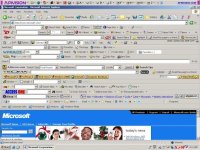
ads ads adsa ads and more ads!

Duke Dude

New member
Sup guys,

I need some help concerning all the ads I've been seeing of late. Firstly I've only noticed them today, so I'm not sure if I've downloaded something by mistake somehow that changed a setting somewhere but I have been getting ads on almost every single website.

Youtube for example has this HUGE add just underneath the search bar which takes up about a 5th of my screen, it's incredibly annoying. My homepage is AOL and for the first time today there is a slim bar at the top asking me to download the "official" AOL tool bar.

I dunno if I've done something as I've only noticed this today but it has been irritating the hell out of me. I dunno if it's because I'm so irked right now but my browser feels quite a bit slower as a result as well...

EDIT: Okay there's something seriously off here, as soon as I posted this key words in my post are hotlinked with links to more ads!
 
Sup guys,

I need some help concerning all the ads I've been seeing of late. Firstly I've only noticed them today, so I'm not sure if I've downloaded something by mistake somehow that changed a setting somewhere but I have been getting ads on almost every single website.

Youtube for example has this HUGE add just underneath the search bar which takes up about a 5th of my screen, it's incredibly annoying. My homepage is AOL and for the first time today there is a slim bar at the top asking me to download the "official" AOL tool bar.

I dunno if I've done something as I've only noticed this today but it has been irritating the hell out of me. I dunno if it's because I'm so irked right now but my browser feels quite a bit slower as a result as well...

EDIT: Okay there's something seriously off here, as soon as I posted this key words in my post are hotlinked with links to more ads!

Check your chrome/firefox extensions. There will probably be something there you didn't knowingly install.
 
Yep, I've seen it before. It is some kind of adware that got installed on your browser / computer. If it is just in the one browser, you can probably just disable the browser extension. If it is in any browser, a bit more work will be required.
 
Thanks for all the responses guys! I will look into all those programs asap!
That being said though, I still want to remove whatever has managed to worm it's way onto my laptop.

Yep, I've seen it before. It is some kind of adware that got installed on your browser / computer. If it is just in the one browser, you can probably just disable the browser extension. If it is in any browser, a bit more work will be required.

I only use IE (I know :eek:) so how would I go about checking this?
 
Drop IE immediately. Switch to Chrome or Firefox and install Adblock Plus. Firefox can also optionally be installed with NoScript.

Scan the system with Malwarebytes. If that finds nothing, see if there's a recent system restore point that was made and roll back to that. Disable or uninstall any extensions that you may have in IE. Get rid of it asap, because that malware can be re-hacked to hijack links and install keystroke loggers.
 
Sounds like a classic adware browser hijack.

Depending on your level of technical expertise, there are a few things you cna do and depending on the virus, there may be hurdles to overcome.

Firstly try uninstalling and toolbars or similar found in your Control Panel Programs, or installed within your browser (checking add-ons, extensions, etc).

I've managed to avoid this problem for years now (a past life as a PC technician teaches you well), but there are a few programs I recall using that helped out. Not sure how up to date these have been kept.

HiJackThis | Free software downloads at SourceForge.net
http://sourceforge.net/projects/hjt/

Still useful as it can help you analyse your registry, but only fiddle if you know what you are doing.

CCleaner - PC Optimization and Cleaning - Free Download
http://www.piriform.com/ccleaner

This is a good all-round easy to use package that can clean up your browsers and other files systems - again, fiddle at your own risk.

The following two programs I haven't used for a while so someone else will have to vouch for their effectiveness. Good luck!

Ad-Aware Free Antivirus and Antispyware by Lavasoft | Protection from Virus, Spyware & Malware | Top Internet Security for Windows
http://www.lavasoft.com/

Spybot - Search & Destroy
from Safer-Networking Ltd.
http://www.safer-networking.org/
 
I don't know why, but everybody has a "free toolbar" that they bundle with the installation these days. My general rule is that whenever I install something, I deselect any additional plugins / toolbars that I'm prompted to install.
 
I don't know why, but everybody has a "free toolbar" that they bundle with the installation these days. My general rule is that whenever I install something, I deselect any additional plugins / toolbars that I'm prompted to install.

You mean like this? Yeah deselect those "helpful" toolbars during installation.

too_many_toolbars.jpg
 
Sounds like a classic adware browser hijack.

Depending on your level of technical expertise, there are a few things you cna do and depending on the virus, there may be hurdles to overcome.

Firstly try uninstalling and toolbars or similar found in your Control Panel Programs, or installed within your browser (checking add-ons, extensions, etc).

I've managed to avoid this problem for years now (a past life as a PC technician teaches you well), but there are a few programs I recall using that helped out. Not sure how up to date these have been kept.

HiJackThis | Free software downloads at SourceForge.net
http://sourceforge.net/projects/hjt/

Still useful as it can help you analyse your registry, but only fiddle if you know what you are doing.

CCleaner - PC Optimization and Cleaning - Free Download
http://www.piriform.com/ccleaner

This is a good all-round easy to use package that can clean up your browsers and other files systems - again, fiddle at your own risk.

The following two programs I haven't used for a while so someone else will have to vouch for their effectiveness. Good luck!

Ad-Aware Free Antivirus and Antispyware by Lavasoft | Protection from Virus, Spyware & Malware | Top Internet Security for Windows
http://www.lavasoft.com/

Spybot - Search & Destroy
from Safer-Networking Ltd.
http://www.safer-networking.org/

James, I love you :love:

I went into my control panel and found something called "Delta Toolbar" which I do not recall ever downloading. I deleted it, restarted my laptop and all the ads have disappeared :D.

Thanks to every who helped! I'll try using those adware blocks that you guys recommended :o.
 
James, I love you :love:

I went into my control panel and found something called "Delta Toolbar" which I do not recall ever downloading. I deleted it, restarted my laptop and all the ads have disappeared :D.

Thanks to every who helped! I'll try using those adware blocks that you guys recommended :o.

I said and then there's James.... :rolleyes::p
 
Back
Top