MyGaming Steam Community Giveaways

Add store bought games to Steam account spend.

This might have been asked before but here goes.

Can I add my old store bought games to my Steam account? I have a suit case full of these.
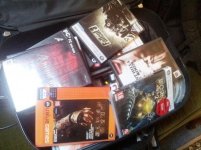
20131027_141104_22.jpg

I know you can add a "non-Steam game to your library" but then it will not be counted towards your Steam game spend.

Most of the games I have is on the steam market but I'm not going to buy them again just so they can add up to my "Steam account spend". I've only spent about $74 on games according to Steam but with this case I've spent way more.

It'll be really great if I can increase my account's spend status with games I've already bought so I can take part in the give-aways. :)
 
This might have been asked before but here goes.

Can I add my old store bought games to my Steam account? I have a suit case full of these.

I know you can add a "non-Steam game to your library" but then it will not be counted towards your Steam game spend.

Most of the games I have is on the steam market but I'm not going to buy them again just so they can add up to my "Steam account spend". I've only spent about $74 on games according to Steam but with this case I've spent way more.

It'll be really great if I can increase my account's spend status with games I've already bought so I can take part in the give-aways. :)

Generally no, only these retail games can be activated on steam: https://support.steampowered.com/kb_article.php?ref=7480-wusf-3601
 
This might have been asked before but here goes.

Can I add my old store bought games to my Steam account? I have a suit case full of these.

I know you can add a "non-Steam game to your library" but then it will not be counted towards your Steam game spend.

Most of the games I have is on the steam market but I'm not going to buy them again just so they can add up to my "Steam account spend". I've only spent about $74 on games according to Steam but with this case I've spent way more.

It'll be really great if I can increase my account's spend status with games I've already bought so I can take part in the give-aways. :)

I'm pretty sure Bioshock 2 and Fallout 3 will activate on Steam. Dead Space 1 should activate on Origin, or you can contact their support with a photo of your cd-key. There seems to be a ton of games in that bag (I dig your collection ;) ), so there should be enough to raise your "spent value".

Like The-1 said, use this link: https://support.steampowered.com/kb_article.php?ref=7480-wusf-3601 to see which ones you can activate on Steam.

Also the Steam version of Bioshock 2 recently removed GFWL, and gave the Minerva's Den DLC for free, so it would definitely be worth adding that (using your retail code).
 
Last edited:
I'm pretty sure Bioshock 2 and Fallout 3 will activate on Steam. Dead Space 1 should activate on Origin, or you can contact their support with a photo of your cd-key. There seems to be a ton of games in that bag (I dig your collection ;) ), so there should be enough to raise your "spent value".

Like The-1 said, use this link: https://support.steampowered.com/kb_article.php?ref=7480-wusf-3601 to see which ones you can activate on Steam.

Also the Steam version of Bioshock 2 recently removed GFWL, and gave the Minerva's Den DLC for free, so it would definitely be worth adding that (using your retail code).

Great!!!!! I will take a look at the link and check if I can my games. I tried activating it with my dc-keys but it didn't work so I think I used the wrong method.

I appreciate the help peeps!
 
hmmm maybe a should write a step by step guide, here is a quick and dirty one for now:


  1. Register on Steamgifts.
  2. Once you're logged in, click on Giveaway -> Create a Giveaway
  3. Choose the game you want to give away from the dropdown menu. Note that some of them have a * next to them. These are games that have been in bundles before, and they don't add to your "contributor value" over a certain amount
  4. Select the time period you want to run it for. It's usually best to start your giveaways "now" and give a reasonable end date and time. (times are local)
  5. In the Who Can Enter section, choose "Steam Group" and then select "MyGaming community" from the dropdown list.
  6. You can ignore the other field for the most part, then click "Create Your Giveaway" and confirm it.
  7. Once the giveaway ends, Steamgifts will immediately pick a random winner, it will give you the email address and Steam details of the person you should send the key / gift to.
  8. After you sent the key, mark the box that says "Gifts Sent" and you're done.

Please let me know if anything here isn't clear or if you need more info.

So do i buy the game from steam first ?
 
Ok next question sorry for the noobiness what is a game that people actually want i have no idea which one to buy :D

Well I can assure you that, if you should buy something like Call of Duty: Ghost you'll attract many people to your give-away :p

Or just go to the Top seller list, or even more economical, the specials tab, and buy something you would enjoy from the list. I pretty sure you'll find someone without a specific game that will enter your give-away...
 
So do i buy the game from steam first ?

You can either buy from Steam and store it in your inventory or buy and mail it to the Winners email address or simply buy from other stores like Green Man Gaming or such.

Ok next question sorry for the noobiness what is a game that people actually want i have no idea which one to buy :D

Simple, buy what ever you want to give to the community. I normally opt for underrated games that I really enjoyed. Example the Men of War series I am currently posting. I really really love this series to bits and think more people should know about it. If giving it to fellow gamer's help it grow then I call it Job Done.

Or you can simply gift games that you got in bundle's and already own or do not want ie: the ones that come with ATI cards. Here you can simply PM the code to the winner.
 
Who's mattamort? :P

thanks very much! loved the gothic series so im sure to enjoy this!

- - - Updated - - -

Ok next question sorry for the noobiness what is a game that people actually want i have no idea which one to buy :D

I can also tell you that Metro 2033 is NOT a game people want :P

But if you went ahead and got 12 (to give me GREAT odds of getting one) pre-orders of Thief, then this community would give you virtual hugs. :)
 
Last edited:
I'm pretty sure Bioshock 2 and Fallout 3 will activate on Steam. Dead Space 1 should activate on Origin, or you can contact their support with a photo of your cd-key. There seems to be a ton of games in that bag (I dig your collection ;) ), so there should be enough to raise your "spent value".

Like The-1 said, use this link: https://support.steampowered.com/kb_article.php?ref=7480-wusf-3601 to see which ones you can activate on Steam.

Also the Steam version of Bioshock 2 recently removed GFWL, and gave the Minerva's Den DLC for free, so it would definitely be worth adding that (using your retail code).

Out of all the 20 odd games I have, only Bioshock 2 activated by me entering the cd key into "Activate a game on Steam". Fallout 3 didn't work at all which is weird. I sent Steam Support a list of the games I'm trying to activate, their cd keys and a pic of each one with the original disc and cd key on the case as proof of it's authenticity.

I hope they can fix the issue as all the games I have is on the Steam Store and so they are supported by Steam and not just Games for Windows Live. This is such a pain! :-)
 
Out of all the 20 odd games I have, only Bioshock 2 activated by me entering the cd key into "Activate a game on Steam". Fallout 3 didn't work at all which is weird. I sent Steam Support a list of the games I'm trying to activate, their cd keys and a pic of each one with the original disc and cd key on the case as proof of it's authenticity.

I hope they can fix the issue as all the games I have is on the Steam Store and so they are supported by Steam and not just Games for Windows Live. This is such a pain! :-)

Just a quick heads up, they gonna ask you for proof of purchase. Did it last time I bought a game from Look & listen that did not activate. No proof = no register. Load of people I know learned this the hard way.

What I did is made a fake one in Excel and printed it. Took a photo of "invoice" + games + ID book and my Steam ID written next to the cd keys. That worked like a charm.
 
Back
Top