Overheating GPU

MalicE

Party time! Excellent!
I seem to be having a bit of a heat issue with my recently purchased 560Ti.

On idle it runs between 30 and 40 degrees. While gaming it goes up to 70 and even 90 degrees (depending on what I'm playing)

Now while it doesn't cause my system to crash it can surely not be healthy for the GPU to be running at those temps.

I have a fan on the lid and 2 fans at the back but had to resort to opening the case now to let the heat out.

Anybody know of a cheap cooling solution?
 
I seem to be having a bit of a heat issue with my recently purchased 560Ti.

On idle it runs between 30 and 40 degrees. While gaming it goes up to 70 and even 90 degrees (depending on what I'm playing)

Now while it doesn't cause my system to crash it can surely not be healthy for the GPU to be running at those temps.

I have a fan on the lid and 2 fans at the back but had to resort to opening the case now to let the heat out.

Anybody know of a cheap cooling solution?

Which model 560Ti is it? Have you OC'd the GPU?
 
Can you get a side fan in?

I found an extract fan below the GPU worked in my previous case. Now I have 2 side intakes which also works
 
Your thermal paste is up...I reckon you bought it 2nd hand, so must be the thermal paste.
 
I seem to be having a bit of a heat issue with my recently purchased 560Ti.

On idle it runs between 30 and 40 degrees. While gaming it goes up to 70 and even 90 degrees (depending on what I'm playing)

Now while it doesn't cause my system to crash it can surely not be healthy for the GPU to be running at those temps.

I have a fan on the lid and 2 fans at the back but had to resort to opening the case now to let the heat out.

Anybody know of a cheap cooling solution?

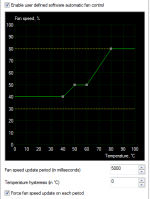
Install MSI afterburner and set custom fan speeds depending on your temps. My GTX560 will hit 100c at 40% fan speed, so I set it to increase my 10% every 10c it rises. Works like a charm, also it's not limited to MSI cards I have a Inno3D.
 
Can you get a side fan in?

I found an extract fan below the GPU worked in my previous case. Now I have 2 side intakes which also works

I suggest this as well for the meantime, you get car-slot fans and extraction fans that easily seat below and above card in an ATX chassis that should take heat off quite a bit.
 
@Malice

What chassis are you using?
Is it a reference or aftermarket cooler?

As Glordit suggested, the fastest way is to get MSI afterburner to create a faster fan profile. Afterburner also allows you to underclock your GPU. Performance will take a slight hit, but will definitely bring the temps down.
I'm running a reference 660ti, gets to 71C under load with the following fan profile:
msi.PNG

If your card has a reference PCB, you can grab this:
http://titan-ice.co.za/arctic-accelero-twin-turbo-ii-gpu-cooler.html
 
@Malice

What chassis are you using?
Is it a reference or aftermarket cooler?

As Glordit suggested, the fastest way is to get MSI afterburner to create a faster fan profile. Afterburner also allows you to underclock your GPU. Performance will take a slight hit, but will definitely bring the temps down.
I'm running a reference 660ti, gets to 71C under load with the following fan profile:
View attachment 8710

If your card has a reference PCB, you can grab this:
http://titan-ice.co.za/arctic-accelero-twin-turbo-ii-gpu-cooler.html


This is what I am using at the moment, sadly fps = gpu power increase = LOUD FAN, specially when I play games with 200+ Fps CS:GO and TL2 so I have to force Vsync or lock the frames to avoid overstressing the GPU and Fan.
 
How would one even go about replacing the paste?

You'd need to unscrew your cooler and heatsink from the PCB. Then you'll see the chip - wipe it down and apply new TIM.

Then put the heatsink and cooler back on. Nothing too complicated. Just requires you to be patient.
 
You'd need to unscrew your cooler and heatsink from the PCB. Then you'll see the chip - wipe it down and apply new TIM.

Then put the heatsink and cooler back on. Nothing too complicated. Just requires you to be patient.

Thanks!

That does not sound to hard... But i assume that you have to be careful when doing that
 
@ applause
Basic guidelines

1. Avoid static, make sure your in a carpet free area and are touching something metal regularly
2. If you aren't sure how things will fit together then take plenty of pics to help your reassembly
3. Work slowly and don't use force
4. Research, try find out as much as you can before you open anything
 
Here is a link to an article on side panel fans I remember from way back.

http://www.pugetsystems.com/labs/articles/Side-Panel-Fans-Are-They-Worth-It-102/
 
Also try finding industrial Nano Aluminium Thermal Compound, has the best heat conductivity I've ever seen.
 
Which model 560Ti is it? Have you OC'd the GPU?
I'll actually have to check that. all I know is is that it's a Inno3D


Can you get a side fan in?

I found an extract fan below the GPU worked in my previous case. Now I have 2 side intakes which also works

I suggest this as well for the meantime, you get car-slot fans and extraction fans that easily seat below and above card in an ATX chassis that should take heat off quite a bit.
I have been looking into this. they are quite cheap at takealot


Your thermal paste is up...I reckon you bought it 2nd hand, so must be the thermal paste.
secondhand yes. been trying to avoid this procedure :p


Install MSI afterburner and set custom fan speeds depending on your temps. My GTX560 will hit 100c at 40% fan speed, so I set it to increase my 10% every 10c it rises. Works like a charm, also it's not limited to MSI cards I have a Inno3D.
I installed it this weekend actually. will try and post my profile lunchtime when I can remote home


@Malice

What chassis are you using?
Is it a reference or aftermarket cooler?

If your card has a reference PCB, you can grab this:
http://titan-ice.co.za/arctic-accelero-twin-turbo-ii-gpu-cooler.html
my chassis is almost 10 years old. one of those handle boxes :D

this is the one I have if I'm not mistaken
GTX560Ti-300x161.jpg


that twin turbo looks good, but also bigger than my cars, which only has 1 fan :(
 
Last edited:
Get a new case. The older cases don't cut it when it comes to the new hardware. My GTX280 went up in flames due to a lack of space beneath the GFX card and the bottom of the case. Look for a case that has fans at the bottom to help with airflow. Most of the hot air leaves through the back and top of the case. If the air gets trapped between the GFX card and the case it will cause overheating very easily.

The GTX280 was a card that ran warm even with good fans and venting, but on the day it died it was the closest I have ever been to a real live volcano.
 
Back
Top