
PsychoFish
New member
As far as I know, your hardware actually takes more of a knock by the mini surges from constantly being switched on and off as apposed to just leaving it running.
That myth has been debunked to many times...

As far as I know, your hardware actually takes more of a knock by the mini surges from constantly being switched on and off as apposed to just leaving it running.

That myth has been debunked to many times...
 Capacitor/Surge buffers? Please enlighten me!

But generally yes, PSU manufacturers have been building in additional surge protection circuits into their components but not to protect you from switching your device on.
/snip

That's really interesting! Thanks for all the info.Sure, let's start with why and how electronics generally fail. Most can be classified as either a time related failure or a cause related failure. Cause related failures are failures related to temperature, stress, impact, etc.
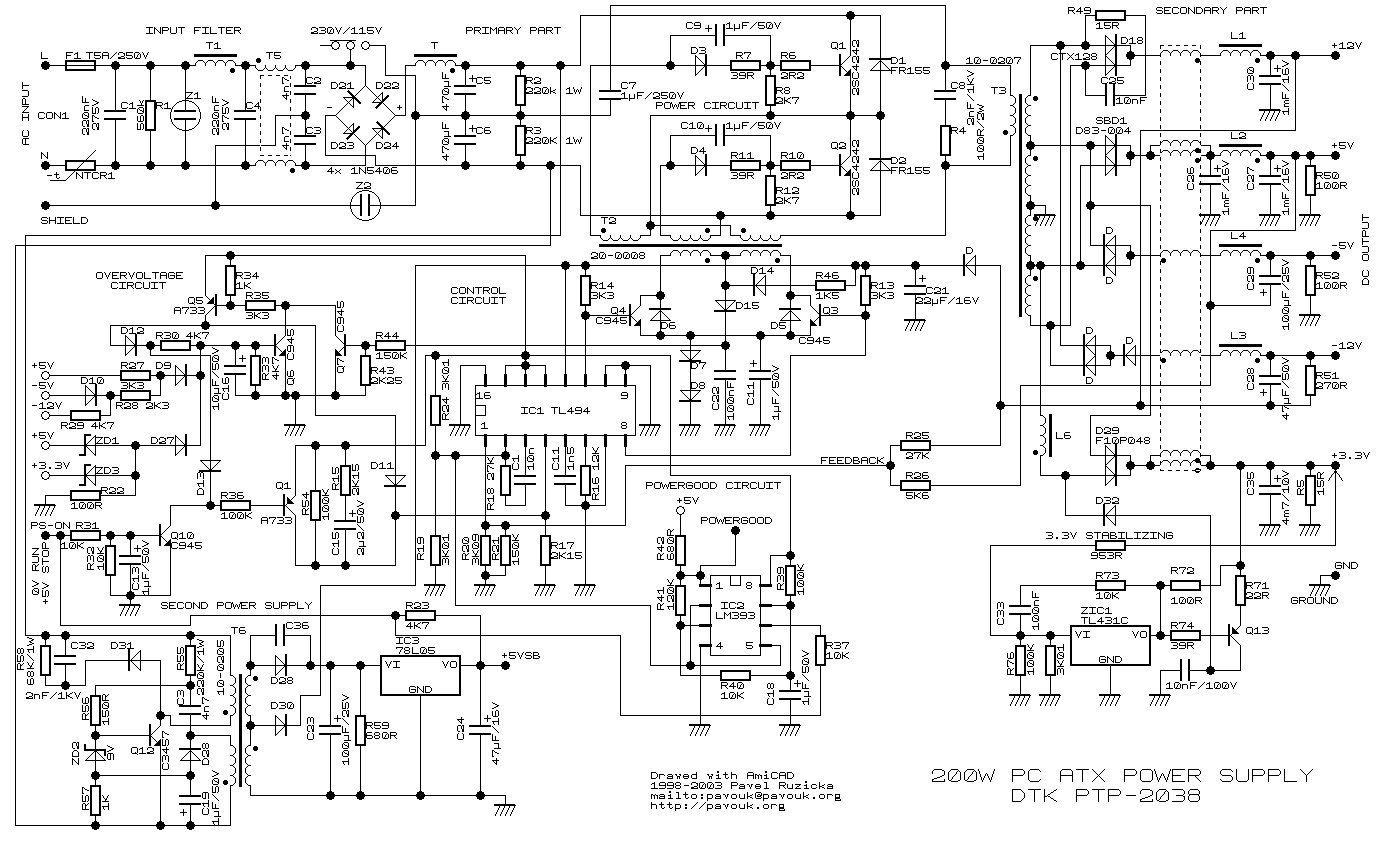
Now back to PCs, which have switched mode power supplies. See circuit diagram of a 200W ATX PSU
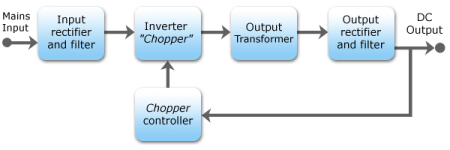
The theory of operation is still:
View attachment 9859
So to get back to surges. This will generally be due to a contact failure (soldering that was done incorrectly), a relay failure (less likely, but still possible) or the failure of another component due to a manufacturing fault, exposure to heat outside of the acceptable operating parameters.
But generally yes, PSU manufacturers have been building in additional surge protection circuits into their components but not to protect you from switching your device on.
Unless you have a ups I would be more worried about power spikes and brown outs rather than whether your PC is constantly running or not

Its just designed for, and startup with known, normal conditions (if everything is within spec, 220V, room temperature etc etc) is perfectly fine. See avatars response below.Awesome, thanks for the detailed response! ^5
I'm no electrical engineer, but in layman's terms, there's enough buffer and different sections for the "surge" to sort of dissipate before it even reaches the sensitive components?
That's because it's not a 'surge' when you switch your PSU on, it's a transient period (as opposed to the steady state when it running). The transient state is simulated and studied extensively when the PSU is being designed to ensure that components can tolerate it, whereas a surge is specifically an input larger than expected by a certain margin (for instance a 220V outlet pushing suddenly having 300V of potential difference). While it does use more power in the transient state, it's not enough to justify leaving a PSU on; you break even after a couple of seconds, not minutes or hours.
Was your PC built as a server? Or is it just a regular computer that you're using?My PC is also our media/streaming server. So it remains on most of the time. The only time it's switched off is when we know we're not going to use it for extended periods of time. Then we unplug it at the wall as well.
Was your PC built as a server? Or is it just a regular computer that you're using?

Sorry for my ignorance, but how would you build a PC as a server any differently to a normal PC? I know server hardware relatively well and you would be surprised as to what actually goes into servers from a hardware perspective. Take Dell servers as a prime example.
I'll use an entry level tower server as the example (PowerEdge T310). It has a one socket motherboard that was made under an OEM agreement with Foxconn and has a very stock standard Inter Chipset on it. It uses standard DDR3 memory. It has OEM 120mm fans (a whole two of them) which were probably made by Coolermaster from the looks of it. The Xeon processor (which has a few technical differences between it and the Core i5/i7 processors) has an Intel provided OEM heat sink and fan. And lastly it will have some type of RAID controller, again Dell has an OEM agreement with a vendor to produce Dell branded RAID controllers. The biggest differentiation is that the server comes with redundant power supplies and even this is an optional extra.
To summarize, a server is more than just the sum of it's hardware. The hardware is nothing special and nothing better than what you can get off the shelf. Even benchmarking a Xeon processor against an i7 will not even give you a clearer perspective. The Xeon is better at certain tasks and the i7 will be better at others.
Isn't the concept in the word itself "server" " a computer or computer program which manages access to a centralized resource or service in a network." .so my microserver can serve as a personal computer (I.e. I watch all my movies off the pc or games) or I can convert it to serve my client pc with network services (I.e. media server). Something you didnt mention was the ability to have ECC Ram which is vital under certain application needs.
Tbh you could convert most new pc`s to servers with the exception that you wont have power redundancy. Though you lvl 2 cache on cpu will be lower for consumer products I doubt you would hope to have 30 users on your pc running microsoft office and doing erp systems.
correct, the question was however "Was your PC built as a server?" and not "Was your PC configured as a server?"
So in actual fact it should be are you using your desktop pc as server or do you have a server rack?
ECC Ram is a completely different beast. I have only ever seen it properly in use on Oracle hardware running an Oracle Database that supports a financial transaction server. Apart from that...very rare and very expensive.


