

brendanvb
New member
Hi all,
My boss has been having some internet issues at his house and believes he has been shaped dramatically. The ISP in question is a small company here in George, the owner of which is one of his friends. He switched to them from Mweb and I advised him that there is no way a small company here would be able to offer the same kind of service Mweb was giving him, which was an uncapped, unshaped account for approx. R2600 p.m. This new ISP costs about R1000 more and they told my boss they aren't throttling him at all, but he doesn't believe them as the service is severely worse than what he was getting from Mweb. He has asked me if I can try and do some tests to prove he is being shaped. I've come across this program called DiffProbe which supposedly shows if your connection is being shaped. Please can someone explain exactly what the results indicate?
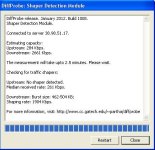
So I assume the estimated Upstream and Downstream figures are what the line is capable of, but what exactly does the Downstream burst size indicate? Is 462-502kbps the speed we are getting and the shaping rate of 1904kbps what we are not getting?
Thanks in advance!
My boss has been having some internet issues at his house and believes he has been shaped dramatically. The ISP in question is a small company here in George, the owner of which is one of his friends. He switched to them from Mweb and I advised him that there is no way a small company here would be able to offer the same kind of service Mweb was giving him, which was an uncapped, unshaped account for approx. R2600 p.m. This new ISP costs about R1000 more and they told my boss they aren't throttling him at all, but he doesn't believe them as the service is severely worse than what he was getting from Mweb. He has asked me if I can try and do some tests to prove he is being shaped. I've come across this program called DiffProbe which supposedly shows if your connection is being shaped. Please can someone explain exactly what the results indicate?
So I assume the estimated Upstream and Downstream figures are what the line is capable of, but what exactly does the Downstream burst size indicate? Is 462-502kbps the speed we are getting and the shaping rate of 1904kbps what we are not getting?
Thanks in advance!
