Stereo Speakers with 5.1 Headphones

mottamort

Bargain Hunter
Hey there, got a bit of a conundrum that I hope someone here has a possible fix for.

I got a pair of Turtle Beach z6a (the full 5.1 one's not the usb-only connection) about a month ago. I absolutely LOVE the sound, love the surround. But unfortunately, my pc is also my "movie theatre", and as such I have 2 stereo speakers for when the significant other and myself want to watch something.

The problem I'm having is that my headphones are setup as 5.1 surround, but speakers are obviously stereo. So in "Sound" (Win 7), I am constantly switching between 5.1 Setup and Stereo setup, otherwise I A) Don't get the proper 5.1 ear-honey I so crave while gaming or B)miss out on 60% of sounds in stereo when using speaker setup.

Is there a way I can configure my speakers to always get stereo (full sound) while my headphones always get 5.1?

The headphones come with splitters for the sound, which probably doesnt HELP matters, but I've tried setting up speakers in the front port and pretending they're the headphones, but i still only have 1 audio output streaming it through.

Anyone have any ideas so i dont constantly have to be switching between sound config every time i switch between speakeres and headphones?


...apologies if my message isn't clear, ask and I will clarify :)
 
Your message is clear:)

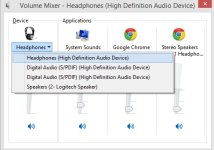
Windows 8 manages all different sound devices independently.

I'm sure someone else would be able to give you a simpler solution;)

Untitled.jpg

Do you plug both your headphones and speakers into the same place?
 
Last edited:
Until yesterday I had speakers plugged into the splitter that the headphones has, but started seeing if i cant make them 2 devices if i plug in speakers in front panel "headphone" jack.
Well even if headphones are in back (4 jacks plugged in) and speakers are in front jack, my pc still only sees it as one "device" called speakers...
 
Until yesterday I had speakers plugged into the splitter that the headphones has, but started seeing if i cant make them 2 devices if i plug in speakers in front panel "headphone" jack.
Well even if headphones are in back (4 jacks plugged in) and speakers are in front jack, my pc still only sees it as one "device" called speakers...

Are you using the pre-packaged audio software and drivers or you using windows drivers?
 
Are you using the pre-packaged audio software and drivers or you using windows drivers?

Motherboard (GA-Z77-D3H) drivers (VIA Audio), why? I have other "devices" in my sound config panel, but they're all HDMI/SDPIF outlet from my gfx card. when home i can show a screenshot if it helps...
 
Do you have flexible audio I/O ports? i.e if you plug in a device on an audio output port, does it allow you to specify the I/O device?
 
As in if i plug in my microphone into the subwoofer jack does it go "what device did you plug in? is this a microphone?" Yes, i can change jack specification
 
Niiiice, a non-USB 5.1 headset. Unfortunately that's what's giving you grief. If it were a USB headset Windows would automatically change default sound device when you plug it in and out.

Jack specification is iffy and you won't achieve much playing around with audio devices and Windows can only have one audio device at a time. Changing jack configuration probably won't work, but try it... your MB drivers might be able to do it.

A half-decent sound card should manage this for you easily. My sound card software has a setting for plugging in multiple devices at the same time and each with a different output stream.

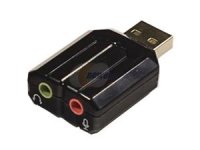
Or maybe an adapter for your speakers? Then Windows would auto reconfigure every time you plug them in out out. Maybe there's a 5.1 adapter (I didn't search too deeply)

12-186-035-03.jpg
 
Last edited:
A half-decent sound card should manage this for you easily. My sound card software has a setting for plugging in multiple devices at the same time and each with a different output stream.

View attachment 12114
Which soundcard would that be? that is almost exactly what i'm looking for hehe. I have onboard as well as an old Cobra something lying around (which i learnt was roughly as good as current onboard due to its age, so didn't bother using)


Well unfortunately it DOES need usb for power, but yea, its the 5.1 Jack one. Straight from Hong Kong :)

I've been reading online and apparently even if I stick in a soundcard and plug each one seperately, as you say windows (7) will only allow 1 device at a time (by design apparently), but maybe that'll make things SLIGHTLY less annoying. Coz sometimes im in 5.1 from last nights gaming session and i wanna play something so i go into it forgetting to change first, notice voices (center speaker) is off and i have to EXIT the game (changing from 5.1 to stereo whilst in a game seems to break sound hehe). With 2 devices I think i'd at least be able to swith on the fly....maybe.

Wouldnt i run into the same problem with an adapter though? or would it automatically change from stereo to 5.1 (and then hopefully back to 5.1 when plugged out). although with where my jacks are it might actually be more effort to pop in/out USB every time i wanna use stereo :P

As always, thanks for the responses :)
 
I'm not 100% sure about whether the adapter would work. I'm about 93.7% sure ;) My assumption is based on previous experience with USB headsets. From the expensive ones to the cheapo ones, when you plug them in Windows switches the audio device as USB sound is handled by a different controller. These adapters aren't expensive so I think it would be worth a try.

I use the Xonar Phoebus. But even the cheapest soundcard will almost always be better than onboard sound. And even something as simple as the Xonar DG should work for you. If the card can't handle multiple output streams what you can do is plug your headphones into the soundcard (headphone amp!) and plug your speakers into onboard. Then on playback devices you can switch between them quite easily.
 
Last edited:
Then on playback devices you can switch between them quite easily. -<-- this is exactly what I've been thinking of doing.

But even the cheapest soundcard will almost always be better than onboard sound. <-- I haven't found this to be the case with my specific options. i was doing research on which is better between the 2 specific brands i have available (onboard or discrete). onboard sound has definately come a long way, and the "cheap" soundcard im talking about is also rather old. 8 years roughly give or take.

Will have a look into Xonar though, and try see if I can guarantee results with the "cheap" option, although I guess if I'm getting 5.1 headphones I may as well get a "decent" soundcard to go with it hehe.
 
Will have a look into Xonar though, and try see if I can guarantee results with the "cheap" option, although I guess if I'm getting 5.1 headphones I may as well get a "decent" soundcard to go with it hehe.

Just get a SoundBlaster X-Fi and get it over and done with. Stop mucking about.
 
But even the cheapest soundcard will almost always be better than onboard sound. <-- I haven't found this to be the case with my specific options. i was doing research on which is better between the 2 specific brands i have available (onboard or discrete). onboard sound has definately come a long way, and the "cheap" soundcard im talking about is also rather old. 8 years roughly give or take.

cheap soundcard != obsolete tech :P I just mean a card without all the bells and whistles for audiophiles. Unless you have a high end gaming MB any new soundcard should be better.
 
Motherboard (GA-Z77-D3H) drivers (VIA Audio), why? I have other "devices" in my sound config panel, but they're all HDMI/SDPIF outlet from my gfx card. when home i can show a screenshot if it helps...

The VIA VT2021 codec. so mainstream/high end i think? Definately think its better than the rusty discrete which still has a Midi/gaming port on it ^_^

But yes, I do agree with you that any new soundcard (as in new in terms of time, not condition) will be better :D

EDIT: found some info, but since I'm not an audiophile not 100% of whether Db is good higher or lower, i would assume higher means better range. and Khz would be higher = better frequency?

Via
VT2021
7.1+2 Channel

Output: 24-Bit, 192KHz, 110dB
Input: 24-Bit, 192KHz, 100dB

ASUS Xonar DG ($39)
Output: 24-Bit, 96KHz, 105dB
Input: 16-Bit, 48KHz, 103dB

ASUS Xonar D1 ($95)
Output: 24-Bit, 192KHz, 116dB
Input: 24-Bit, 192KHz, 112dB

Creative Sound Blaster X-Fi Titanium HD ($205)

Output: 24-Bit, 192KHz, 122dB
Input: 24-Bit, 96KHz, 118dB
 
Last edited:
Unless you're recording your own music I wouldn't worry about Input. For output as long as the SNR is above 105db you're good. The higher the frequency the bigger the range of sounds that it can produce, basically. The bitrate has to do with the quality of the source. If your source is 16bit then the card can upsample the stream and it might sound good, or you might get artifacts. With games and proper video rips this will never be an issue though.

I am not very familiar with motherboards so I don't really know what's good and bad :P But looking at those specs it seems pretty decent. The DG actually looks like a downgrade ^_^


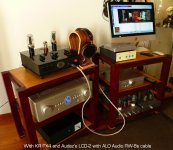
Just remember to match your gear with the soundcard. You need some really fancy stuff to take full advantage of a top sound card like the X-FI. However, if you get a pair of these then that X-FI will make your audio so, so clear :D But it's still not enough. You need soemthing like this:

19.jpg

Dem vacuum tube amplifiers :love:


edit: well I derailed this fast :P

Any soundcard should work for you and your speaker/headphone issue. A slightly better soundcard, however, would probably let you have both your speakers and headphones plugged in and give you a noticeable audio quality increase. Check the jacks at the back.
 
Last edited:
err...I have an update, for anyone still interested. This afternoon i was fiddling around with unrelated stuff (unplugging and removing old hdd, optimizing cable arrangement in case for better airflow) when i noticed once I turned pc back on I had no sound. Like nothing. If i click the volume slider to "test" (to hear the ding noise) the green bar wouldnt even indicate noise was being played. Dxdiag reported there was an unknown sound error, and testing the device in "Sound" came back with an error failed to play test tone.

After a bunch of restarts and unplugging and replugging in stuff i uninstalled the VIA driver, and reinstalled it.

GUESS WHAT!?! I now have 2 devices (apart from the AMD hdmi etc ones). One called Headphones and one called Speaker. The headphones one is front port ONLY, while the speakers is usual speakers.

So it seems win 7 finally has unlocked the setup that FriedPiet showed in the first reply. I can now setup my "headphone" to be stereo where the speakers are plugged in (while just renaming it for clarification), and my headphones are now in the main device. So switching between devices is now as simple as clicking the volume button :)


NO idea how it came about, I can only think there were win 7 updates on tuesday (is it first tue of every month or 2nd?) that I hadnt restarted pc for and it came into effect. Oh well...

Thanks for all the help though guys, I'm rather ok with switching between the two, as its much less tedious now :D
 
sigh...more drama. As of this evening, my headphones won't work (microphone and internal mic-speaker on earphones still do) if my speakers are plugged into the "headphone" port in front...and i've lost the 2 seperate audio devices in Sound. sigh...........
 
Never understood how computers do that. As soon as you turn around it stops working. Then, they get especially irritating because as soon as you call someone over to come see it's working again. And then it's not when they leave...

Have you tried threatening it with unplugging it, or giving it a bath?

:P Maybe going through all the steps you did first time might help?
 
Back
Top