LastPass is brilliant!

Hiro

New member
okay, so i have gotten very nervous about the fact that over the past 10 years I have registered accounts on TONS of websites, and ended up using pretty much the same password (or variations of it) on a lot of them. Yes yes, i know, terrible :( but dammit, how is one meant to remember so many passwords ?

anyways, i finally got around to creating account on LastPass.com and its bloody awesome!! it even allows you to easily modify your existing passwords to secure, randomly generated ones :)
 
okay, so i have gotten very nervous about the fact that over the past 10 years I have registered accounts on TONS of websites, and ended up using pretty much the same password (or variations of it) on a lot of them. Yes yes, i know, terrible :( but dammit, how is one meant to remember so many passwords ?

anyways, i finally got around to creating account on LastPass.com and its bloody awesome!! it even allows you to easily modify your existing passwords to secure, randomly generated ones :)

Yeah, my girlfriend introduced me to it a while back and now I can't live without it. Really useful.
 
I've only heard good things about LastPass of late. I've always just trusted Chrome to save my passwords, but I'll definitely give this a shot. Thanks for sharing.
 
I used to use it a while back. Lately though I've developed a method of incorporating the site's name into my password in the form of a code plus my default password. So if my default password is password, my myGaming password would be something like myg4m!ngpassword, gmail would be gm4!lpassword (though it's not THAT easy ;) - my code uses a different base numbering system + shifted alphabet :D )

Does this make me paranoid? :P
 
I've only heard good things about LastPass of late. I've always just trusted Chrome to save my passwords, but I'll definitely give this a shot. Thanks for sharing.
my main issue was not so much the place it is being stored (chrome vs lastpass, although im sure latter is more secure). it was more a matter of having too many websites with SAME password :(

LastPass even scans through all your saved passwords and flags the duplications so you know what needs to be changed. and it then generates a random new password for you, and stores it :) so like it says on the Box, you only ever need to remember ONE password :)


I used to use it a while back. Lately though I've developed a method of incorporating the site's name into my password in the form of a code plus my default password. So if my default password is password, my myGaming password would be something like myg4m!ngpassword, gmail would be gm4!lpassword (though it's not THAT easy ;) - my code uses a different base numbering system + shifted alphabet :D )

Does this make me paranoid? :P

sounds like too much effort :)
 
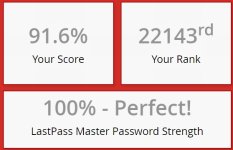
fek, mine is like 12% :(

but in my defence, i have only just begun the great cleanup!

haha... It was a gradual process initiated at the beginning of last year (I think) which was eventually accelerated by my OCD.

It would be higher but I have a few weaker passwords (such as router) for easy access and my mom's accounts which haven't yet been converted (I need to get her attention before I start changing things--something which is surprisingly difficult to achieve).

But yeah, I'm a big fan of LastPass (thanks to Eugene who recommended it to me). The only time I have a password shorter than 100-characters is when the site the password is for itself limits it.

I also use XMarks (also owned by LastPass) to sync my bookmarks. So between LastPass and XMarks I can switch between Firefox and Chrome at will and never have to worry about losing anything.

I'll always have a soft spot for Firefox and I keep holding thumbs that they'll get their throne back one day. But for now, x64 Chrome FTFW!
 
What is this?

LastPass vault security check thingumy.

Checks the strength of your passwords, whether or not your e-mail credentials have been involved in any breaches as well as whether or not the sites your passwords are used in have been breached and whether or not it's advised to change your password.

Very awesome tool and very good information to have at hand.
 
Holy crap on a cracker! Pretty sure that's overkill :) I'm just going with randomly generated 10 character passes

Well, when logging in is about as difficult as a couple of clicks, I don't really have any particular reason not to go for it.

I also have the app on my phone so when it's needed I just log in, copy and paste it where needed :)

LastPass is centralised security convenience at its finest.
 
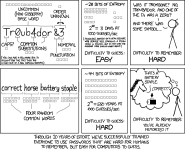
Talking about security.....

password_strength.png

^ I can not stress how accurate this is in today's day and age!!!! Esp when it comes to user security.

Also use to teach my users to incorporate site names into passwords but with the latest cracking software, doing so in fact gives the hackers a Rosetta stone so avoid it at all cost.
 
Back
Top