Flex
Will lift for boobs!
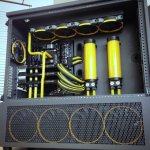
So this was my very first custom water cooling loop that I have made.
It is all nice and fun to have AIO coolers, but they should be made so much cooler than what they are. And since they do not make them cooler, I guess we just have to make our own water cooling.
I know there are people on here that have asked about Water cooling, both AIO (all in one) and custom loops.
There are pro's and con's for both.
The AIO is plug an play. The way you get it, it stays. It is on closed and sealed unit requiring 0-no maintenance at all.
A Custom water loop on the other hand is well... custom. You can ad more radiators, pumps, reservoirs, tubing, coulours, hard, soft. So if you can imagine it you can do it.
So when first wanting to do a custom water loop, you need to establish what you case can handle in terms of radiator size. most cases will be able to take at least a 240 or 120 radiator. My case, the NZXT S230 can take a 240, 120 and 140 radiator. But I only opted to got with 1x240 as I am only cooling my CPU at the moment.
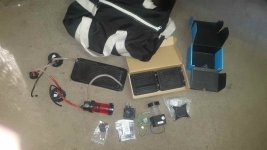
So first things first. Cleaning the radiator, pump and CPU block.
As this is not a sealed system, everything has to be super clean so that nothing grows in the loop.
So everything was rinsed several times with boiled distilled water. Some people add vinegar and all kinds of other stuff. But I cleaned it with what will be running in there permanently.
Unfortunately you can't assemble the loop out side of the case and then transfer it to the computer. You have to assemble it in the case. With preferable most of the hardware in place ( NOT POWERED ON ).
When everything is assembled and you have tightened all of your fittings (preferably compression fittings). Then you need to full the loop with water and run leak tests.
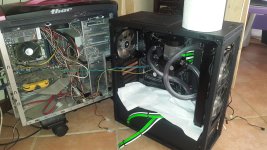
To do this, you will need another PSU or your own that has been shorted on the 24pin to allow it to still power the pump. I used another computer as shown in the pics.
You need to fill the res bit by bit. Switching the pump on an off each time to allow the water to start flowing through the loop. Remember these pumps can NEVER run dry, as the water acts as lubricant. Repeat this till the water starts flowing back into the reservoir.
While your PC components are still off. Let the pump run for 12-24 hours to make sure it does not leave. Take Kitchen towels or toilette paper and place it at the bottom of the case to clearly see of there is water.
If all is cool and dry, then Whala!!
For me it did not go that smoothly though, I had 2 failed leak tests. Luckily it was no where near the Mobo, but at the bottom of the Rad. So just drenched the bottom front part of my pc. Blow dried my PC to make sure everything is nice and dry =D
I will be doing hard tubing soon when the GPU comes.
Complete build thus far can be found HERE
It is all nice and fun to have AIO coolers, but they should be made so much cooler than what they are. And since they do not make them cooler, I guess we just have to make our own water cooling.
I know there are people on here that have asked about Water cooling, both AIO (all in one) and custom loops.
There are pro's and con's for both.
The AIO is plug an play. The way you get it, it stays. It is on closed and sealed unit requiring 0-no maintenance at all.
A Custom water loop on the other hand is well... custom. You can ad more radiators, pumps, reservoirs, tubing, coulours, hard, soft. So if you can imagine it you can do it.
So when first wanting to do a custom water loop, you need to establish what you case can handle in terms of radiator size. most cases will be able to take at least a 240 or 120 radiator. My case, the NZXT S230 can take a 240, 120 and 140 radiator. But I only opted to got with 1x240 as I am only cooling my CPU at the moment.
So first things first. Cleaning the radiator, pump and CPU block.
As this is not a sealed system, everything has to be super clean so that nothing grows in the loop.
So everything was rinsed several times with boiled distilled water. Some people add vinegar and all kinds of other stuff. But I cleaned it with what will be running in there permanently.
Unfortunately you can't assemble the loop out side of the case and then transfer it to the computer. You have to assemble it in the case. With preferable most of the hardware in place ( NOT POWERED ON ).
When everything is assembled and you have tightened all of your fittings (preferably compression fittings). Then you need to full the loop with water and run leak tests.
To do this, you will need another PSU or your own that has been shorted on the 24pin to allow it to still power the pump. I used another computer as shown in the pics.
You need to fill the res bit by bit. Switching the pump on an off each time to allow the water to start flowing through the loop. Remember these pumps can NEVER run dry, as the water acts as lubricant. Repeat this till the water starts flowing back into the reservoir.
While your PC components are still off. Let the pump run for 12-24 hours to make sure it does not leave. Take Kitchen towels or toilette paper and place it at the bottom of the case to clearly see of there is water.
If all is cool and dry, then Whala!!
For me it did not go that smoothly though, I had 2 failed leak tests. Luckily it was no where near the Mobo, but at the bottom of the Rad. So just drenched the bottom front part of my pc. Blow dried my PC to make sure everything is nice and dry =D
I will be doing hard tubing soon when the GPU comes.
Complete build thus far can be found HERE
Last edited: