1000gb ssd

Zuiplap

New member
Hi guys

Games are getting bigger and bigger.

GTAV for instance needs more than 60GB. The Witcher 3 and the new Wolfenstein all need more than 30GB.

My 236GB SSD is getting too small and I have been thinking about a 1000GB (1Terrabyte) SSD.

What are your views and which one will you recommend? :)
 
If you have the money for it, I'd say go for it, I love SSDs :D
Can't really help with recommendations though
 
Yes! It will be expensive.
I will have to sell the sparewheel of my car and my falseteeth to afford it!.
Maybe the Joker will have a recommendation.
Rebeltech looks like the best bet at this stage for such an expensive purchase.
At this stage to get extra space I am not uninstalling my favourite games, I just XCopy them to my external drive.
So if I want to play one of them again, I just copy it back.
But I feel I cannot carry on like this for a long time.
 
You have false teeth? How old are you?! On second thought... who would buy false teeth second hand???

Anyways. Do you keep all your games installed? Don't you uninstall the games you finished?

I suppose if we all had uncapped fibre it would be easier to uninstall an reinstall games...

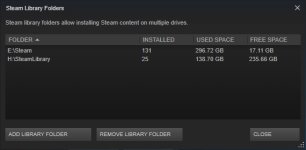
Well, looking at my libraries, I guess a 1TB ssd would be handy:
steam libraries.jpg
 
Yes! It will be expensive.
I will have to sell the sparewheel of my car and my falseteeth to afford it!.
Maybe the Joker will have a recommendation.
Rebeltech looks like the best bet at this stage for such an expensive purchase.
At this stage to get extra space I am not uninstalling my favourite games, I just XCopy them to my external drive.
So if I want to play one of them again, I just copy it back.
But I feel I cannot carry on like this for a long time.

A guy I work with now studied with the South African that created XCopy back in DOS days. He sold it to Microsoft for a not-so-small fortune.
 
FriedPet - I am 71 years old. The Joker have seen me. I have'nt false teeth because I still have one tooth in my mouth which I refuse to get rid off.
I uninstall games that I am finished with, but my best games like MotoGP14, Mortal Kombat Komplete, etc. I like to play regularly.

FarligOpptreden - Where are my Dos days? The first Dos game I played was the 2D sidescroller of the Prince of Persia (in the 1990's). I then had a Pentium 100Mhz with a hard disk size less than 1 GB. Unbelievable today.
It is interesting to hear that a South African has created XCopy back in DOS days.
 
Last edited:
Hi guys

Games are getting bigger and bigger.

GTAV for instance needs more than 60GB. The Witcher 3 and the new Wolfenstein all need more than 30GB.

My 236GB SSD is getting too small and I have been thinking about a 1000GB (1Terrabyte) SSD.

What are your views and which one will you recommend? :)

Are you running a laptop? Why bother with a 1TB SSD? Get yourself a standard SATA HDD if on a desktop.
 
Space Chief - I have a 1TB Sata HDD on my backup desktop PC.
On my new desktop PC (which the Joker build) I have the SSD. I am now used to a SSD and do not want to go back to a SATA HDD. Everything with a SSD is faster (getting into Windows, opening programs, etc.)
I am now like a spoiled child, I don't want to play anymore with my old toys.
 
Space Chief - I have a 1TB Sata HDD on my backup desktop PC.
On my new desktop PC (which the Joker build) I have the SSD. I am now used to a SSD and do not want to go back to a SATA HDD. Everything with a SSD is faster (getting into Windows, opening programs, etc.)
I am now like a spoiled child, I don't want to play anymore with my old toys.

Perhaps. You can still keep your operating system and SWAP file on the SSD. Keeping your games on a fast 7200RPM drive IMO is cheaper and almost as fast. SATA3 transfer read/write rates should be close to 150MB/sec on a modern drive and computer on a fast 64MB cache 7200rpm drive.

You'll still get your Windows starting up fast. I have a Mac Pro desktop setup with a main drive being a OWC 480GB SSD and so programs start fast as does swap but assets (video, jpg, audio) and documents I keep on a variety of internal mostly Hitachi HDDs.

I got a 1TB SSD for my Macbook Pro but that's only because the device can only take one drive and I wanted solid state to avoid HDD head crashes. :)
For a desktop I'd go with system SSD and a variety of HDDs. In fact maybe go with two 1TB devices in RAID-0 if you really want fast speed IMO.
 
Space Chief - Very interesting what you are saying.

Excuse my computer illeteracy, but what does IMO stand for.
 
[MENTION=13821]Zuiplap[/MENTION] IMO = in my opinion

You may also see IMHO (= in my honest/humble opinion) occasionally.

Kids today, AmIRite?!
 
The Joker said:

"I would definitely recommend an upgrade if you plan on keeping games installed. As far as the best value for money drive, Samsung 850 Evo 1TB drive would be number 1 on my list".

Prices are as follows:

1. CompuShop Online = R6,045 http://compushoponline.co.za/samsung-1tb-850-evo-series-2-5-sata6g-ssd-mz-75e1t0bw.html
2. PC Link Computers = R6,105 http://www.pclinkshop.co.za/?option...rt_product_id=15214&virtuemart_category_id=26
3. RebelTech = R6,170 http://www.rebeltech.co.za/32-ssds?orderby=name&orderway=asc&orderway=asc#/page-8

Now it is time to decide. Buy or wait. If I wait and the rand weakens further prices will definitely go up.

Or I carry on as usual.
 
I am a little stupid with these things. Is extra cables supplied with a new SSD and if so how do I connect them?
I believe the thicker cable comes from the power supply, but where does the thin cable comes from?
 
I am a little stupid with these things. Is extra cables supplied with a new SSD and if so how do I connect them?
I believe the thicker cable comes from the power supply, but where does the thin cable comes from?

You won't get extra SATA cables with the new SSD, usually you have to buy them separate (unless you get extra cables with your motherboard that you aren't using yet).
Power cables you should have spare of from your PSU. If you have a modular PSU, you might have to plug an extra cable in if non extra are available at the moment.

Both cables are flat, one is wider than the other though. The wider of the 2 is the power cable. The other one is the SATA data cable and connects to the SATA ports on your motherboard.

Good luck! :)

Edit: You can tag/mention people in posts by putting an @ in front of their username, so it will look like [MENTION=13821]Zuiplap[/MENTION]

Since [MENTION=21]The Joker[/MENTION] helped you with your build, I'm sure he can help on the cable front
 
Last edited:
Before I bother the Joker can somebody tell me how these cables look. Say for instance I want to buy them from RebelTech, how do I identify the correct power and sata cables. There are so many different cables on their website http://www.rebeltech.co.za/161-cables that I am not sure which will be the correct cables to buy.
 
Space Chief - Very interesting what you are saying.

Excuse my computer illeteracy, but what does IMO stand for.

As explained. You may just save yourself some bucks. SSD prices will become cheaper every year, despite the weakening Rand. I'd say keep the R5000 saved to buy a better graphics card.
 
[MENTION=19099]Space_Chief[/MENTION] - I have a Twin Frozer Gaming GeForce GTX 780. Still strong enough for most games out there.

It is possible that SSD's will come cheaper every year, but seeing that I am 71 years old and not 26, I must enjoy myself now and not later. Later I can be dead from old age.
 
[MENTION=19099]Space_Chief[/MENTION] - I have a Twin Frozer Gaming GeForce GTX 780. Still strong enough for most games out there.

It is possible that SSD's will come cheaper every year, but seeing that I am 71 years old and not 26, I must enjoy myself now and not later. Later I can be dead from old age.

Haha, 71 is not that old.

Well installing an SSD is easy then. Just buy one and get a SATA cable and plug it in. Most are 2.5 inch but you can also get PCIE SSDs which you plug into your PCI slot like an extension board. You may need an adapter for your desktop box to fit a 2.5 inch drive.
 
Back
Top