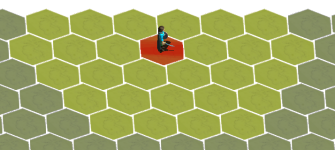
Anybody proficient in Hexagon map algorithms?

Avantar

New member
Not being a programmer by trade and only knowing a little of various languages, I am attempting a tactical game using Hexagons.
I have learned that there are different coordinate templates you can use for your nodes as well as hexagons have 3 axis' - like a cube and that x+y+z = 0
So all said and done, there is also the A* algorithm for calculating the shortest path around obstacles.

Heck, I just want to select my character and move him to other tiles according to his/her movement points.:D Information I Google make it sound so complicated - like bringing it across to someone that codes for an eternity - which is not me.

Just wondering if anyone here attempted a tactical board game before?
 
Not being a programmer by trade and only knowing a little of various languages, I am attempting a tactical game using Hexagons.
I have learned that there are different coordinate templates you can use for your nodes as well as hexagons have 3 axis' - like a cube and that x+y+z = 0
So all said and done, there is also the A* algorithm for calculating the shortest path around obstacles.

Heck, I just want to select my character and move him to other tiles according to his/her movement points.:D Information I Google make it sound so complicated - like bringing it across to someone that codes for an eternity - which is not me.

Just wondering if anyone here attempted a tactical board game before?

You trying to make a 3D hexagon from what I am reading?
To move an object on a x y plane?

Sounds complicated due to the addition of sin, cos and tan (which i am terrible at). But from what I understand you have a center point you align your Character to. As for the algorithm to figure out shortest path, ill have to do some research myself. What are you doing this in or more what are you designing this in?
 
Last edited:
You trying to make a 3D hexagon from what I am reading?
To move an object on a x y plane?

Sounds complicated due to the addition of sin, cos and tan (which i am terrible at). But from what I understand you have a center point you align your Character to. As for the algorithm to figure out shortest path, ill have to do some research myself. What are you doing this in or more what are you designing this in?

Not really 3D, but need z for the special 'deformation' properties of the Hexagon. You see- the hexagon is the outlines of a cube and when you mathematically calculate neighboring nodes, it might not compute correctly unless you consider the z-axis. (Yeah, I know...it is like 'whatever' :) ) For the most part you can leave out Z and only calculate it when needed since x+y+z = 0

I wanted to do it in C++, but what do I know of that...not much. So I am going to do it in Fusion 2.5 that should make my life easier. I will still need to understand the logic behind this as well as formula's, loops and calculations.
Things like the formula for distance between two points. (That should be easy) But just the whole logic behind this, I guess.

I find this way more difficult than expected - it is really making me look dumb. It would be awesome if I could make it an ISO hex grid.
Then there will be the added direction calculation (I guess) of each node for character movement and animation.

How exciting...
 
Got me excited to make me wanna do it in unreal engine.if I get it working in blueprints I'll try port to c++

Sent from my E5823 using Tapatalk
 
I've coded an A* pathfinding algo from scratch and also built a basic hex engine...but that was years ago & I never combined the two.

Do a basic A* first...on a simple X Y grid. A* only really makes sense once you build one...and its actually a pretty cool project - pathfinding in generally is interesting. Any idiot can build something that finds a path, but doing so fast and efficient is the trick (which A* does).

Avantar said:
I have learned that there are different coordinate templates you can use for your nodes as well as hexagons have 3
Pretty sure I used a simple X Y (aka cartesian plane) for hexagonal as well...and then compensated for the offset of every second row via code. Much easier dealing with 2 axes than with 3 for stuff like storing location, though it does require some lateral thinking on movement and range calculations. I'd imagine it'll also complicate the path finding, though as I said never did both together.

And finally...consider using fine grained square grids instead of hex. Hex will make you tear your hair out...

Sounds complicated due to the addition of sin, cos and tan (which i am terrible at).
No cos/tan stuff...its hex as in civilisation series tile layout. The linear algebra calcs you only need for pure 3D...and thats a whole different ballgame.
 
Thank you for all the replies. I haven't started yet. Reading up a bit first. Got so many ideas. Will shoot it out on paper first and see how it goes. Hex tactical games is a dying breed and it is nice to see that there is still some interest and actual members that coded as much.
 
Last edited:
Pretty sure I used a simple X Y (aka cartesian plane) for hexagonal as well...and then compensated for the offset of every second row via code. Much easier dealing with 2 axes than with 3 for stuff like storing location, though it does require some lateral thinking on movement and range calculations. I'd imagine it'll also complicate the path finding, though as I said never did both together.

different ballgame.

So i found the simplest way to calculate distance is to 'stretch out the y-axis' or how do I say - It goes like this:
|0,0||0,1||0,2| and so on
|1,1||1,2| and so on
|2,1||2,2||2,3|and so on

I am just trying to illustrate the y-axis is the same going diagonally left. Anyway: this makes distance calculation easy since

destinationX-PlayerX = result1
destinationy - PlayerY = result2
delta distance = result1-result2 or Max(Max(abs(result1),abs(result2)),abs(distance))

Still struggling with calculating all available moves; since shortest path first suggests that you have a destination point. I don't and the problem is selecting available moves around obstacles. Still too thick for that - will read some more...:-)
 
Still struggling with calculating all available moves;
huh? Available moves for each consecutive movement are the 6 adjacent hex. String enough of those discrete movements together with A* and you've got your path. You can't really calculate "all available moves" across the board...thats exactly what you're trying to avoid by using A*
 
I guess this is what I am struggling with. Say you have 3 moves in any direction but there are obstacle tiles on the board-no go tiles. I want all the tiles highlighted where you can move to. So you click on your player and the tiles highlight. Moving around a obstacle cost more. I will post a picture sometime. Not sure how this fit together. I have no problem heighlighting adjacent tiles for a distance of 3 away. Still need to look at A* but like I said-I want to highlight all tiles you can move to before desiding on a destination. Does it make sense or am I having it all wrong?
 
huh? Available moves for each consecutive movement are the 6 adjacent hex. String enough of those discrete movements together with A* and you've got your path. You can't really calculate "all available moves" across the board...thats exactly what you're trying to avoid by using A*

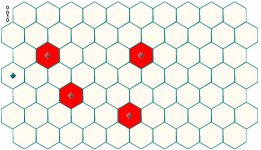
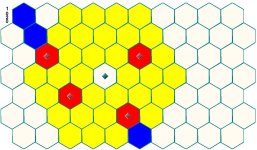
So say I have the following map with the player having 2 moves. So the yellow should be highlighted tiles where you can move, red is a obstacle and the blue cross is a tile that shouldn't be selected: Is this also implemented with A*? :
hexmap.JPG
 
Thinking about this - the way I would like to do this game will be more a tactics game and may not need the A*.(Less RPG) Thinking more in the lines of X-COM type. I do not know - will see when I get there. It is all new to me.
 
So say I have the following map with the player having 2 moves. So the yellow should be highlighted tiles where you can move, red is a obstacle and the blue cross is a tile that shouldn't be selected: Is this also implemented with A*? :
View attachment 21231
No. Thats like a dozen combinations you can just calculate all of them. A* is used if you need to crunch a path from one side of the map to the other...there are billion of possible combinations so need an algo that balances quality of path against speed. Think of a warcraft map. If you command your unit to go to the other side of the map...A* is what works out what path it takes to get there and how it navigates around obstacles.

In your case the player might not need A*, but if you want the PC to control the opponent then you likely will. If you don't use A* for the player units then that limits you to moving to nearby squares only...i.e. can't command the unit to spend the next 20 turns moving to other side of map
 
No. Thats like a dozen combinations you can just calculate all of them. A* is used if you need to crunch a path from one side of the map to the other...there are billion of possible combinations so need an algo that balances quality of path against speed. Think of a warcraft map. If you command your unit to go to the other side of the map...A* is what works out what path it takes to get there and how it navigates around obstacles.

In your case the player might not need A*, but if you want the PC to control the opponent then you likely will. If you don't use A* for the player units then that limits you to moving to nearby squares only...i.e. can't command the unit to spend the next 20 turns moving to other side of map

Thanks. Now that makes sense. So for now I am stuck on the calculation for player movement - omitting tiles unreachable around objects. Will get there - Also checking A* out as I type.
 
OK. Just an update:

Pulling my hair out but here is what I should have done and what I have actually done.

Getting all the neighbors of the player and highlighting the tiles minus the obstacle tiles are pretty straight forward:
Because distance is the max absolute value of the three results (destination y - player y, destination x - player y, first result - second result),
I simply loop through all the hex tiles where the distance from the player is <= to the number of moves and highlight the tile except when it is an obstacle.

This still does not give me the correct distance around obstacles. The movement cost to tile differs when an obstacle is in line with one of the six sides of the hexagon. The cost increments with 1 for each tile after the obstacle tile in that direction. Obstacles diagonally in line on the points of the hexagon does not make a difference to movement cost.

The apparent easiest way to then rather calculate distance from the player keeping obstacles in mind, is to do a movement-limited flood fill. I really struggle doing this in Fusion. Seems like using something like Unity is the way to go - but I am not going to learn C# now. :)

So my very long workaround is this: I get all the obstacle tiles in the movement range from the player and note all their info in an array. Here is another snag: Obstacles diagonally (on the pointy sides of the hexagon) should be excluded. It took me a while, but there are only 4 directions that needs to be taken in account and because these diagonals differ with y+2 and only x+1 (depending on direction), I could exclude tiles where (Hex y - player y)*2 = Hex x - player x and derivatives of that depending on the direction.

Then for each of the (now valid) obstacle Hex tiles, I add a movement cost of 1 for each hex behind the obstacle tile in the respective directions and run my loop as before but just adding the cost.

So I had: On loop Max(Max(Abs(r1), Abs(r2)), Abs(r3)) < player movement and Hexid=Loopindex and Hex is not an obstacle, highlight tile

Instead I will run: On loop Max(Max(Abs(r1), Abs(r2)), Abs(r3))+movement cost < player movement and Hexid=Loopindex and Hex is not an obstacle, highlight tile

Now I have the correct cost, direction and all available tiles that can be moved on, according to movement, highlighted - yah!

Next will be movement - No idea when I will get there: The idea is simple in that the highlighted tile you click will be the destination and the player the source - From there, determine the lowest cost from destination to source. (I have most of this info already stored in an array) For each path tile mapped, reverse the direction so that your animation works correctly, walking from source to destination.

Implementation is another thing. I probably need to make use of a while loop, which I cannot get to work correctly in Fusion 2.5

Anyway - All of the calculations has got no bearing on actual pixel position and therefore it will not matter if you make an ISO grid or plain 2D, it will all work out the same.

After that, I suppose it will be attack distance and highlighting enemy units in range of the attack. Enemy AI will be the last to do (if I do) Will just be a versus game to start off with.

Perhaps have a peek to see where I can acquire some nice royalty free sprite sheets for friendly and enemy units - This would of course be on the D&D theme.
 
Last edited:
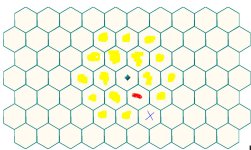
I am done with working out the 'extra cost' tiles and to visualize this:
cost1.JPG

Green diamond is the player - red represents obstacles. Now I click on the player and it has 3 movement points:
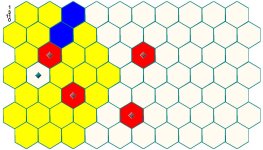
cost2.JPG

The Yellow tiles represents 3 hexes away in distance from the player, blue marks the tiles that will cost more to reach because of an obstacle. The first blue tile would normally have cost 2 points to reach, but that needs to move to 3 points and so for each tile in the same direction after the obstacle. Note that there are no extra cost involved for the diagonal right obstacle.

cost3.JPG

I still have to implement the cost - this was just as explanation - It will now be simple to highlight the correct tiles. By implement I mean that it is all done, but I had to change some code for you to see the blue tiles. All calculations, clicking, overlapping, costs - it is all in place.

Next will be finding the shortest path to a tile clicked. I probably will hang here for a bit; since I will try flood fill first, then progress to Djirka Algorithm and then A* - depending on the frustration degree and how much I want to learn and then move on.

Anyone here doing something like sprite sheets, animation or graphics?
 
Last edited:
Finally getting somewhere. :D

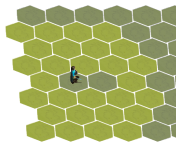
Made an ISO map from a random tile found on the Net.
It now works with A* for the shortest path.
Animation and direction works correctly.
Player faces the correct direction at the end of the path.
Player does not move off the grid.

Astar1.PNG

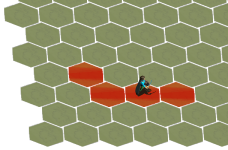
There is an 'obstacle right in front of the player and movement points are 3 taken from the player.

Astar2.PNG

I used red tiles just to mark the path during the calculation. In game, I will not show the calculated path.

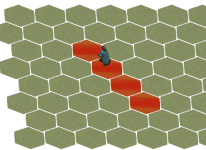
Astar3.PNG

Just showing animation going diagonally.

This is just for a single character. Next I will attempt this for selecting multiple characters.
After that will be the combat system. Will probably use arrays for units to read the combat stats from.
Then I will probably modify the code to work like an engine so that I can easily just add units and objects without any additional coding.
After that, probably need some backgrounds and color - texturing.
Actually make it playable between two people and probably end it off with playing against some AI.
Perhaps leveling? Character customization?
Perhaps have it work on a point system...obviously a game starts with an idea and I have the general one that got me excited - but there is room for a lot of other implementations.

The main idea is that this should be fun, balanced and simple. (Not complicated)
It should also be short and sweet, like a game of speed chess.

If I am really bold and up for some study, I could make this a LAN game. (Play with a friend perhaps on Hamanchi) Oh...just dreaming - this is very far into the future.
 

Attachments

  • Astar1.PNG
    Astar1.PNG
    87.7 KB · Views: 13
Looking good. Decent progress :)

Thats about as far as I made it when I toyed with this stuff.

Think I used tiles from Civ 2 or something.

I will try flood fill first, then progress to Djirka Algorithm and then A*
I'd skip straight to A*.

Floodfill will give you performance issues unless you're planning on having very few units. I took a brief look at Djirka...didn't get any "ah ha" from it and thus A*. If I'm not mistaken A* and Djirka should be equally applicable here so either should work.

Also...you might want to investigate threading while the project is still at an early stage...if you don't use threading from the start you'll hit problems later.
 
Back
Top