Capped versus Uncapped - Does this idea make any sense?

GregRedd

New member
I've been thinking too long about this and fear I'm getting myself very confused. So, please help confirm the logic/lack of logic in what I'm thinking of doing with my ADSL accounts.

At the moment I have:
Home Uncapped Advanced ADSL from TelkomInternet @ R290pm
AND
75GB (+75GB) Capped ADSL account from AfriHost @ R300pm (don't judge me, I know the AH issues, but it works for me).

My monthly usage over the last year or so averages around 100-120GB a month with a max of 205GB last November (I'm looking at you Star Citizen!) I think a fair bit of that average is from downloads and updates - at least half if not more.

The difference in speed between the AH Capped and the TK Uncapped accounts is chalk and cheese (when my ADSL line is up of course, but that's a different story...) For e.g. I've just run SpeedTest on both the accounts a few minutes ago:

[Wired connection to my desktop, 10Mb line]

Telkom Uncapped
Ping = 32ms
Download = 3.99Mbps
Unpload = 0.89Mbps

AfriHost Capped
Ping = 12ms
Download = 8.69Mbps
Upload = 0.81Mbps

What I'm thinking about doing is changing the Telkom Uncapped account to a small Capped account (I think the smallest at the moment is the 10GB SoftCap deal @ R99pm) and using it in the event that I run out of the AH bandwidth (or they cancel the double data deal), but then also switch to it at night and schedule all my downloads and updates to happen overnight during the Telkom Free Night Surfer times that you get with their Capped accounts (00:00 - 07:00).

With that in place I would essentially have 150GB + 10GB of decent speed, capped data to use during the day, and for general gaming, browsing, etc in the evenings, and the unlimited night surfer data to use overnight for downloads and updates. (And as a bonus, save myself R200-odd a month.)

Would doing that make any sense at all?
 
this makes complete sense

I switched from uncapped to capped because of this. when I queried why my line was running so slow (nearly dead sometimes) I was told it's because the uncapped accounts are the first to be de-prioritized if there's heavy traffic.

since I went capped I've had no issues what so ever. plus the nice added bonus of it working out cheaper as well.
 
Going to be trying out capped at my new place, don't think my usage will be too bad when its just me and the GF using it now.

Will be streaming a lot so don't want any shaping at all.
 
Thanks for the replies all. Think that'll be the way I go then. Now I'm going to figure out how to create and schedule a couple of macros to load the different router configs at the appropriate times. Anyone have any suggestions?

BTW, do "shaping" and "throttling" amount to much the same thing?
 
Going to be trying out capped at my new place, don't think my usage will be too bad when its just me and the GF using it now.

Will be streaming a lot so don't want any shaping at all.
I have the 40gb + 160gb package from Web Africa and so far I haven't been able to max it out

Thanks for the replies all. Think that'll be the way I go then. Now I'm going to figure out how to create and schedule a couple of macros to load the different router configs at the appropriate times. Anyone have any suggestions?

BTW, do "shaping" and "throttling" amount to much the same thing?
not really

shaping is when they.... well, shape certain aspects of your line, like downloads and P2P traffic, when the network gets very busy. which is normally standard business hours (unless you are with Afrihost)

throttling is when MWEB says you've been downloading too much and then they cut your line speed in half
 
not really

shaping is when they.... well, shape certain aspects of your line, like downloads and P2P traffic, when the network gets very busy. which is normally standard business hours (unless you are with Afrihost)

throttling is when MWEB says you've been downloading too much and then they cut your line speed in half
Ahh, okay gotcha. Thanks [MENTION=5134]MalicE[/MENTION], love it when people are able to explain tech things in simple terms that make things so easy to understand. Appreciated.
 
not really

shaping is when they.... well, shape certain aspects of your line, like downloads and P2P traffic, when the network gets very busy. which is normally standard business hours (unless you are with Afrihost)

throttling is when MWEB says you've been downloading too much and then they cut your line speed in half

That is 100% correct yes. That is why most uncapped lines are shaped, and get throttled. Because the ISP feels that you are "abusing" the service that you pay for and use.
 
From my experience, as I have tried them ALL.

Home uncapped account ( the cheapest uncapped accounts):
Shaped, in some cases throttled too depending on ISP. Not really ideal for downloading alot, decent pings for online gaming.

Business uncapped account ( most expensive, obviously)
Unshaped, unthrottled, good speeds 24/7. Good pings for online gaming. Great for huge downloaders

Capped accounts
Unshaped, good pings, no throttle. Similar experience to the Business account and limited usage if you have the same data usage every month more or less.


I had them all, and mostly had a capped account since I have ADSL as it's currently the BEST in terms of price/performance ratio.
Currently running a business uncapped account since I got a PS4 as game updates are huge, and I download alot of games from PSN.

ISP used for these comparisons is Afrihost and Axxess. However they both use MTN as their upstream provider
 
What [MENTION=13245]blaaislaai[/MENTION] said in the above is very important. The kind of internet you want to get hugely depends on what you are going to use it for.
 
Last edited:
What is the difference between shaping and Throttling?
[MENTION=5134] MalicE[/MENTION] explained it very nicely.
shaping is when they.... well, shape certain aspects of your line, like downloads and P2P traffic, when the network gets very busy. which is normally standard business hours (unless you are with Afrihost)

throttling is when MWEB says you've been downloading too much and then they cut your line speed in half
 
[MENTION=5134] MalicE[/MENTION] explained it very nicely.
shaping is when they.... well, shape certain aspects of your line, like downloads and P2P traffic, when the network gets very busy. which is normally standard business hours (unless you are with Afrihost)

throttling is when MWEB says you've been downloading too much and then they cut your line speed in half

Ah right thanks, knew what shaping was just thought throttling was the same thing basically.

As an example, My Torrent downloading is shaping during peak hours on my Uncapped
 
Doesn't going capped kill your ability to download patches and things when you have a lot of games in your library that update often?
 
Doesn't going capped kill your ability to download patches and things when you have a lot of games in your library that update often?

Depends on how big they are off course. I put auto update off. As half of the games in my library I do not play anymore
 
Doesn't going capped kill your ability to download patches and things when you have a lot of games in your library that update often?
That's what I'm going to use the Telkom capped account for - specifically the unlimited Night Surfer allowance between 00:00 and 07:00.

Will set Steam to only download updates between those times, same with uTorrent. The other things, like GOG updates and the Star Citizen launcher I'll manage manually depending on the time of the month, how much data I've still got available, and how keen I am to update something.
[MENTION=16362]Flex[/MENTION] makes a very important point too - tons of bandwidth wasted in the past with auto updates of things that I haven't touched for ages.
 
That's what I'm going to use the Telkom capped account for - specifically the unlimited Night Surfer allowance between 00:00 and 07:00.

Will set Steam to only download updates between those times, same with uTorrent. The other things, like GOG updates and the Star Citizen launcher I'll manage manually depending on the time of the month, how much data I've still got available, and how keen I am to update something.
[MENTION=16362]Flex[/MENTION] makes a very important point too - tons of bandwidth wasted in the past with auto updates of things that I haven't touched for ages.

Didn't know you could could tell steam to do that, that is really cool if possible!
 
Didn't know you could could tell steam to do that, that is really cool if possible!
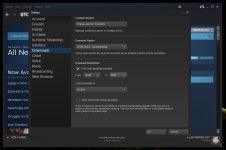
Yip, you can indeed:

In your Steam Client, select "Settings" from the "Steam" menu:
Screenshot-2015-05-12-15.15.jpg

Then select "Downloads" from the side menu, and set your preferred auto update time range:
Screenshot-2015-05-12-15.19.jpg

And worthwhile checking the Download Region setting while you're there.
 
Back
Top