Cybersmart 10 mb line

Keepa34

New member
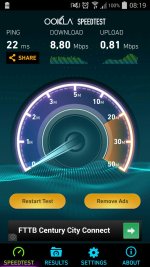
So my girlfriend's dad has a 10mb line from cybersmart running on a business line, what should his upload and download speeds be because I did a test now and this doeskin seem right.. to me it feels slow for a 10 MB line . he has a Linksys WAG120N


Attachments
  • uploadfromtaptalk1398486708912.jpg
    uploadfromtaptalk1398486708912.jpg
    60.1 KB · Views: 120
Last edited:
A business line should be unshaped so those speeds are bad.

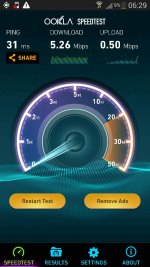
These are my speeds on my 10mb account with Openweb. I'm not running a business account so mine is prone to shaping.

Were there any previous issues with his line? How far from the exchange is he?
 

Attachments

  • uploadfromtaptalk1398493216149.jpg
    uploadfromtaptalk1398493216149.jpg
    154 KB · Views: 131
A business line should be unshaped so those speeds are bad.

These are my speeds on my 10mb account with Openweb. I'm not running a business account so mine is prone to shaping.

Were there any previous issues with his line? How far from the exchange is he?

I did some digging and its actually his modem, it has:

DSL Downstream Rate: 6144 kbps and
DSL Upstream Rate: 640 kbps

So he just needs to buy a new modem but I doubt that he'll do that
 
I did some digging and its actually his modem, it has:

DSL Downstream Rate: 6144 kbps and
DSL Upstream Rate: 640 kbps

So he just needs to buy a new modem but I doubt that he'll do that

Why not if you pay for a freaking business account, but he is to cheap to by a decent router?

Wait wait is that the sync rate on his router or the limit of the router? Since even my R200 router could do 10meg when I had 10meg line.
 
I did some digging and its actually his modem, it has:

DSL Downstream Rate: 6144 kbps and
DSL Upstream Rate: 640 kbps

So he just needs to buy a new modem but I doubt that he'll do that

Then he may as well get a 4mb line cos he's wasting his money.
 
Wait wait is that the sync rate on his router or the limit of the router? Since even my R200 router could do 10meg when I had 10meg line.

How do I check if that is the limit of the router or the sync rate?

this is all the DSL Info

--- DSL Information ---
DSL Driver Version: 3.4.4.10.0.1
DSL VPI/VCI: 8/35
DSL Status: Up
DSL Mode: G.dmt
DSL Channel: 0
DSL Upstream Rate: 640 kbps
DSL Downstream Rate: 6144 kbps

Down up
DSL Noise Margin: 120 dB 128 dB
DSL Attenuation: 65 dB 153 dB
DSL Transmit Power: -901 dBm -901 dBm
 
A business line should be unshaped so those speeds are bad.

These are my speeds on my 10mb account with Openweb. I'm not running a business account so mine is prone to shaping.
Shaping shouldn't affect the speedtests to any noticable extent. Biz accounts should be faster though due to lower contention.

So he just needs to buy a new modem but I doubt that he'll do that
No don't buy yet.

How do I check if that is the limit of the router or the sync rate?

this is all the DSL Info

--- DSL Information ---
DSL Driver Version: 3.4.4.10.0.1
DSL VPI/VCI: 8/35
DSL Status: Up
DSL Mode: G.dmt
DSL Channel: 0
DSL Upstream Rate: 640 kbps
DSL Downstream Rate: 6144 kbps

Down up
DSL Noise Margin: 120 dB 128 dB
DSL Attenuation: 65 dB 153 dB
DSL Transmit Power: -901 dBm -901 dBm
There is no limit on the router. The limit is imposed from the Telkom side. They do this if the line is a bit flakey - it artificially limits speed but the line will be more stable due to improved SNR.

I'd suggest he downgrades to 4mbps - he is too far from the exchange by the looks of it so I don't think 10mb will be possible.
 
There is no limit on the router. The limit is imposed from the Telkom side. They do this if the line is a bit flakey - it artificially limits speed but the line will be more stable due to improved SNR.

I'd suggest he downgrades to 4mbps - he is too far from the exchange by the looks of it so I don't think 10mb will be possible.

This.

Router limiting the speed...

2499461-1394410947285.jpg
 
Actually... :p

You can on some routers as part of QoS - its not relevant to OP so I skipped it in order to not confuse. It helps improve the flow of packets. i.e. You'd set it to just a hair of what your line is actually capable of. Not entirely sure why, but it definitely helps improve the feel of the setup especially on the upload.

As I said, definitely not applicable to OP's case.
 
Actually... :p

You can on some routers as part of QoS - its not relevant to OP so I skipped it in order to not confuse. It helps improve the flow of packets. i.e. You'd set it to just a hair of what your line is actually capable of. Not entirely sure why, but it definitely helps improve the feel of the setup especially on the upload.

As I said, definitely not applicable to OP's case.

lol... Exactly, you know as well as I do that it wouldn't be QoS limiting the speed it's synchronised at.

Just looking at the SNR and attenuation would spell out the problem.
 
Back
Top