
You are using an out of date browser. It may not display this or other websites correctly.
You should upgrade or use an alternative browser.
You should upgrade or use an alternative browser.
Games better in 720p than 1080p?
- Thread starter Pooky
- Start date


I don't have an xbox but yes it should look better @720P then @1080P the res doesn't change. It gets streched to fit on 1080P
When the Xbox is set to work at 1080p, the TV resolution is 1920x1080, but when I change the Xbox to work at 720p, the TV resolution changes to 1280x720.

MOnk
New member
No it doesn't. LCD's have a set number of pixels they can't change their native resolution. So the only difference is, are you letting the Xbox do the up-scaling or are you letting the TV do it. Either way, unless the game's internal rendering resolution is 1080p (which most aren't) there is going to be up-scaling occurring.When the Xbox is set to work at 1080p, the TV resolution is 1920x1080, but when I change the Xbox to work at 720p, the TV resolution changes to 1280x720.
No it doesn't. LCD's have a set number of pixels they can't change their native resolution. So the only difference is, are you letting the Xbox do the up-scaling or are you letting the TV do it. Either way, unless the game's internal rendering resolution is 1080p (which most aren't) there is going to be up-scaling occurring.
Oh - howcome my TV then displays a little box after changing it that displays the resolution:
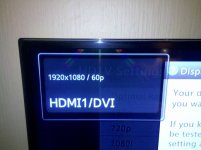
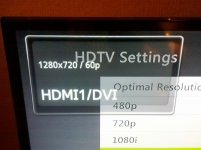
That is showing you what the resolution of the input image is.
Ah okay. So if I set the Xbox to 1080p, then the Xbox is handling the upscaling, and if I set the Xbox to 720p, then the TV is doing it?
In this case it appears that the TV does the upscaling better than the Xbox.

Glordit
Neo Zeon
If you're TV cant do 1080p (like mine), it's going to render it at 720p regardless if the Xbox is pushing out 1080p or not. It's the same as hooking my PC to my TV it shows the PC outputting 1080p but the screen is limited at 1280x720, Ithink that is what the Xbox is doing, upscaling the image to 1080p from 720p.Ah okay. So if I set the Xbox to 1080p, then the Xbox is handling the upscaling, and if I set the Xbox to 720p, then the TV is doing it?
You'll have to test that a little bit, some friends say they feel a slight input lag when running games at 1080p on their Xbox's.In this case it appears that the TV does the upscaling better than the Xbox.
Last edited:
MOnk
New member
It can also depend on the input connection type, some TV's process Component images differently to say VGA or HDMI. So if you are really finicky about the image quality you can try them all out and see which output your prefer.Ah okay. So if I set the Xbox to 1080p, then the Xbox is handling the upscaling, and if I set the Xbox to 720p, then the TV is doing it?
In this case it appears that the TV does the upscaling better than the Xbox.
It can also depend on the input connection type, some TV's process Component images differently to say VGA or HDMI. So if you are really finicky about the image quality you can try them all out and see which output your prefer.
So it's possible that if I change to component I might get nicer quality?
Glordit
Neo Zeon
So it's possible that if I change to component I might get nicer quality?
If you change to component it will blur and fuzz the image as well as loose a bit of quality. Since Component is Analogue where HDMi is Digital, component is just there for people that do not have TV's with HDMi inputs.
MOnk
New member
Not really true, as I said some TV's handle the different signals better, some do HDMI better some do Component better. Not only that the colour ranges can also better different, so you may just prefer how one looks over the other.If you change to component it will blur and fuzz the image as well as loose a bit of quality. Since Component is Analogue where HDMi is Digital, component is just there for people that do not have TV's with HDMi inputs.
If you have the cables and depending on your setup, there is no reason not to try it out.

masheleni
New member
1080p is better than 720p simply because it's a higher resolution.
1080p is better than 1080i, as there is no interlacing.
I do not have an XBox, but rather a PS3. PS3 supports up to 1080p, both home screen and in games.
- Now the things to consider are:
- does XBox support 1080p? I assume it does.
- Do the games you play on XBox support 1080p? This is indicated at the back of PS3 games, not sure about Xbox ones. I have noted that many PS3 games support only 720p, so if you play a 720p game on a 1080p resolution, I suspect it either goes to native 720p resolution or upscales the resolution to fit the screen.
- Another important factor to consider is, does the TV support 1080p full HD? There are many which support 1080i, and not 1080p, for instance.
- And lastly, is the XBox output set to use native 1080p output?
I am of the opinion that HDMI is better than Component simply because it is digital, however, a good valid point was made in which different TVs output different picture, so you will have to see what the best configuration for your hardware is.
1080p is better than 1080i, as there is no interlacing.
I do not have an XBox, but rather a PS3. PS3 supports up to 1080p, both home screen and in games.
- Now the things to consider are:
- does XBox support 1080p? I assume it does.
- Do the games you play on XBox support 1080p? This is indicated at the back of PS3 games, not sure about Xbox ones. I have noted that many PS3 games support only 720p, so if you play a 720p game on a 1080p resolution, I suspect it either goes to native 720p resolution or upscales the resolution to fit the screen.
- Another important factor to consider is, does the TV support 1080p full HD? There are many which support 1080i, and not 1080p, for instance.
- And lastly, is the XBox output set to use native 1080p output?
I am of the opinion that HDMI is better than Component simply because it is digital, however, a good valid point was made in which different TVs output different picture, so you will have to see what the best configuration for your hardware is.

Strifehart
New member
1080p is better than 720p simply because it's a higher resolution.
1080p is better than 1080i, as there is no interlacing.
I do not have an XBox, but rather a PS3. PS3 supports up to 1080p, both home screen and in games.
- Now the things to consider are:
- does XBox support 1080p? I assume it does.
- Do the games you play on XBox support 1080p? This is indicated at the back of PS3 games, not sure about Xbox ones. I have noted that many PS3 games support only 720p, so if you play a 720p game on a 1080p resolution, I suspect it either goes to native 720p resolution or upscales the resolution to fit the screen.
- Another important factor to consider is, does the TV support 1080p full HD? There are many which support 1080i, and not 1080p, for instance.
- And lastly, is the XBox output set to use native 1080p output?
I am of the opinion that HDMI is better than Component simply because it is digital, however, a good valid point was made in which different TVs output different picture, so you will have to see what the best configuration for your hardware is.
Across the board there's very few games that support a 1080p rendering resolution. Most games render at 720p or even below that.
There's a very comprehensive list regarding this over at Beyond3D :
http://forum.beyond3d.com/showthread.php?t=46241
I can't find the original article now, it's quite old, but they had a similar discussion around games looking better in 720p than 1080p. A lot of it has to do with the actual engine the game is using. The Xbox 360 for instance disable anti-aliasing at 1080p, and allows it at 720p. With TVs doing additional image processing (when not running in "Game Mode" etc) and 4xAA running, the 720p can often look better than 1080p image.
Wrt some of the other posts, also keep in mind that many games use even lower resolutions for performance reasons, and then the upscaling and image processing plays a big role. For instance, CoD: Black Ops ran at 1040x800 with 2xMSAA on the Xbox, and 960x540 on the PS3. Running the console at 1080p leaves the game at the mercy of the console and TVs upscaling capabilities.
Wrt some of the other posts, also keep in mind that many games use even lower resolutions for performance reasons, and then the upscaling and image processing plays a big role. For instance, CoD: Black Ops ran at 1040x800 with 2xMSAA on the Xbox, and 960x540 on the PS3. Running the console at 1080p leaves the game at the mercy of the console and TVs upscaling capabilities.

m3n4ce
New member
The best example where I saw the biggest difference between 720p and 1080p is by using BluRay, yes I know the Xbox does not have BR but its a good mechanism for testing output and how the TV displays the Picture.
Look at the difference between a normal 720p Bluray, Or even HDPVR against a proper 1080p BluRay movie. The difference is very noticeable.
Look at the difference between a normal 720p Bluray, Or even HDPVR against a proper 1080p BluRay movie. The difference is very noticeable.
MOnk
New member
Going WAY off topic here.The best example where I saw the biggest difference between 720p and 1080p is by using BluRay, yes I know the Xbox does not have BR but its a good mechanism for testing output and how the TV displays the Picture.
Look at the difference between a normal 720p Bluray, Or even HDPVR against a proper 1080p BluRay movie. The difference is very noticeable.
People aren't asking/arguing if 720p is better than 1080p, of course it isn't. It's about which is better to use when your source is 720p (or lower as is mostly the case for console games these days).
m3n4ce
New member
Going WAY off topic here.
People aren't asking/arguing if 720p is better than 1080p, of course it isn't. It's about which is better to use when your source is 720p (or lower as is mostly the case for console games these days).
No no no.... you misunderstood. I was a bit vague, what I meant was you can use that as a tool to measure where and under what circumstances your setup looks better. I.e. using Component cable versus using HDMI etc etc.
Soz my bad

