Google Cardboard

Mister 44

New member
This is a thread dedicated to Google Cardboard, the low cost VR Headset developed by Google. Post anything about Cardboard that you found, tweaked or think: software, games, modifications etc are all welcome.

What is Google Cardboard?
You can get more info about Cardboard here: https://cardboard.withgoogle.com/
Basically it is a cardboard viewer (some assembly required) that uses lenses, magnets and your smartphone to create a VR Headset ala Oculus Rift, although they aren't really in the same category. Think of it as Oculus Lite.

How does it work?
Once assembled, you put your smartphone running the appropriate software into the viewer. The two lenses bring the screen into focus. To create the 3D effect, Cardboard (like all VR headsets) uses a side-by-side method. This means that you have two images displayed on the screen, one for each eye. If you start the software on your phone without placing it in the viewer, you can clearly see this in action. The magnets are used to simulate a tap on the screen. Some of the software are programmed to detect a change in the phone's magneto meter as a tap because it is tough to get your finger inside the box to tap the screen. Head tracking (this means shifting the picture to the left if you turn your head left etc) is handled by the accelerometers and other nifty, magical sensors in your phone.

What can I do with it?
Walk around in VR environments, play VR games, watch 3D movies, watch VR movies, tinker... Lots of stuff, really.

Will it work with my phone?
I don't know, but it is easy to find out. Download the Google Cardboard app and see what runs and what doesn't. It is free and even if you don't have a unit, you will be able to see if it runs properly and if the head tracking works. To test the magnets, just swipe a small magnet next to your phone and see if it registers a tap while inside the app. Some apps may work while others don't, depending on your phone.

Where do I get it?
I bought my unit from Micro Robotics and had it couriered to me. I placed my order on a Thursday afternoon and received it on Monday afternoon and this is in an area that is very much "out lying".
https://www.robotics.org.za/index.php?route=product/product&product_id=879&search=cardboard
There are many other places on the web where you can get it as well with more or less features, varying quality and different sizes. I'll say more about this in a follow-up post about the assembly.
 
Last edited:
Assembly of the unit
Assembly is not too difficult.
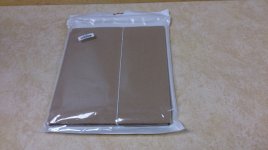
It comes in a package that looks like this:

PACKAGE.JPG

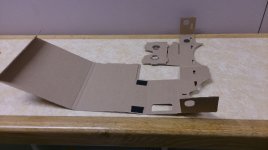
Once you open it (and before tearing anything) it looks like this:

FOLDOUT.JPG

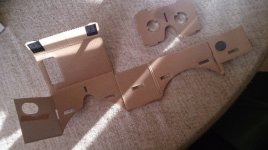
You'll notice that the magnets, velcro and lenses are already in place in the model that Micro Robotics sells. Take this opportunity to clean the lenses thoroughly.

After all the extra cardboard has been torn off, my unit looked like this:

TORNOUT.JPG

Now it is a case of folding and sticking the thing together. There is a piece of sticky tape provided but I recommend leaving that be and just using an extra rubber band to hold it closed since you'll probably want to open it again.

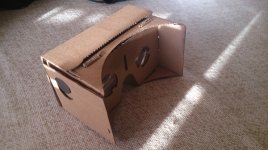
The assembled unit looks like this:

ASSEMBLED.JPG

A few important notes about the unit from Micro Robotics
There are specific units for larger phones (like the Samsung Note) available on the web. This is not one of them. I have a Sony Xperia Z (according to GSMArena, the size is 139 x 71 x 7.9 mm) and without any covers it is about the exact size of the unit. I'm having a few issues with focus and I think it is because the phone doesn't fit inside the unit completely. I can easily fix this by cutting a few millimeters away, but I want to be entirely sure before I do this.
This unit has plastic lenses to keep cost down. I think glass lenses will improve the effect immensely, but it will be much more expensive. If you played with one of these and liked it, you can always look for glass lenses later. So no rush.
Another issue is the magnets. The magnetometer in my phone is on the "wrong" side of the phone. I can't turn the phone around in the viewer because this places pressure on the power button and switches the phone off as soon as I close the box :rolleyes: To work around this, I removed the magnets and hold it in my right hand while viewing.
Edit: This works but it doesn't always register the tap/click. I find myself sticking my finger inside the viewer to double tap the screen often.
Lastly, the unit from Micro Robotics doesn't come with an NFC sticker. This is not much of an issue since the NFC tag is only there to auto start the Cardboard app once you insert the phone into the box (or any other app you program it for). Just tap the app and then put the phone in the box, you lazy git.
 
Last edited:
Hang on a minute here.... This is a joke right?

Look at my profile pic. Now look back at my post. Now look at my profile pic again. Does it look like I'm the type to joke about technology?
:D

In all seriousness: It's completely legit. It is not a replacement for the Oculus, but it is a nice toy while we wait for that tech to become affordable enough. I'll do a complete review tonight on the VR experience and what it can do (spoiler: it's better than you'd think just by looking at it).
 
Last edited:
Iv heard quite a bit about this, Pretty awesome stuff! Thanks Mister for the updates! Nice to know we can get it in SA... Think i will be ordering one to have a mess around with...
 
Well Mr 44, you made a believer of me. Order has been placed. Looks way too cool from videos I've seen that I must have this in my life. Quick question, how is the video quality when watching a 3D video? And how about the aspect ratio of said video?
 
That is pretty cool. Was expecting quite a hefty price before clicking the link so super surprised at the low cost. Will have to check this out sometime.
 
Video file playback with Google Cardboard

There are video apps in the play-store that does side-by-side playback, but those (that I could find) are for playing back a normal video file in a SBS way to view with cardboard and get that big screen feel, no 3D involved. I'll look at the video quality and feel later but first I want to focus on what 3D SBS videos are.

An Introduction on 3D SBS video

Let me explain what a SBS video file is: When you download a 3D video, there is a good chance it will be in this format. Playing on a PC or on your phone using your regular video player, you will see two videos playing side by side.

roadrunner.jpg
Here's a screenshot of 3D SBS video playing on the default Android player on my phone.

If you have a 3D TV and use that for playback, the image will be blurred (when viewed without the 3D glasses) because the TV combines the two images and the glasses filter the image, sending the left part of the video to left eye and the right part to the right eye. This trickery produces the 3D effect and it is very similar to how a VR headset works except that each image is send directly to each eye without having to use image combining.

windyday.jpg
This is a screenshot of "Windy Day" (part of the cardboard app) in action. Can you see the split screen effect is similar to the video screenshot?

What does all this mean? It means you can just play a SBS 3D video using any player you want to view the file in 3D for Cardboard. It also means that you can't view a normal video without a special player that duplicates the video so that it looks like the above screenshots.

2D Video playback
The screen resolution of your phone will be a big factor in how good the video looks in Cardboard. Because the video needs to be duplicated, the viewable video will only be half of your screen resolution. My Xperia Z is full HD (1920x1080) so in effect I will view a video @ 960x510 (the vertical is also halved to keep the aspect ratio intact). Don't worry, visually it still looks fine, so don't let the drop in resolution put you off from trying it.

There are a few apps available that will take a normal video and duplicate it for you. The best I found is called "Side-by-Side player". What makes this app special, is that you can zoom out on the video. Look at the screenshots above. Do you see there is no border between the left and right images? SBS player can add a black border around the left and right images, scaling the size down. This is important with Cardboard because the lenses does not give you a full field of view on the screen so watching the video at max resolution produces a "sitting too close to the cinema screen" feeling where you miss all the action that happen in the corners of the screen. Looking at the video with this border made me realize something else: Cardboard distorts the view somewhat on the top and bottom edges of the screen, so looking at the video gives you a curved TV feel. It is not too bad, but it may be off-putting for some people.

3D Video playback
As I've stated previously, you can use any video player to watch 3D videos. The problem is that there is not a player at the moment that will add that black border like SBS player does when watching 2D video, so you have a perpetual feeling of missing the action in the edges of the screen. The 3D effect is similar to cinema and TV, so not bad at all. Your source is very important, obviously. Cardboard won't make a badly done 3D movie a great 3D movie. I haven't had any aspect ratio issues with this technique but again, that could be an issue if your source file is off.

My personal feelings on video in Cardboard
It is not bad at all. It's like watching a movie on a huge screen but the focus issues I've had is more prominent in video than in VR environments. If I can sort that out, I may watch movies this way but I have a suspicion that part of the problem is the plastic lenses. If you want to watch movies with Cardboard, I think glass lenses is the way to go.
 
Last edited:
First, I want to link to a thread, started by DrDude about various VR options available.
http://mygaming.co.za/forum/showthread.php/39383-VR-Devices-Which-is-the-better-choice
It's an excellent read and I highly recommend you go see what the good Dr has to say. It is mostly about VR in gaming perspective but it touches on Google Cardboard and the very real problem of gaming with it. DrDude also raises some very important and very real issues around the future of Oculus Rift. Go read it now if you haven't already, this guy knows what he's talking about.

On to the next part...

VR with Cardboard

In the Cardboard app there are 8 options, each showcasing a different feature and I'll briefly look at each.

Tutorial
It just tells you to pull the ring (magnet) to click and tilt the unit on 90 degrees to go back. Not much to see here. Move along.

Tour Guide
This is a number of 360 photos of Versailles with a voice-guided tour. Your route is set and while it is very beautiful (look at the ceilings) it lacks any form of freedom of movement (apart from looking around) or interaction.

Exhibit
A number of 3D models (not the female kind, sorry guys) are displayed and you can view them from any angle by moving your head. The point of this one is to showcase moving around an object instead of standing inside a room and looking around.

Windy Day
A short VR movie. You are stationary while the action happens around you. You need to follow the characters in the movie as the plot (hahahaha) progresses. This is my goto for anybody that asks about the "weird cardboard box" on my desk because it incorporates video and VR without disorientation. If you wondered what VR movies will look like, this is probably a good example.

Earth
This is a good one. It takes a while to load properly but it's worth it. Cardboard loads a random (probably?) area from Google Earth and you start out stationary. Clicking/tapping/magnet-pulling sets you in motion and your movements will follow your line of sight. Think of it as a slow-motion Superman simulator. My first time was in a valley between two large hills with a number of lakes all around. Doing this on a highspeed internet connection could be really amazing.

YouTube
Nice menu system but it's essentially just watching YouTube on a big screen.

Photo Sphere
For some reason I can't get this to work at all. If I sort it out, I'll report back.

Street Vue
High speed movement through Paris using streetview images. Not bad visually, but you are set on a linear path with nothing much to do except look around (should be a great hit with CoD players -> jk).

Final thoughts on Cardboard App
The Cardboard app is there to showcase methods and incorporation with Google's other products like Streetview, Earth and YouTube. It is worth the effort but interaction and freedom of movement is limited. Luckily, the app is just a showcase and there are already many different games and apps on the play-store that supports cardboard.
Next time, I'll look at some games and 3rd party apps that work with Cardboard.
 
Last edited:
You can make this yourself as well the only tricky part is getting the 40mm lenses.

Absolutely. Myself being a bit... erm... coordinately challenged, I've rather taken the pre-cut route. If luck holds and the winds prevail I hope to get my hands on a 3D printed unit fitted with glass lenses within a few months at which time I'll do a write-up on that as well with comparisons to the cardboard model.
 
Last edited:
It seems Micro Robotics has run out of stock of this. My order is now delayed. I am a sad VR-less panda

Here's a picture of a chicken wearing a VR headset to make you feel better.

chicken_vr.jpg


What's that? You want context for why a chicken is wearing a specially designed VR headset? Isn't it enough that the chicken owns a headset, so now you're questioning its motives?

Fine. Here.

http://www.iflscience.com/plants-and-animals/these-virtual-reality-headsets-make-farmed-chickens-believe-they-roam-free
 
Absolutely. Myself being a bit... erm... coordinately challenged, I've rather taken the pre-cut route. If luck holds and the winds prevail I hope to get my hands on a 3D printed unit fitted with glass lenses within a few months at which time I'll do a write-up on that as well with comparisons to the cardboard model.

Where are you going to be getting this from? Could you possibly order more than 1? I too have been told Micro Robotics are out of stock... But from what you have said, if it would be possible to get a "better" one with Glass lenses then count me in!
 
Where are you going to be getting this from? Could you possibly order more than 1? I too have been told Micro Robotics are out of stock... But from what you have said, if it would be possible to get a "better" one with Glass lenses then count me in!

A friend of a friend bought himself a 3D printer. So he asked the friend to help him set it up and figure out how it works. So he downloaded a design for a plastic unit to test the printer with. I think you can get glass lenses on Amazon.
 
Back
Top