GTX 560 Ti crashes, don't know what to do.

drdiebrein

New member
Hi ok first my system specs,
Intel i5 750
Intel H55 Motherboard
PNY GTX 560 Ti OC
8GB DDR3 1333 RAM
500W PSU
I'm also running two screens.

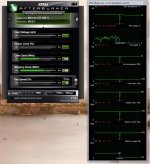
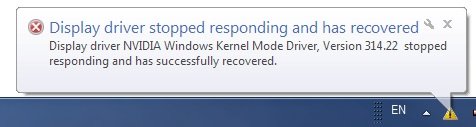
The problem I'm having is that at random points my screens would get no-signal and then two seconds later they would be fine again(except that I cannot open any games that I had running and such so I have to restart them). I also get a message that says "Display driver stopped responding and has recovered"(see attached pic No. 1).No. 1.jpg I ran MSI afterburner and all the stats drop to zero except GPU usage which goes up to 4 billion %??????:confused:No. 2.jpg This is very worrying and also highly irritating when gaming. Any assistance would be appreciated.
Thanx
 
It is stock overclocked but no overclocking done by me, and I cannot increase the voltage from MSI Afterburner.

EDIT(also I haven't changed anything else there all of that is default setting)
 
Last edited:
It is stock overclocked but no overclocking done by me, and I cannot increase the voltage from MSI Afterburner.

EDIT(also I haven't changed anything else there all of that is default setting)
Drop the clocks by 20% on both mem and core (temporarily). If that helps then investigate adding a bit more voltage - if not then something else is wrong.
 
what type of 500W PSU is that, and how old is it?
when did this start happening? maybe something isn't seated correctly?
 
what type of 500W PSU is that, and how old is it?
when did this start happening? maybe something isn't seated correctly?

It's a coolermaster extreme power plus I think it's about 3-4 years old, it started happening about a week and a half ago, everything is seated properly I did check for that.
 
Have you tried wiping the drivers and reinstalling them?

Otherwise instead of trying to over and underclock the damn thing, just RMA it.
 
RMA'ing a product without even investigating wtf is wrong is poor style imo. Unless of course it doesn't even boot of course...

What's left to be investigated? The graphics card drops, the driver claims to fail. If doing a complete wipe of the drivers and reinstalling them doesn't solve the problem, the device is correctly seated and you can rule out other components then by all means, RMA it.

I don't see the point of trying to negotiate the device into working (adjusting clock frequencies, etc). If it's faulty then replace it while your warranty period is still valid.

If it were me, I figure I've paid for a working product that I expect to last at least as long as its warranty period. I have no interest in sitting with half-working junk if I'm entitled to a replacement.

I can also only assume that OP has either narrowed it down to the graphics card through replacing components or is otherwise in a position where he can't and his only option is to RMA the device and hope that he's right about it.

I also don't see how it's "poor style." If it's the graphics card, he gets a new one. If it's not, he gets his card back and pays for the shipping charges. All-in-all, it's proper procedure when you're entitled to a warranty.

Sitting on your hands and hoping the problem magically resolves itself hasn't fixed anything yet :)
 
Ok so I turned my PC off and on again and that fixed it... JJ lol I'm not that stupid.

Anyway I would have RMA'd it a but it's out of warranty which sucks since I would have gotten lifetime warranty if I only had registered it in the first 90 days, I noticed that fine-print on day 91. Otherwise Ill try wiping the drivers and then re-installing them again. As this is the first time I'm really wiping my drivers, ever, with any card... I could use some help regarding this. I there a specific program I should use etc...
Thanx in advance
 
Common problem with the 560ti

You can either update the bios or you can downclock it (same thing since the bios update just downclocks it)

And yes you can increase the voltage with MSI afterburner.
 
What's left to be investigated? The graphics card drops, the driver claims to fail. If doing a complete wipe of the drivers and reinstalling them doesn't solve the problem, the device is correctly seatedand you can rule out other components then by all means, RMA it.
I'm sure you can see whats left to investigate with the help of the highlighting.

I don't see the point of trying to negotiate the device into working (adjusting clock frequencies, etc).
You miss the point. Since he can't jack up the voltage I suggested, as a temporary trouble shooting aid to drop the voltages instead. Either will fix a borderline card. *If* that works then at least he know he has isolated the problem (though not fixed). Troubleshooting...

I can also only assume that OP has either narrowed it down to the graphics card through replacing components
Assume based on what? :confused: Seriously...point me to where OP even *hints* at having eliminated everything else as the cause.

I also don't see how it's "poor style." If it's the graphics card
Yes...if its the graphics card...except we don't know whether it is. Hence me suggesting investigating further if my initial (fairly idiot proof test) doesn't yield results.

Poor style as in people RMA stuff for the most bullsht reasons ever. e.g. Better card released a few days later. Each person should make a reasonable effort to investigate the cause (to whatever extent his/her skills allow) before causing both the manufacturer (and future consumers) an unnecessary financial loss.

If the card is broken, by all means RMA it, bitch about it publicly, swear to never buy the brand again etc. But at least try & make sure you're right before doing so. Why do you think GFX's are cover in big fat warnings to connect external power?...because the manufacturers are sick of people who don't bother to investigate and instead:

just RMA it.
 
It is the card,anyone who has tried playing BF3 with 560ti will no doubt have experienced the black screen of doom coupled with the sound of a thousand soldiers played through a speaker inside a vibrator.
 
You might be experiencing problems related to TDR (Timeout Detection and Recovery) regarding your GPU
More info on it here

What happens is that during intense graphical processing (e.g. while playing a game) the GPU doesn't get info to Windows in time and results in the system "hanging". TDR kicks in to reset the GPU and that's what the message is about. This might be your problem. I've had issues with my HD5870 where in game the game freezes for a second then the screen goes black while audio and gameplay continues (in some games, other games crash) after a few more seconds the game carries on as normal (except if it's one that crashes). I've tried to narrow down on what my issue was (drivers, heat, ram, mobo etc.) so now I've found out about TDR.

Possible Solution
There are some tweaks you can try in the registry:
"Ok, the trick is:
1) open your Win 7 registry editor
2) go to the key : HKEY_LOCAL_MACHINE\System\CurrentControlSet\Control\GraphicsDrivers\
3) highlight it then right click on this key
4) Add DWORD TdrDelay
5) Set value of TdrDelay to the number of seconds you allow your GPU to run with no feedback to the system (ie Timeout watchdog..)
personally I've set this value to 8 seconds (from the default 2s) so that it leaves plenty of time to the GPU to perform overcomplicated computing intensive kernel without having Vista considering a fault and hence "recovering the device"

You can also set the delay to 0 thereby turning off TDR. Try it out see if it helps you.
 
Thanx alot for all the replies.

First thing, earlier I said I couldn't change the voltage with MSI AB, I was wrong it seems I can I have to go into settings and unlock voltage control. However I would really prefer not to mess with my clocks and voltage as I am not very experienced in that area and would rather not break anything(probably sounds a bit silly I know).

Next, I would just like to say again RMA is not an option since I don't have warranty anymore.

Also I do not have a clue how to update the BIOS. According to the little research I did do on it, it seems to me to be rather risky. In addition I have played BF3 many times before (and all manner of graphics intensive games for that matter) and never got problems like this. The card is almost exactly 2 years old and I've never gotten problems before.

And finally, in regards to the TDR thing it does seem that, that is what I have. But I also know that it's rather risky to go fiddling with system registries that I don't entirely understand. I have some questions about that process- Is it completely safe?, Is that for 64 bit systems and 32 bit?(I'm 64 bit), and Did it work for you?
 
Clocking is only dangerous if you increase the clocks,turn core and memory clock down by 100 and save it to a profile.Set it so it starts at system startup.If you don't like the changes then you can just hit the reset button.
 
And finally, in regards to the TDR thing it does seem that, that is what I have. But I also know that it's rather risky to go fiddling with system registries that I don't entirely understand. I have some questions about that process- Is it completely safe?, Is that for 64 bit systems and 32 bit?(I'm 64 bit), and Did it work for you?

If you follow the instructions and only make changes where it tells you it'll be fine. Make a backup of your reg by exporting it first, you can always import the backup if things go wrong (Registry Backup Tutorial)

If you have issues the simplest thing will be just to delete the values you've added thus resetting them to default.

My OS is Win 7 64 bit. I've added the TrdDelay key and given it a value of 8. Can't really say if it works yet because the problem is erratic - sometimes affecting certain games and sometimes not. I'll try run one of the usual "culprits" and see. Your problem actually reminded me of this issue (it hasn't happened in a while but the other day Dead Island gave me the problem) so I'm testing it out as well. Just thought I'd let you know about it in the meantime. If the fix works I'll be sure to post my feedback here.
 
Had the same freezing, black-screen issue with TdrDelay set to 8 so I tried turning it off (set to 0). Seems to be working so far.
 
Ok so thank you for all the help you guys have given me, you've all been a great help. I'll see what happens with my TdrDelay set to 0, and in the meantime I've noticed it's been happening a lot less anyway. Regardless I've also decided it's time for a new rig although I am going to wait until the 700 series comes out for GeForce.
 
I have the same problem with my GTX 560Ti. I tried the TdrDelay settings, but my problem remained.
I did a rom update last night, and noticed that the voltage went from 0.95 to 1.012. Hopefully this finally resolves my issues.
 
Back
Top