Help me DIY something

Wenzdayz

Thread Killer Mk III
i Want to connect this Ironman light to my pc:
IMG-20151127-WA0004[1].jpg

it works with two AAA batteries and i want to basically connect it up to my pc so that when i swith on the PC this light will light up with the pc instead of me having to switch it on via the battery pack.

this is what the battery pack looks like and connector wire to the light
IMG-20151127-WA0008[1].jpg
 
So what you want to do is put the switch on always on and draw power from the psu if I understand correctly right?
yes exactly.. i thought i could just connect it to one of the extra power cables from the PSU but it didnt work.
 
when you move the battery box the arc reactor changes depending on how you move it.

do you want it to continue working in this fashion or would you just like it to remain on when your computer is on?
(I assume you won't be moving it, hence it won't be changing?)
 

I'm thinking connecting it to a pc/laptop with USB will be the easiest, otherwise you can perhaps also use the wires from a case fan and connect it directly onto the motherboard.

The batteries supply 1.5V, however it looks like there is a small transformer thing on the board, difficult to see. USB supplies 5V and 500mA (max), so if the light is a LED, it should work.

So take the red and black wires going to the battery pack, and connect them to the red and black wires from a USB cable.
 
There's good news and bad news on this one.

The good news is that mobo's have 3.3V running on them, and the extra 0.3 V should not be an issue for lights. I'd simply leave the switch in the on position, and power up from the PSU directly.

The bad news is that it looks like the 3.3V is not easy to tap into. It's typically used for "Chipsets, some DIMMs, PCI/AGP/PCIe cards, miscellaneous chips".

To do this, you'll need a friend who is proficient with a soldering iron and a multimeter. Step 1 would be to find a power port from the PSU that is 3.3V using the multimeter. If it's free, try to find a female molex connector and crimp/solder it onto the power leads running from the battery to the control board of your light. If you can't find a female molex or a free port, cut the leads (identified by the multimeter) and make Y-joints out that let's you tap into the power. These gets soldered on to the control board.

It should work with minimal hacking, but YMMV, this is at your own risk, don't try this at home, and IANAL.
 
I'm thinking connecting it to a pc/laptop with USB will be the easiest, otherwise you can perhaps also use the wires from a case fan and connect it directly onto the motherboard.

The batteries supply 1.5V, however it looks like there is a small transformer thing on the board, difficult to see. USB supplies 5V and 500mA (max), so if the light is a LED, it should work.

So take the red and black wires going to the battery pack, and connect them to the red and black wires from a USB cable.

That would work, connect the Red cable to a USB Type A Male connector (Pin 1) and the black cable to Pin 4 and you'll be good.

You can get some from http://www.dx.com/p/diy-usb-type-a-male-plugs-adapters-black-10-pcs-376843#.VmZ1rHYrKM8

Alternatively you could (depending on your motheboard and the risk you want to take) connect it directly to your MB/PSU
 
Another way is to use 3x 1N4004 rectifier diodes in series to drop 5v to about 2.9v. Each diode "consuming" 0.7V and they cost about 25c each.

Connect Molex red wire to diode to diode to diode to Reactor red wire and connect Reactor black wire to either of the molex black wire.

You can even use a female molex connector to connect to your PSU molex plugs.
 
Another way is to use 3x 1N4004 rectifier diodes in series to drop 5v to about 2.9v. Each diode "consuming" 0.7V and they cost about 25c each.

Connect Molex red wire to diode to diode to diode to Reactor red wire and connect Reactor black wire to either of the molex black wire.

You can even use a female molex connector to connect to your PSU molex plugs.

Or that
 
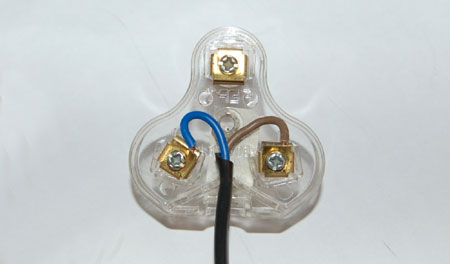
What would work as well is connect the red and black wires to a normal plug and just plug it directly into the wall "whistling:

2-pin6.jpg
 
thanks guys, let me see if i have any of the thingy's you mention.

i tried doing this as i found a youtube vid to diy your own LED lights:
20151208_190618[1].jpg
cause i have extra connectors to my PSU. needless to say it didnt work.
 
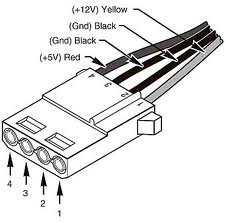
The center two connectors are both ground, that's why it's not working. You need to connect it to 4 (+5V Red) and 3 (Ground Black)
molexpinoutdiagram.jpg


Just not sure if 5V might be too much.
 
thanks guys, let me see if i have any of the thingy's you mention.

i tried doing this as i found a youtube vid to diy your own LED lights:
cause i have extra connectors to my PSU. needless to say it didnt work.

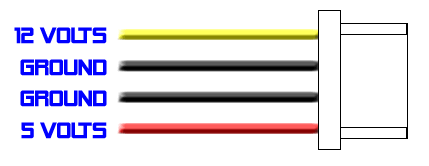
Perhaps this will help you understand why that dit not work.
molex.gif


Just be carefull your putting 5v onto something that normally only gets 3v max. I would rather get a resistor before trying it again.
 
Last edited:

Strange that it didn't work. Also though, why is the red wire coming out of the 2nd slot and not the first one? The wire order is like this usually. So you might have been connecting the light to 2 ground wires, instead of 1 ground and the 5V line.

molex.gif


Edit: seems I was beaten to the punch :3
 
Strange that it didn't work. Also though, why is the red wire coming out of the 2nd slot and not the first one? The wire order is like this usually. So you might have been connecting the light to 2 ground wires, instead of 1 ground and the 5V line.

molex.gif

Bwhahahahaha
 
Back
Top