

Flex
Will lift for boobs!
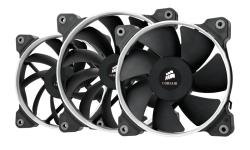
Thought all PC Case fans are equal? Well think again!
There are many factors to consider all depending on your current build.
Power and Speed control
There are 2 options being a 3 pin or 4 pin (PWM).
Most older mobos have 3 pin fan connectors, with most new fans having 4 pin connectors.
The 4th pin allows you to control the fan speed via software without adjusting the power being delivered to the pin. If you want to change the speed on a 3 pin fan then you have to change the power being delivered to the fan vie the 3 pin. This means that if it is an LED fan, the LED will dim and not be as bright as on 100% power.
You can fit a 4 pin on a 3 pin and other way around as well. You do however get connector for 4 pin fans to 3 pin connectors as well.
As with the Water Cooling, I will be doing the fans 101 in segments to soo how much interest there is before writing a 50 page write up!
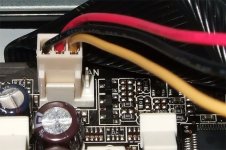
3 Pin fan plugged into a 4 Pin connector on the mobo
There are many factors to consider all depending on your current build.
Power and Speed control
There are 2 options being a 3 pin or 4 pin (PWM).
Most older mobos have 3 pin fan connectors, with most new fans having 4 pin connectors.
The 4th pin allows you to control the fan speed via software without adjusting the power being delivered to the pin. If you want to change the speed on a 3 pin fan then you have to change the power being delivered to the fan vie the 3 pin. This means that if it is an LED fan, the LED will dim and not be as bright as on 100% power.
You can fit a 4 pin on a 3 pin and other way around as well. You do however get connector for 4 pin fans to 3 pin connectors as well.
As with the Water Cooling, I will be doing the fans 101 in segments to soo how much interest there is before writing a 50 page write up!
3 Pin fan plugged into a 4 Pin connector on the mobo


