How to resize attached images?

What worked better for me was imgur. You're then able to grab a BBCODE link directly from there for a resized image or thumbnail.
 
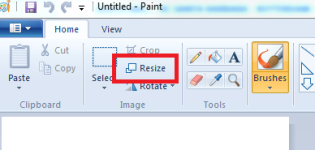
You can just do it in paint really easily, and upload direct from your PC:

paint.PNG

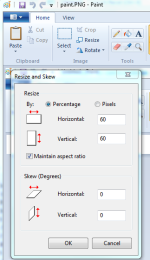
below is simply reducing the pic to 60% of the original size:

paintsnip.PNG
 
Soz, think my initial question wasn't clear enough :o

I meant for attachments that are already uploaded.
When you go to edit the post, all you see is:
Code:
[attach] some number [/attach]
Is there any parameters that you can add to adjust the size once it is uploaded?


I actually know how to resize images with paint and photoshop.. even GIMP :D
 
Soz, think my initial question wasn't clear enough :o

I meant for attachments that are already uploaded.
When you go to edit the post, all you see is:
Code:
[attach] some number [/attach]
Is there any parameters that you can add to adjust the size once it is uploaded?


I actually know how to resize images with paint and photoshop.. even GIMP :D

Yeah I have no idea, but when you upload/attach an image, do the following in future.

When you select the insert image icon, and go the the "From URL" tab, make sure to untick "Retrieve remote file and reference locally". Then it won't put the image in the attach brackets with a number (like you mention), but instead it will put the image URL in img brackets, as in [ img ] some url [ /img ]
 
Last edited:
I also just tend to use photoshop now after posting a few GIGANTIC images... "whistling:
 
Lesson learnt, will either resize before upload or host pic somewhere first :)

@Mod, please close this thread, it has served its purpose.
 
I have added an additional rule to the stylesheet so resizing is no longer necessary (except to reduce file size). Give it a whirl!
 
Back
Top