Need help from the over clockers and tweekers.

RyanvF

New member
Hi guys,

I've been getting Nvidia crashes whenever my GPU gets even a little bit of stress, been trying to play Batman Arkham Origins and I just can't get past 3-5mins. I've done a driver wipe and reinstalled latest drivers fresh, Ive checked the power, and i've tried turning up fan speed. I tried running the game in DX9, even on lowest settings. These are the two messages I get from event viewer.

"Display driver nvlddmkm stopped responding and has successfully recovered."
Then directly after:

"Faulting application name: BatmanOrigins.exe, version: 1.0.0.0, time stamp: 0x53597942
Faulting module name: d3d11.dll, version: 6.2.9200.16570, time stamp: 0x5153774d
Exception code: 0xc0000005
Fault offset: 0x000a5068
Faulting process id: 0xb04
Faulting application start time: 0x01d220e65758b4ab
Faulting application path: F:\Steam\steamapps\common\Batman Arkham Origins\SinglePlayer\Binaries\Win32\BatmanOrigins.exe
Faulting module path: C:\Windows\system32\d3d11.dll
Report Id: 2e61fa53-8cda-11e6-bbfb-d43d7ed8b42b"

I've read somewhere that this could be caused by the clock speed of the Gpu, it could be too high or out of sink with my memory? Any advice on how to change it and what to change it to would be greatly appreciated.

SPECS:
Win 7 Professional 64bit
MSI Z87-G43
PSU: 700W Coolermaster
Intel i5 4430 @ 3.0GHz
EVGA GTX760 4GB FTW edition
2x 4GB DIMM
1x WD 1TB HDD
 
When you say driver wipe. Did you use DDU?

That would be step 1. if you did, then yeah.
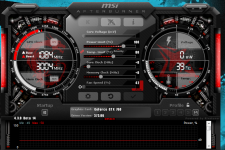
The gpu clock speed and your RAM shouldnt really have an effect on one another, they likely mean your card's VRAM, which is sitting at 3004mhz. This sounds about right since the 760 memory runs at 1502, so its likely doubled.


Otherwise, are you sure its not a arkham origins specific issue? That game is dog-terrible. try running a 3dmark (demo is free on steam) benchmark or something else (MSI Kombustor even) to check the stability of your card itself, coz it does sound like its limited to Arkham Origins :)

If you wanna check, its really easy to dial down the gpu memory clock speed a chunk, and you wont really get insane drops in performance.


I downloaded MSI Afterburner and lowered the clock speed on my 970, should be the same procedure for you: In the middle theres Memory Clock (MHz) with a bar that on yours is 0 (in the middle) click it on the left until its about 100 (or 50 or whatever incrememt you like, 100 should be fine) then click the tick mark button (under those on the right, next to settings and reset).

Thats that

Oh and its the exact same process for the clock speed (Core Clock). so you can dial that down an look at Arkham Origins too
 
Last edited:
this is mine with Arkham Origins running in the background, with me having dialed back the memory on the fly :)

dcf56454d68e604a0c3b269782e2bdf8.png
 
25 minutes into Arkham Origins I remembered why i dont care. Bad fighting mechanics and a crash halfway through...lovely.
 
Haha thanks for the help man, yeah I used DDU. I thought it was a driver issue because of the Nvidia error I get which relates to the card thinking it's over heating or what not. My BF3 also crashes randomly so I came to the conclusion it must be my hardware and not just 2 buggy games. :/ What crash did you get? CSGO plays fine, but then again that doesn't stress my card. Will run combustor and post results

Sent from my HUAWEI GRA-L09 using Tapatalk
 
Okay, so I just tried underclocking the Video Memory by 100. Tried to run Arkham Origin and 3mins in, same crash occurred, then I reset the clock to 0 and my nvidia display drivers crashed again, this time causing a black screen, so they didn't recover this time.
 
Update:
Did Stress tests and benchmarks from Kombustor (memory and cpu), all kept up fine. Temp rose to about 70 celcius which is fine. No crashes at all.
*Faulting module name: d3d11.dll* this is what is faulting, don't know what this means? is it related to DX11? I've tried running the game in dx9 mode through steam but that doesn't help.
 
Heres my fault log. not dx11 related, just general one

Code:
Faulting application name: BatmanOrigins.exe, version: 1.0.0.0, time stamp: 0x53597942
Faulting module name: BatmanOrigins.exe, version: 1.0.0.0, time stamp: 0x53597942
Exception code: 0xc0000005
Fault offset: 0x00e47761
Faulting process ID: 0x3ecc
Faulting application start time: 0x01d22158bcb49a95
Faulting application path: E:\installed games\SteamLibrary\steamapps\common\Batman Arkham Origins\SinglePlayer\Binaries\Win32\BatmanOrigins.exe
Faulting module path: E:\installed games\SteamLibrary\steamapps\common\Batman Arkham Origins\SinglePlayer\Binaries\Win32\BatmanOrigins.exe
Report ID: 8752f362-c87c-45f0-b0bf-a185956a5dff
Faulting package full name: 
Faulting package-relative application ID:


I read a bit on your fault. apparently - Exception code: 0xc0000005
relates to permissions denying the game.

So you might get around it by giving full control on your batman origins folder

steamapps\common\Batman Arkham Origins
Right click on the folder
properties
security
edit(button)
enable full control for the folder.

Also, did you force dx9?
Use -d3d9 parameter in launch options or with .ini edit

Go to <path-to-game>\SinglePlayer\BMGame\Config\
Locate and open file BmEngine.ini in text editor.
Locate line AllowD3D11=True and change it to False.


Lastly, how long did you run Kombustor for? an hour? 2 hours? gotta run it at least an hour or so to properly test stability of the card, coz franklyl even with bf3 crashing i'm not 100% sure its a card issue. crashes happen hehe (especially in arkham origins)
 
eehhh I will run the tests again when I get home from work, only ran benchmarks and stress test for about 10min :D When I forced DX9 i used launch options "-d3d9" and I set all graphics to low. Also note that I set power options to high performance in windows and in Nvidia control panel for my GPU. I've set the permissions in Batman Arkham Origins folder to "Full Control" -Didn't help.

I've noticed that Exception code: 0xc0000005 could also be related to the program attempting to access memory that it shouldn't. So when I get the chance I will swap out memory and see if that helps.
 
So I've tried just about everything and I still get the error. When playing in DX9 I get the same fault as you with the .exe failing. So I might have found the solution, underclocking both my GPU clock and memory clock by -100. Now my both battlefield 3 and Batman seem to be working fine. I have an EVGA gtx 760 4gb FTW edition which I believe is factory over clocked which might be the problem with these games. If any one has any info on this it would be appreciated :)

Sent from my HUAWEI GRA-L09 using Tapatalk
 
Back
Top