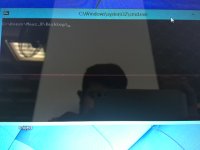
Pink line across laptop

maaz

New member
Good morning

I turned my laptop on this morning an there is a pink line across the whole screen I tried rebooting and its is still there. The line starts when the pc is still booting up and is still there in bios.

The specs :
Core i7 4702 MQ 2.20 Ghz
Intel HD 4600
4GB ram
500 GB HDD
it's a Mecer laptop

Any advice is much appreciated.
 

Attachments

  • Capture.PNG
    Capture.PNG
    7.3 KB · Views: 60
If it's there from startup and even in BIOS, it's the screen itself that's developed a problem. I don't know of a quick fix, so I'm afraid you'll have to take it into a repair shop. And then you'll have to brace yourself, 'cause afaik replacing screens are pretty expensive.
 
There's no line in your screen cap, but then again, the laptop won't know it's there so it won't put it in a screenshot.

I would imagine it's probably the screen, you'll probably have to take it in for repairs
 
Sounds like the screen itself is damaged, probably a row of pixels has shorted out, been bashed, or even a drop of fluid got in there somehow.

If it's old, it's not surprising. If it's not old, then hopefully it's still under warranty.
 
Sounds like the screen itself is damaged, probably a row of pixels has shorted out, been bashed, or even a drop of fluid got in there somehow.

If it's old, it's not surprising. If it's not old, then hopefully it's still under warranty.

If its the screen itself warranty won't cover it, they'll claim its physical dmg and he'll have to fork out for the repairs.

Before sending it in I would say try the following.
I'm sure the laptop comes with a vga or dvi out port, so plug in a pc monitor and see if the problem is displayed on the pc monitor as well, if it is its most likely the graphics card which in this case is on board so they'll have to replace the whole board and chip (Warranty claim at their cost). If it doesn't appear on the pc monitor it is def the screen (They'll send it in for repair at your cost).
 
/snip

Sorry for the crappy image guys.

At least you appear to be dressed, judging by the reflection :D
Do as Joker suggested and and test the graphics card with another monitor. I'm pretty sure it's your screen, though, but rather be sure before you take the laptop in.
 
Tried connecting display via HDMI and VGA the line does not appear. So the screen is damaged, I will call the company tomorrow to see what they say.

Thanks for quick replies much appreciated. :)
 
Back
Top