Port Forwarding Help

Crableg

New member
Sorry if this is the wrong place, just didnt know where else to post.

So i have been scouring the internet to try find the problem and i can't seem to find the answer, so I thought I would turn to the PC geniuses of Mygaming for help.

I am setting up a Modded minecraft server, and trying to do the port forwarding. Now I am confused because it was working and suddenly now its stopped working and it doesn't show the port as open. it seemed to stop working after I added another PC to the network, but i have removed that pc since it stopped working.

When i use http://www.canyouseeme.org/ to check if the port is open, i get a "No route to host" error.

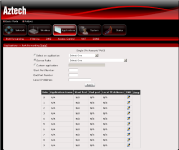
My router is the standard telkom issue Aztech 700wr, the port forwarding section looks like this (sorry about the quality):
aztech.PNG

So i have created a custom application, then put the port 25565 in both the public and private fields. The IP address I've put in is the address of the router (standard 10.0.0.2), this is where the problem comes in, i am not sure which IP address to use, when it worked previously it was using the router address of 10.0.0.2, I thought it should be the IP address of the machine hosting the server, which is 10.0.0.4, however this doesn't work either.

I have included rules in my windows firewall for those ports in bound and out bound, I have phoned Telkom and they said they are not blocking the port. So I'm just not sure what the problem is. (I think its got to do with the ip address).

I know you should use a static IP address also if your hosting a server, but my public IP address only changes if my router resets, and the server is for friends so its easy to give a new IP to them.

Is there a difference between having an IP address of 192.168.XX.XX or the 10.0.0.X?

Anyone able to help :S ?
 
the ip should be the ip of the machine where the server is running.

you can check the status of your network card to get the current ip.
 
My router is the standard telkom issue Aztech 700wr, the port forwarding section looks like this (sorry about the quality):

So i have created a custom application, then put the port 25565 in both the public and private fields. The IP address I've put in is the address of the router (standard 10.0.0.2), this is where the problem comes in, i am not sure which IP address to use, when it worked previously it was using the router address of 10.0.0.2, I thought it should be the IP address of the machine hosting the server, which is 10.0.0.4, however this doesn't work either.

I have included rules in my windows firewall for those ports in bound and out bound, I have phoned Telkom and they said they are not blocking the port. So I'm just not sure what the problem is. (I think its got to do with the ip address).

I know you should use a static IP address also if your hosting a server, but my public IP address only changes if my router resets, and the server is for friends so its easy to give a new IP to them.

Is there a difference between having an IP address of 192.168.XX.XX or the 10.0.0.X?

Anyone able to help :S ?

The external IP (if asks for it) should be something like 0.0.0.0 as we don't know what IP's they'll be connecting from, so you want to leave this open to interpretation or set it to ANY. You will also want to forward TCP and UDP traffic to a destination IP, this will be your server. Ensure your server has a static IP and if not, maybe set a static route or reserve the IP in the router so that it does not issue it to another device or renew said IP.

This should help: http://portforward.com/

Lastly, the IP range shouldn't matter. Whether it be on the 192.168.0.x range or 10.0.0.x range. As long as you have your X source to Y destination and the appropriate protocols, you should be good to go.
 
Are you using DHCP on the host PC? The IP might have changed. The new PC might have taken the IP previously used by the server PC. A good idea when hosting a server on a PC is to give it a static IP, or to add a reservation to the DHCP server for that PC.

As for the rule, yes you need to use the internal IP address for the host PC.

Edit: What BeoTeK said.
 
Ok, so essentially you need to set the port forward rule as such:

Name : Whatever the hell you want
Start Port : 25564
End Port : 25566
Local IP : Private IP of the PC that is hosting the application (i.e. 10.0.0.4)

That should do the trick. Ensure that the PC has a STATIC IP address or a DHCP reservation. Also ensure that your firewall on the router (IP filter or whatever the hell they are running) is allowing port 25565 through from source address 0.0.0.0/255.255.255.255 with destination of 10.0.0.4 port 25565
Second rule (if you dont have a allow 10.0.0.0/8 or 10.0.0.0/16 or 10.0.0.0/24 to access 0.0.0.0/255.255.255.255 on port any) is to allow 10.0.0.4 (as source address) on any port to communicate to 0.0.0.0/255.255.255.255 on port any
 
And to clarify the Start Port : 25564 & End Port : 25566 crap, some of these bloody SOHO/non-commercial grade routers don't work well with the start and end port as the same value. It's just their crappy software.
 
Which is why I prefer Cisco kit...

hostname(config)# object network Minecraft_server
hostname(config-network-object)# host 10.0.0.4
hostname(config-network-object)# nat (inside,outside) static 192.168.XX.XX service tcp eq 25565 eq 25565
 
Awesome thanks for your help guys, when I'm home I will try changing the ports to 25564 to 25565, as i doubt its a very expensive router that telkom gives for free.

Otherwise i think i need to figure out how to disable the routers firewall like you said, haven't done that yet.
 
Aztech 700 wr.hi want forward port my cctv dvr.

Hi i want port forward my cctv dvr. The dvr ip address is 192.168.1.xx and port is 34567 Nd mobile port is 34599
How should i go about port forwarding so i can use my samsung note 4 to view it on my phone.
i went into port forwarding in 10.0.0.2 it ask for rule and public port and private port and tcp.
This is were i get lost please help.
Thank u
 
Hi i want port forward my cctv dvr. The dvr ip address is 192.168.1.xx and port is 34567 Nd mobile port is 34599
How should i go about port forwarding so i can use my samsung note 4 to view it on my phone.
i went into port forwarding in 10.0.0.2 it ask for rule and public port and private port and tcp.
This is were i get lost please help.
Thank u

Try this... http://portforward.com/
 
Hi i want port forward my cctv dvr. The dvr ip address is 192.168.1.xx and port is 34567 Nd mobile port is 34599
How should i go about port forwarding so i can use my samsung note 4 to view it on my phone.
i went into port forwarding in 10.0.0.2 it ask for rule and public port and private port and tcp.
This is were i get lost please help.
Thank u
 
Hi i want port forward my cctv dvr. The dvr ip address is 192.168.1.xx and port is 34567 Nd mobile port is 34599
How should i go about port forwarding so i can use my samsung note 4 to view it on my phone.
i went into port forwarding in 10.0.0.2 it ask for rule and public port and private port and tcp.
This is were i get lost please help.
Thank u

Did you go to the link that was provided before your duplicate post?
 
Back
Top