Show your media

AlphaJohn

New member
As per the topic, what media center do you use for entertainment?

I'll start with what I found to be very cost effective yet very capable.

I have one of them Android media devices (MyGica ATV 482 R1100.00) connected to my TV (Hisense K316) All of this is controlled via a Rii Mini Airmouse R250.00. Using a simple 2TB USB HD as storage.

With this set-up I can Download & play all my movies, chat/browse the internet or even watch Netflix (Thanx to Hola) or even play angry birds :)

So whats your set-up like?
 
My PC is set up pretty close to the TV (42" LED), so I've got a HDMI cable running from the PC to the TV on a switcher (because I've got the XBox set up on the TV as well - only two HDMI ports).

So I pretty much just use my TV as a PC screen, and manually control it via Unified Remote on my phone. So we can stream/watch/play pretty much anything from my PC.
 
PC / PS3 / PS4 / Xbox One

Take your pic, but mostly PC and/or Xbox one. Also depends which TV I wanna watch it on. The 32" or the 47".
 
Iv got a "mini PC" connected to my Amp with HDMI cable... pretty straight forward from there, use a normal wireless mouse to control the PC...

Anyone else using Popcorn Time?
 
You can check my latest blog, that, in effect, is my setup. Though my tower case now sits on the floor.
Will take a pic and upload it when I get home (with details).
 
What I have found (Or more my problem) with PC set-up's are that they eat power also the fans seem to make a noise and consoles normally have this media check crap that pick up some "demo" content and refuse to play.
 
im using my laptop hooked up to the tv 40" via hdmi with xbmc, and xbmc android remote on my 7" tablet to control it

still need to get a larger harddrive for my lan pc which will eventually become my permament media centre pc

before i archived and organised everything on the laptop i had this mess about 2-3 years ago

attachment.php


attachment.php


ill post more pics tonight
 
I think the "invention" if you can call it that, of the HDMI cable really has made this a hell of a lot easier to set up... Having everything function through one cable saves so much time and confusion with the set up...
 
im using my laptop hooked up to the tv 40" via hdmi with xbmc, and xbmc android remote on my 7" tablet to control it

Best dam media app ever. Was both surprised and glad that it was on the little MyGiga Android device, even better was that I got PseudoTV on it as well.
 
Using a HP - Micro server (R1500 at the time) (http://www8.hp.com/us/en/products/proliant-servers/product-detail.html?oid=6280786)
Added a GT 220 GPU (+/- R 600)
Then added an additional Lan (R 150)
Total:- R2 250
If include windows 8 thats an extra R800 (back then)

Since its CPU uses just a heatsink with no fan, hardly ever hear the thing. Also its running a 150W psu so not power hungry.

Pretty much have no codec issues or moving the from room to room.
Using Wireless keyboard and mouse to operate.
 
Last edited:
In the lounge I have WD HD Live for streaming Netflix, YouTube, movies etc.
Also a Toshiba 3D Bluray for, well Blurays.
If I play media directly from a HDD I just stick it into the TV directly.
In the bedroom is a Smart TV that handles streaming and an LG Bluray player. When I play direct from HDD, I stick it into the Bluray's USB because the wires are too short to reach the TV.
 
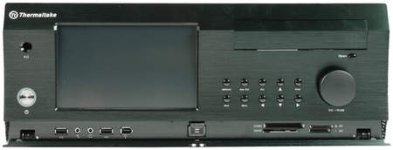
I have a fanless atom motherboard and fanless geforce 210 sitting in a Thermaltake DH-202 case. The case looks like this:
htpc-7-2-L-232077-13.jpg

I can switch on the HTPC using a remote compatible with the case and obviously browse openelec with the remote. I'm running openelec off a USB drive and have a internal HDD with steamOS installed (for testing purposes). With openelec, I'm running plexmbc.

All my media is stored on a HP N40L microserver running Xpenology. The microserver has 2x3tb, 2x2tb and 2x320gb hard drives inside. I have plex media server installed which serves up the media to my HTPC and my gaming rig if I want.

The HTPC is connected to my Sony TV via HDMI. I also have PS3 for blu-ray duties.
 
Last edited:
Xbmc on android devices. Can remote control via iPhone or android phone/pad

One device is designed for a media server. Other is a pad with HDMI out.

Content is served up via samba share or upnp/dlna server.
 
I have this:

58028_471994106979_5246045_n.jpg


It's Jamo S608 front speakers and centre, rears have been mounted since this photo, connected to a Denon 1911 AVR Receiver, Playstation 3, Sasmung 40" LCD,. (Want to replace at some point).

In my PC room I have a PC running PS3 Media Server, which downloads stuff and copies it to the correct folders on the Media Share.

In my bedroom, I have a 32" Samsung LED, wall mounted. Connected to a Raspberry Pi, and can also stream all content from PC to Room TV.
 
Last edited:
I have this:

58028_471994106979_5246045_n.jpg


It's Jamo S608 front speakers and centre, rears have been mounted since this photo, connected to a Denon 1911 AVR Receiver, Playstation 3, Sasmung 40" LCD,. (Want to replace at some point).

In my PC room I have a PC running PS3 Media Server, which downloads stuff and copies it to the correct folders on the Media Share.

In my bedroom, I have a 32" Samsung LED, wall mounted. Connected to a Raspberry Pi, and can also stream all content from PC to Room TV.

Very clean, very nice. I'm jelly. I still need to acquire a 32" wall mount for my LED TV.
 
I have this:

It's Jamo S608 front speakers and centre, rears have been mounted since this photo, connected to a Denon 1911 AVR Receiver, Playstation 3, Sasmung 40" LCD,. (Want to replace at some point).

In my PC room I have a PC running PS3 Media Server, which downloads stuff and copies it to the correct folders on the Media Share.

In my bedroom, I have a 32" Samsung LED, wall mounted. Connected to a Raspberry Pi, and can also stream all content from PC to Room TV.

How do you get past Cinavia? Its the main reason I went looking for something else.
 
Back
Top