Some Fibre Assistance

Flex

Will lift for boobs!
Hey guys.

So telkom came to install the Fibre, I got it working using LAN. But i can't seem to log into the Router what so ever. Can't see it's ip in the cmd ipconfig /all. It is a Huawei Echolife GH8240H, can it be "locked" ?

I then connected my TP Link wireless router to the Huawei so that I have wifi for all my other devices.
My PC is also connected to the TP link now via LAN and has internet access.
I can see the TP link om my wireless devices and can connect, but there is 0 internet connectivity on the wireless devices.

Any Idea what could be wrong or what I can try to fix this?

Any help would be appreciated.

Thanks ladies
 
Uh...so the layout should be as follows. Physical fibre cable comes into house somewhere and terminates into some kind of little wall box thing. Out of there comes the (usually thin and yellow) fibre to the fibre Router (so far all this should be provided from ISP side). From there you'll have an ethernet cable going to your ethernet router (usually provided by ISP with fibre, sometimes you need to provide your own). ensure that cable goes into the EWAN port of the router. ADSL does not necessarily mean it can do ethernet internet.


So I'm thinking its possible you dont have the right router to get internet from...


Just googled your router now. Yea thats the 2nd box. Those are usually locked, and you need a ethernet router to connect and get internet

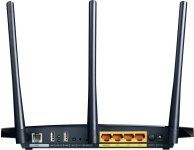
Heres an image of my router. And i have a cable plugged into the WAN/LAN going back to that Echolife.
product_2070437.jpg
 
Last edited:
Uh...so the layout should be as follows. Physical fibre cable comes into house somewhere and terminates into some kind of little wall box thing. Out of there comes the (usually thin and yellow) fibre to the fibre Router (so far all this should be provided from ISP side). From there you'll have an ethernet cable going to your ethernet router (usually provided by ISP with fibre, sometimes you need to provide your own). ensure that cable goes into the EWAN port of the router. ADSL does not necessarily mean it can do ethernet internet.


So I'm thinking its possible you dont have the right router to get internet from...


Just googled your router now. Yea thats the 2nd box. Those are usually locked, and you need a ethernet router to connect and get internet

Heres an image of my router. And i have a cable plugged into the WAN/LAN going back to that Echolife.
View attachment 24483

I am on the internet with my main PC using an Ethernet cable.
The problem is with the wireless. i can see the wireless and connect to it, but can't get internet access on the wireless devices.

I managed to figure out that I am not supposed to be able to log into the Huawei ONT though. So that is sorted. now just the Wireless
 
I am on the internet with my main PC using an Ethernet cable.
The problem is with the wireless. i can see the wireless and connect to it, but can't get internet access on the wireless devices.

I managed to figure out that I am not supposed to be able to log into the Huawei ONT though. So that is sorted. now just the Wireless

Sorry man, I totally didn't read that bit o_0

Think that takes away any credibility I may have had, so I'll let someone else assist you :p

One thing I will mention is check if the wireless is setup as an Access Point or not. Put it in bridge mode or something, so it isn't expecting a direct internet source?
 
Sorry man, I totally didn't read that bit o_0

Think that takes away any credibility I may have had, so I'll let someone else assist you :p

One thing I will mention is check if the wireless is setup as an Access Point or not. Put it in bridge mode or something, so it isn't expecting a direct internet source?

That makes more sense yeah.

From what I have gathered there are a few options.

Check if TP Link and pc are DHCP
Check all on same Subnet
Check TPlink is setup as a Access point
 
That makes more sense yeah.

From what I have gathered there are a few options.

Check if TP Link and pc are DHCP
Check all on same Subnet
Check TPlink is setup as a Access point

Yea, that could be it too, if wireless router is set as dhcp and handing out different IP's to those that are on same subnet as what theEcholife is giving, then that would do it. you definitely don't want 2 things handing out IP's to the devices on the network.

So yea, check that you only have 1 dhcp server (obviously if echolife is using dhcp then you cant disable that due to lock, so will need to disable on wireless). Then check that wireless is in bridge mode or at least knows its only an access point and not trying to get its internet via ADSL or something.
 
Yea, that could be it too, if wireless router is set as dhcp and handing out different IP's to those that are on same subnet as what theEcholife is giving, then that would do it. you definitely don't want 2 things handing out IP's to the devices on the network.

So yea, check that you only have 1 dhcp server (obviously if echolife is using dhcp then you cant disable that due to lock, so will need to disable on wireless). Then check that wireless is in bridge mode or at least knows its only an access point and not trying to get its internet via ADSL or something.

Yebo was thinking the same. This Fibre story is such a mission!
 
But i can't seem to log into the Router what so ever. Can't see it's ip in the cmd ipconfig /all.
ipconfig show your local interfaces. Or put differently you'll never see any other devices on there whatsoever. At best you'll see the gateway a specific interface is set to.

Any Idea what could be wrong or what I can try to fix this?

Connect the PC to the router, run a tracert to identify the IP of the router. Then ping that IP from a wifi device & see if it goes through. If yes then you likely just need to point the gateway at the router IP (either on the wifi device or the TP Link not sure). If no then you've likely got wifi isolation switched on.
 
Morning Flex! Did you have a nice sleeps? I jolly well hope so. Say,...how 'bout dat fibre?

Morning man! slept great thanks and you?
Nah! Managed to get it all fixed. 2 DHCP servers as well as PC initiating PPPoE and not the router. =D
 
Back
Top