Speeding up a home network

HomeNetworkSpeed.JPG

This is a file I am copying from my wired desktop PC to a wireless laptop internal HD. As you can see the network usage is barely 15% of network capacity.

- - - - - - - - - - Double Post Merged - - - - - - - - - -

That is nice!
 
View attachment 16388

This is a file I am copying from my wired desktop PC to a wireless laptop internal HD. As you can see the network usage is barely 15% of network capacity.

- - - - - - - - - - Double Post Merged - - - - - - - - - -

That is nice!
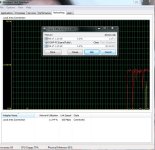
Ok, so a couple of things to note. 100 Megabits per second is the theoretical MAXIMUM throughput of your wired PC. Windows has rate reservations in place which will make it impossible to reach 100% BTW. Also, other limitations like your CPU might also affect throughput. Is your router only 100Mbps? Your CPU is 70% utilized, does your CPU utilization normally go up when you use the network? Are you using an on-board NIC?
 
Thanks for the help. I have noticed that my CPU usage is normally running at between 55 and 70%. It is a result of two processes mainly, upnphost and svchost.exe. I do have an onboard NIC.

I have a Netgear N300 wireless router. I have had iBurst as my ISP but Vumatel is going to be installed in the next couple of days and basically we are going for the 20Mbps option and while that is going to be 10 times faster than my current connection, it would definitely be poor form if my hardware cannot support the higher speeds. Wouldn't I look the nana!? I am also unsure if my current wireless router will be able to handle the different input from the Vumatel box, and then I may have to get a new router too.
 
Back
Top