
Mephisto_Helix
Grump Squad
I think it's the best gif I've ever come across because it's creepy but in a way that makes your brain think "I dunno why the fuck that is creepy!"


I think it's the best gif I've ever come across because it's creepy but in a way that makes your brain think "I dunno why the fuck that is creepy!"

Here you go
Private Sub Worksheet_Change(ByVal Target As Range)
If Target.Column = 1 Then
Cells(Target.Row, Target.Column + 1).Value = Now()
End If
End Sub
In fact, here, download this. You'll need to click the button to enable content, since it works with VBA script, and that'll be after the button to enable editing (because it's a download)
https://www.dropbox.com/s/58ek7c35g8wb6yw/Barcodes.xlsm
EDIT: Added a line to delete the date/time if you delete the barcode as well
Shot man !
Here you go
Private Sub Worksheet_Change(ByVal Target As Range)
If Target.Column = 1 Then
Cells(Target.Row, Target.Column + 1).Value = Now()
End If
End Sub
In fact, here, download this. You'll need to click the button to enable content, since it works with VBA script, and that'll be after the button to enable editing (because it's a download)
https://www.dropbox.com/s/58ek7c35g8wb6yw/Barcodes.xlsm
EDIT: Added a line to delete the date/time if you delete the barcode as well
Sure, let me know if it works for you
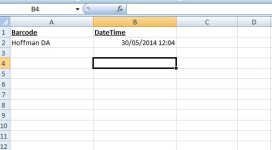
View attachment 11309
Ok it works - now say that particular persons OUT times need to be recorded as well - any way to make it a Time in and Time out next to each other?
Don't underestimate how kak I am with codes.
jirre fok all this code kak .......... work less fuckers
I'm sure. How would we know if it's in or out though?
I could make an In column, and an out column, and a date/time for each.
Or have an in worksheet, and an out worksheet?

ooh ek het op a adcodol in my laai afgekom.... wonder hoeveel pynpille is te veel....

This is work - and I'm fcking stuck. God knows why I got saddled with this.
See what you mean - IN would be early morning and out be later or greater than say 14:00 or whatever. Depends on when the activity ends of course - but I suppose I could just have a line running down and then filter per department.


Howzit people of the palace!!!!! Long time no post
hai ooooooh blommie jy leeeeeeeeeeeeeeeeeeeeeeeeeeeeeeeeeeeeef
Inderdaad. Dis nou naweek vir my. Ek het besluit tot hier toe en nie verder nie.
Hahaha ekke wens, die week is lank en kak. Hoe gaan dit annersins?
Not too bad. Veral noudat die week uiteindelik amper klaar is. Hoe gaan dit in die koue kaap?

Wel vandag skyn die son so bietjie so issie so koud nie. Ma van more af tot woensdag gaan ons goor weer he
Goedso, wanneer ek terug is wil ek nie goeie weer he wat my aandag aftrek van my gaming tyd af nie
Jou Kerbals het ver om te travel! En jy word gemis op TS. So hoe was al die mense ontmoet?
hahahahahaha dit klink soos n plan meneer
