Tweaking Skyrim (Rant)

HavocXphere

New member
So I just spent 2 hours trying to get Skyrim to run smoothly and got absolutely nowhere. Essentially it boils down to:

The game feels laggy if vsync is on. Not a lot, but enough to be noticeable. Switch vsync off and everything goes to shit. Physics, game time of day (!), object location, vertical mouse sensitivity...its all bound to vsync timing.:eek: Took about 10-15 mins of playing before I clipped through a floor in the intro. Googling a bit confirms it.

I'm still somewhat bewildered by it to be honest. This is pretty much game programming 101 - you don't bind any game events to fps because it can't be relied on to be consistent at all.

Its not a performance issue - if I switch vsync off it runs at ~300 fps. I've also played lots of hours of Skyrim on the PC & OS before (enduring the micro lag) - so the freakish physics etc isn't related to my setup.

Gonna give the beta Catalyst driver a shot, but frankly I'm not optimistic. Seems Bethesda programmers are good at creating awesome fun games...that suck balls if you look under the hood.
 
Strange indeed. Do you have any DLC's installed? And have you tried installing the unofficial update for Skyrim? The update is pretty damn good at solving a lot of issues like that, so give it a try as well.
 
I played without vsync without many problems besides screen tearing while viewing the map.
 
Strange indeed. Do you have any DLC's installed? And have you tried installing the unofficial update for Skyrim? The update is pretty damn good at solving a lot of issues like that, so give it a try as well.
All DLCs installed plus the official high res textures. Hmm...well I doubt the USKP will fix the glitches I mentioned because it won't alter the underlying game engine, but it might fix the lag at 60fps - which would be good enough. Thanks.

I think I'll run Steam's verify files over the install and then throw the USKP on top of it. Plus I see there is an equivalent pack for each of the DLCs. :wtf:

That's strange. I hate vsync and never have it on, and Skyrim doesn't have problems.
I played without vsync without many problems besides screen tearing while viewing the map.
How sure are you guys that you played without vsync? Because even if you set vsync to always off in Catalyst Centre...Skyrim overrides it & pegs the FPS to 60. The only way to turn it off is with the variable "iPresentInterval".

As to things that do actually work:

%HOMEPATH%\Documents\My Games\Skyrim\Skyrim.ini
[General]
;Disable intro
sIntroSequence=

%HOMEPATH%\Documents\My Games\Skyrim\SkyrimPrefs.ini
[Controls]
;Mouse Accel
bMouseAcceleration=0

NB ini files get overwritten if you open the options window in Skyrim.

Another thing I learned - I initially had 50mb cloud storage. After I flushed all the saves I checked again and had 200mb. Also...saves need to be deleted in game to remove them from the cloud - you can't just delete the local files.

- - - Updated - - -

Just got a Skyrim trading card...a troll. I think Bethesda is trying to tell me something here...

- - - Updated - - -

Huh...nice. First time I see this update thing
 
I'm 100 % sure I don't use vsync. I even look at the fps to check performance. I have a whole lot of mods installed as well.

Search for S.T.E.P
 
Wow, I've never had problems like this in Skyrim, and I pollute my install with countless mods.

What are your system specs? Will be interesting to read if you manage to solve this.
 
Wow, I've never had problems like this in Skyrim, and I pollute my install with countless mods.

What are your system specs? Will be interesting to read if you manage to solve this.

hahah I think we all do I have around 50+ mods and adding more as we speak :D
 
The physics does get a bit funky without vsync, especially with small objects, but I don't use the in-game vysnc option.

Not sure if the catalyst driver has something similar to nvidia's control panel where you force vsync for certain games.
I set adaptive vysnc in nvidia's control panel, and everything runs smoothly.
No micro stuttering, no screen tears and no bouncy spoons.

Also grab "realistic ragdoll" mod if you are experiencing physic problem with NPCs.
:)
 
Wow, I've never had problems like this in Skyrim, and I pollute my install with countless mods.
Thats the part thats pissing me off - a clean copy of the base game does this micro lag. Maybe I'm just hyper sensitive though - games like CoD4 and BF3 have this weird micro stutter too. There I can switch off vsync though.

What are your system specs? Will be interesting to read if you manage to solve this.
7950 / i5 / 8gb / Win 7 64

Not sure if the catalyst driver has something similar to nvidia's control panel where you force vsync for certain games.
It does - its 100% broken though. Googling it suggests ATI hasn't quite figure forced vsync out on Win 7 64.

Yep. Thats the one.

I'll toy with it some more...I don't think I'll be able to sort out the physics so I'll be aiming solidly at the microstutter.

Pooky: I'll def give STEP a shot too - after I sorted this out.
 
Update - Fixed
Long write-up because the whole thing was a bit of an investigation. If you're lazy though: Latest AMD beta driver fixes the micro stutter and there is no (safe) way around the 60fps in Skyrim.

And I come bearing gifts. :)

You guys will have to forgive that this does have an element of speculation since I don't have access to the Skyrim source to confirm it. ;)

Bad news first.

Firstly - the original assessment was correct in that you don't want to set "iPresentInterval" to 0 under any circumstance whatsoever. iPresentInterval is *not* the setting to toggle vsync on / off - it has a similar effect as a side-effect, but its not vsync.

It appears to be a mechanism to pace the main game loop (which contains a bunch of stuff aside from graphics). vsync in contrast is implement more on a GFX/DX/OGL level.

Unfortunately, iPresentInterval puts a cap on the FPS too as a side effect. Meaning regardless of what you do you're not getting >60 fps without side-effects in game, regardless of what you do in the Nvidia/ATI control panel. This seems to be limitation inherent in the game engine. See reports here. Here. Here. No amount of mods will get rid of it because its the game engine thats the issue. Without the iPresentInterval pacing the game loop runs faster than anticipated by the physics, game time of day, collision detection etc. The more powerful the PC, the worse the glitches are, because its departing further from the expect 60 loops per sec.

So we're stuck with 60fps no matter what & the aim is to make that run as smoothly as possible. This also has the side effect of keeping the GFX cooler since its not running flat out all the time.

------------------------------------------------------------------------------------------

The micro stutter appears to be an AMD problem that just presents itself heavily in Skyrim. Nvidia cards have micro stuttering problem too, but they have been actively managing it while AMD has been fast asleep. So AMD woke up, first fixed the DX 9 games, then in later versions the DX 10 & 11. The issue isn't "solved" its just...a lot better now. Dual GFX seem to suffer more from this (for different reasons).

http://www.anandtech.com/show/6857/amd-stuttering-issues-driver-roadmap-fraps/

------------------------------------------------------------------------------------------

One thing I did learn though is that you can measure the microstutter. Fire up Fraps, set it to benchmark frametimes for 60 sec and jump around in Skyrim for a bit. Fraps dumps a csv of frame number and a raw time count.

There is an online tool to analyse is (online tool), but frankly it just plots the data. I wanted a bit more so I fired up Excel.

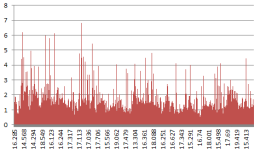
Here is my number crunching showing positive differences between frames render times over standard deviation (1.2ms here).

Analysis.PNG

Unfortunately thats taken with the stutter fixed - its intended to demonstrate the the technique. Max spike of 7 std dev * 1.2 ms / 1000 = 0.0087. So the worst frame was 0.0087 seconds late. This glorious site doesn't allow uploads of Excel files so here are the formulas:

Excel.jpg


------------------------------------------------------------------------------------------

And finally it seems that one can work around many micro stutter issues by running the game in borderless windowed mode. This seems to let the OS sort out the screen tearing - but loses xfire & multimonitor support.

http://pcgamingwiki.com/wiki/Borderless_fullscreen_windowed

Still investigating the best way to do that & haven't measure the effect yet.

------------------------------------------------------------------------------------------

Anyway...mission accomplished. Seems to run on Ultra high with high res pack smoothly.

- - - Updated - - -

oops...the labels on the X axis are wrong. Should be raw time intervals, not deltas. Doesn't really affect anything though.
 
Interesting info, when I get back into Skyrim I'll make sure to take a look into this issue. :)
 
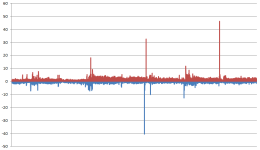
Insane...windowed mode is better. And not just a little bit...miles better. :wtf:

Zero hit on performance (well its 60fps either way), but much more consistent frames. Settings otherwise identical (resolution etc). Used the Skyrim intro without mouse input...so the scene should be identical too.

Blue is windowed, red is fullscreen. Closer to zero is better. These are positive diffs between frame times. So if frame B takes twice as long as frame A then it'll show a spike equal to how much long in ms.
Windowed.PNG

Haven't managed to get the taskbar to go away cleanly nicely though. For improvements that big I'll find a way though.

Edit:
Found one that works nicely...
http://skyrim.nexusmods.com/mods/4/?#content
 
Last edited:
This tool looks like it should work for all games.
http://forums.steampowered.com/forums/showthread.php?p=30525996


If you need to hide the windows cursor then this Autohotkey script will do the trick

Credit for script to lonewolfdon
; Script to hide cursor http://forums.steampowered.com/forums/showthread.php?t=1432431; Minor edits by Nirklars

SetWorkingDir %A_ScriptDir% ; Ensures a consistent starting directory.


SystemCursor("Init")

SetTimer, CheckIdle, 250
return

CheckIdle:
if WinActive("ahk_class Skyrim")
{
SystemCursor("Off")
}
else
{
SystemCursor("On")
}
return

#Persistent
OnExit, ShowCursor ; Ensure the cursor is made visible when the script exits.
return

ShowCursor:
SystemCursor("On")
ExitApp

SystemCursor(OnOff=1) ; INIT = "I","Init"; OFF = 0,"Off"; TOGGLE = -1,"T","Toggle"; ON = others
{
static AndMask, XorMask, $, h_cursor
,c0,c1,c2,c3,c4,c5,c6,c7,c8,c9,c10,c11,c12,c13 ; system cursors
, b1,b2,b3,b4,b5,b6,b7,b8,b9,b10,b11,b12,b13 ; blank cursors
, h1,h2,h3,h4,h5,h6,h7,h8,h9,h10,h11,h12,h13 ; handles of default cursors
if (OnOff = "Init" or OnOff = "I" or $ = "") ; init when requested or at first call
{
$ = h ; active default cursors
VarSetCapacity( h_cursor,4444, 1 )
VarSetCapacity( AndMask, 32*4, 0xFF )
VarSetCapacity( XorMask, 32*4, 0 )
system_cursors = 32512,32513,32514,32515,32516,32642,32643,32644,32645,32646,32648,32649,32650
StringSplit c, system_cursors, `,
Loop %c0%
{
h_cursor := DllCall( "LoadCursor", "uint",0, "uint",c%A_Index% )
h%A_Index% := DllCall( "CopyImage", "uint",h_cursor, "uint",2, "int",0, "int",0, "uint",0 )
b%A_Index% := DllCall("CreateCursor","uint",0, "int",0, "int",0
, "int",32, "int",32, "uint",&AndMask, "uint",&XorMask )
}
}
if (OnOff = 0 or OnOff = "Off" or $ = "h" and (OnOff < 0 or OnOff = "Toggle" or OnOff = "T"))
$ = b ; use blank cursors
else
$ = h ; use the saved cursors

Loop %c0%
{
h_cursor := DllCall( "CopyImage", "uint",%$%%A_Index%, "uint",2, "int",0, "int",0, "uint",0 )
DllCall( "SetSystemCursor", "uint",h_cursor, "uint",c%A_Index% )
}
}
 
Last edited:
Dude, you must've had a LOT of time to sort this out. That, and the FPS jumps must bother you a lot! :D I play all gamed on my Lenovo Y500A and Skyrim is smooth enough on ultra. Most games (including BF3) are playable (30 FPS+) on highest settings...
 
Dude, you must've had a LOT of time to sort this out. That, and the FPS jumps must bother you a lot! :D I play all gamed on my Lenovo Y500A and Skyrim is smooth enough on ultra. Most games (including BF3) are playable (30 FPS+) on highest settings...

Once you've experienced smooth, 100fps gaming for a while, you'll realise how crappy 30fps actually is.

I want to see what these tweaks are like on my new rig. I have high hopes for a gorgeous, smooth skyrim experience :D
 
Back
Top