Understanding Networks, Network Adapters and the TCP/IP protocol

I don't want this thread to die!!

So, here is a question. Can someone explain the uses and reasons for the different port allocations for network traffic? I know there are hundreds of ports specifically for certain services and functions for both TCP and UDP, but I've always just known what the basics ports were allocated to, but no real understanding of the significance thereof.

It's actually an oldish thing of back in the Unix days when ports were opened on a system the use of the port was exclusive the the application that opened the port. Thus ports had to get registered and is how standard ports were defined as, so that application developers can work around known registered ports. This is largely legacy now, but is still very much in play. I can elaborate some more if you want me to, but that is the "in a nutshell" explanation.
 
It's actually an oldish thing of back in the Unix days when ports were opened on a system the use of the port was exclusive the the application that opened the port. Thus ports had to get registered and is how standard ports were defined as, so that application developers can work around known registered ports. This is largely legacy now, but is still very much in play. I can elaborate some more if you want me to, but that is the "in a nutshell" explanation.

Thanks that makes sense. Well, within the scope of this thread, maybe some elaboration wouldn't be out of the question. Seeing as it was used for application specific tasks, I would like to know if that kind of "exclusivity" is still in place within modern networks. Also, was there a defining moment that caused the change to more modern tech?
 
So the concept of ports were actually established by the developers of ARPANET (Advanced Research Projects Agency Network - the first users of TCP/IP and the precursor to modern day internet as we know it). It was initially known as socket number (interesting thing is that *NIX based systems will still refer to ports as sockets). The port number is actually transmitted as part of the packet header as a 16-bit integer (hence why values range between 0 and 65535). Only one process may bind to a specific IP address and port combination using the same transport protocol. You can however have your HTTP server bind to your IP and TCP port 80 and say get FTP to bind to UDP port 80.

The reality is that currently IANA controls the official assignments of port numbers, however many unofficial uses of both well-known and registered port numbers occur in practice. So how old is registered ports? Try 43 years! It was first documented (RFC 322) in 1972.

Now for some cool port numbers. Port 666 is a registered port, recognized by IANA and officially designated to Doom (yes, that doom that came out in the early 90's)

Steam has the following registered ports : 1200 (UDP), 1725 (UDP), 27036, 27000–27030 (UDP), 27014–27050 (TCP)
 
Amazing. Thank you for sharing. At work we have quite a few URL that will be accessed with the port number as suffix, eg. /8080.

Can't imagine people have basically been using 43 year old tech and ideas within the IT landscape.
 
Riddle me this Mr Fish;

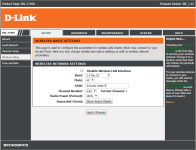
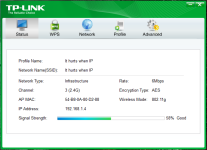
I have to run wifi in my house. PC is upstairs and router is downstairs. PC has a 150mbps dongle. my signal strength stays between 95% and 100%. BUT, my connection speeds fluctuates between 1mbps and about 39mbps and sometimes just disconnects.

I have tweaked everything I can think of but nothing is working.

Also, this is has only been a problem for about a month now. it used to run between 120 and 150 mbps

:cry:
 
Do you have an Android phone? If so, then install https://play.google.com/store/apps/details?id=com.farproc.wifi.analyzer

You might also want to look into potentially disabling 802.11n and switching to 802.11g and possibly a different channel. This will drop your maximum throughput, but should increase stability.

thank you kind sir. I will make these adjustments tonight and revert ASAP :D

currently running auto channel. it's on 1 mostly and accorting to the TP-Link wifi software's buitl-in scanner I'm the only one on that channel
 
Last edited:
thank you kind sir. I will make these adjustments tonight and revert ASAP :D

currently running auto channel. it's on 1 mostly and accorting to the TP-Link wifi software's buitl-in scanner I'm the only one on that channel

NB - Set both the router and the dongle to operate on 802.11g; n is faster, but can be buggy over distance with walls and other electric/electronic interference in the signal path
 
still no improvement :cry:

I'm at the end of my tether. I'm ready to try power line networking...
 
Amazing. Thank you for sharing. At work we have quite a few URL that will be accessed with the port number as suffix, eg. /8080.

Can't imagine people have basically been using 43 year old tech and ideas within the IT landscape.

Glassfish typically occupies ports 8080 and 8181 for applications.
 
I have good news and bad news. Try turning off Auto channel selection on your Router. If your disconnects get worse your router is probably fried. I actually had to chuck a D-Link DSL-2740U in December which locked up for no reason and would disconnect WiFi as and when it liked.

but but but.... It's brand new! :eek:

also, I had the same issue with the previous router (it was a trendnet)
 
but but but.... It's brand new! :eek:

also, I had the same issue with the previous router (it was a trendnet)

Hmm...try switching that auto channel shit off first. See if the problem goes away. Mine would hop through channels and then just lock up and require a reboot and then it left me at its mercy as to if and when it would activate the WAN link and the WiFi...sometimes just the one would come on and not the other, some times both would stay off. I blame Eishkom though.
 
Hmm...try switching that auto channel shit off first. See if the problem goes away. Mine would hop through channels and then just lock up and require a reboot and then it left me at its mercy as to if and when it would activate the WAN link and the WiFi...sometimes just the one would come on and not the other, some times both would stay off. I blame Eishkom though.
Well I'm on a static channel now and still the problem persists. Even tried the windsurfers but they made no difference. I switched the router to broadcast N only which at least makes the peak speed spikes a bit higher.

Seems I'm just going to have to accept that this is my life now :cry:
 
Well I'm on a static channel now and still the problem persists. Even tried the windsurfers but they made no difference. I switched the router to broadcast N only which at least makes the peak speed spikes a bit higher.

Seems I'm just going to have to accept that this is my life now :cry:

I'm positive it's the router though. I'll see if I can dig up my 2740U, however if I recall correctly the last time they released firmware for this router was back in 2013. However I doubt if it's a firmware issue, switched to a Cisco 860VAE-W-K9 as my home router simply because (a) I could (b) it's Cisco (c) i can manage and monitor it like I manage stuff at the office
 
Back
Top