
James
MyGaming Alumnus
Windows 8 only sold as upgrade at retail
There are no stand-alone versions of Windows 8 to be sold at retail
There are no stand-alone versions of Windows 8 to be sold at retail


Windows 8 only sold as upgrade at retail
There are no stand-alone versions of Windows 8 to be sold at retail
How do I buy an upgrade to Windows 8?
When you run Upgrade Assistant, if it finds that your PC is ready to upgrade, it provides a recommendation for which edition to buy, with the option to buy, download, and install Windows 8 from there.
Or if you prefer (and if it is available in your region), you can buy the upgrade as a DVD from a participating retail store. Note that if you're upgrading from a DVD, you must have Windows running on your PC when you begin the upgrade. If you'd like to reformat your hard drive, you can do so as long as you start your PC from media and then format your hard drive from within the setup experience for installing Windows, and not prior to it.
For more info about how to buy an upgrade in your region, visit the Buy Windows 8 webpage.[link]

 new installations and not upgrades !!!
 Put what matters most right on your Start screen. Get instant access to your people, apps, and stuff, so you can spend less time searching and more time doing. Windows 8 is smooth, intuitive, and designed to let you do what you want, the way you want.
Note: This DSP version includes a license and the DVD (no packaging or manuals) and should be purchased with new hardware (New PC, Server, or authorised components) for new installations only. The primary license is only valid for the purchased hardware and cannot be transferred to a new system - it lives and dies with the purchased hardware. The image is for illustration purposes only. You cannot upgrade with this product.
 :
:Step 1: Use the Upgrade Assistant to qualify the PC and pay the $40 (US)
Step 2: When the "Install Windows 8" message appears, select "Install by creating media" to create a bootable USB flash drive or an .iso (a disk image) file.
Step 3: Wait for the Assistant to download the Windows 8 Pro installation package and create the bootable media or .iso file. The flash drive must be have 3GB or more of free space available.
Step 4: Burn the .iso file, if that's the path you chose, to a blank DVD.
Step 5: Use that USB drive or DVD to boot the PC.
Step 6: When you get to the screen in Setup that asks, "Which type of installation do you want?' choose "Custom."
Step 7: Select a disk partition for the OS in the next screen. At this point, you can create a new partition if there's enough space available, or reformat the drive.
Step 8: Continue with the installation of Windows 8 Pro.
[link]

Microsoft has confused retail resellers on the pricing and availability of its Windows 8 operating system, providing no specific details despite a major licensing change.
The company told attendees of its launch event in Sydney today that it would only sell upgrades of the software in retail stores - no boxed copies of the full OS would be available.
JB HiFi staff have also reported that Microsoft had only made upgrade versions available.
But representatives from Harvey Norman and Dick Smith told our sister publication CRN they were “definitely†selling full boxed versions of the software in their stores -- the Windows 8 Pro box for $58.
After checking out some of the websites for these major retailers, we swung by the local Dick Smith Electronics store at North Sydney, and asked for a boxed copy of Windows 8 Pro. After dropping the $58 and chatting with the very pleasant clerk about how cheap the new Windows was, we headed back to the office, and fired it up in the labs.
Our testing was done using a testbench witth the following specs - AMD A10-5800K APU,Gigabyte F2A85X-UP4 Motherboard, 4GB DDR3 and a Plextor M5 SSD. We ensured that the SSD in question was unformatted and straight out of the box from the distributor. We chose a clean install of Windows 8, typed in the included product key and the OS was installed in no time at all.
So far so good, there was no sign of any issues, and we were able to run Windows update and navigate the web. Live tiles began updating as they were supposed to, and it looked like online reports of the boxed copy working were correct.
Deciding to push our luck, we activated the operating system. This was the point where we first encountered problems – we were asked to re-enter our product key (a sure sign that something was up), and once we did this an error message popped up telling us that the software could only be used for upgrading, not clean installation.
Given the confusion from the launch, we suspected that this would be the case. It is also a cautionary tale that you can’t believe the reports that we are seeing about it working without a copy to upgrade from. As is the way with Windows 7, you’ll have to activate it at some point, and that is where the difference between OEM and these retail boxes comes into play.

Why is this the case?
During the launch, and in the press materials, Microsoft neglected to mention the licensing changes it has introduced with Windows 8.
Microsoft previously offered OEM licenses for systems builders, as well as retail upgrade licenses and full retail licenses.
Systems builder licenses are traditionally significantly cheaper than the full retail license, and previously weren’t available directly to end-users. With Windows 7 and prior, the OS was bundled onto hardware and sold via a reseller to the customer.
Microsoft now has done away with the full retail licenses -- meaning full boxed versions will no longer be available in stores -- and added an element to its systems builders licence that allows for personal use.
Microsoft refused to provide any official pricing or launch information on this version, but it is currently available on a number of online stores from upwards of $100 for the 32-bit, and over $150 for the 64-bit versions.
Ars Technica reported that the retail licenses now only covered simple upgrades. There appear to be no changes to its major OEM and Enterprise licenses, meaning no headaches for Microsoft resellers.
While we were undertaking our lab testing, CRN contacted Microsoft multiple times for comment and is yet to receive a response.
* in SA. Weak headline.
I think I'll rather pay a 100 more & go with incredible....less hassle if it goes sideways.


I've already noted this on myg and myb... behind people
What I did:
1. use upgrade adviser
2. buy and note down key
3. exit adviser (I already had a win 8 pro iso)
4. make bootable usb from windows 8 pro iso
5. boot from usb
6. insert key and custom install
done. not so hard. easy.
I see. Edited my comment above to highlight that it is inaccurate.This is a global situation, not just SA.

Can you guys please post some pics of the interface etc. If you don't mind

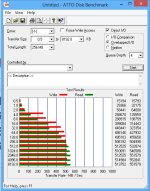

Firstly creaming over my SSD... since it is now on SATAIII. I'm getting the 515wr/555rd now
View attachment 3827


