Your Preferred Phone Setup

Hagan

Check my new Avatar
Lately, most of us have a phone (or phones) that have (make use of) an OS to function, in saying this, many use the stock OS and its stock launcher but others (like myself) prefer a different look, maybe something not really supported by the stock soft/firmware.

What desktop wallpapers do you typically use?
Do you have (shortcut) icons on the desktop (main screen)
Do you make use of a 3rd party phone locker/unlocker?
What apps do you find useful and make use of on a regular basis?

Interface:

I prefer a 'clean-look' interface and have a side-scrolling Dock rather than icons on my main screen.
Widgets:
I do not make use of weather widgets (on the main screen), mine sits in the top-mount "taskbar". If pulled down, I get a more detailed description of the weather.

My wallpaper:

1. Games
2. Cars
3. Women
4. OS (Android)

Notifications:

I download various sound effects and set them relative to the app, making it easier to identify (audibly) what notification I just received without the need of having to check my phone first.

Apps:

1. Grid Watch (to know when Eskom is going to do its thing)
2. Tapatalk - MyGaming notifications only
3. Gmail - Inbox
4. WhatsApp
5. Dropbox
6. Twitter - really just for nots
7. GO Launcher, GO Locker and GO keyboard (some things stock just doesn't do well, by comparison (subjective)
8. QuickPic and PicsArt - Picture viewer and Editor, respectively

If you do not wish to share, that's your prerogative :) if you do, and know of apps and widgets which others may find useful (paid or free), name them.
:)
 
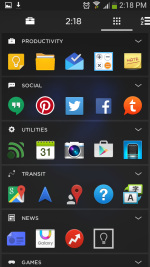
I use Aviate launcher for my phone, I turn off all useless apps that they force on us. As for apps I just have a few games, greenify, whatsapp, MXplayer and winamp.

Screenshot_2015-07-24-14-18-45.png
That is my main screen

Screenshot_2015-07-24-14-18-58.png
How Aviate sorts my apps.
 
[MENTION=2530]Wyvern[/MENTION] Iv been using aviate for a few years now and I must say i think its fantastic... I would seriously struggle to go back to the normal android OS... What i really like is how it changes your main "apps" through out the day as it picks up where you are, for example, when u wake up it gives you all morning apps (you can customize them of course) like weather, news, alarm clocks, calendar etc, then when you get in the car it picks up your movement and gives you all the navigation tools, and things u may use in the car like MP3 Player, then when you get to work it switches to work apps... Its really cool and insanely clever...
 
[MENTION=13244]Tom[/MENTION] I totally agree, I can't use a normal launcher anymore. I have it on my tablet as well and its such a wonderful launcher. It makes life so much easier.
 
I tried Aviate now, but I'm just too used to my current Launcher. Just so many more the things I can do.
 
I tried Aviate now, but I'm just too used to my current Launcher. Just so many more the things I can do.

Aviate is 1000x better than go launcher - I used it for a day . Use aviate for at least a week - then decide. The app is really intuitive and amazing
 
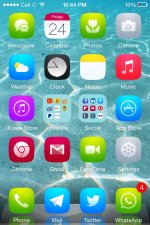
Jailbreak ios 8.4 (presently)

with classic sounds classic Dock & classic battery

some peaceful wallpaper , not a fan of cluttered backgrounds

custom theme (soft remix 3 at present)

IMG_1702.jpg


other Mods

IMG_1703.jpg

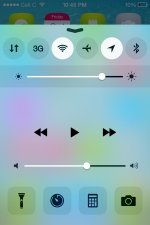
CC Settings
Flurry
alkaline
at&t operator Logo
 
Last edited:
Samsung Galaxy Note4 (rooted on day1) ;) Android all the way, can do so much with this OS.

I have the standard Touchwizz launcher, had no need for 3rd party launchers as this one works perfect and never had any issues either.
My background is a picture of The Flash

1.Custom boot animation

2. Most used apps:
- BBM
- Whatsapp
- Facebook

3. Favourite games:
Clash of Clans
Siegefall
Smart Remote

My Interface is not sorted in any way, all apps/games are randomly on my screen . I know exactly where they are.

Phone is pretty much stock, until I get bored with it then custom ROMs will come into play, eventually.
 
i just upgraded to Lollipop on my Samsung S5

Using the standard touch wiz the phone came with. i did change the keyboard from the standard one to Swift keyboard as it learned what word most often and prioritizes them. Also it recognizes afrikaans.

my background is a picture of Blackwidow comic art

Most used apps:
1)facebook
2)Whatsapp
3)Instagram
4)google Inbox

most useful apps on my phone
1)colour flash light
2)Grid watch
3) weatherbug
4) lookout antivirus
 
Do you make use of a 3rd party phone locker/unlocker?
No

Interface:
I use the standard interface. I like it :D
4 home screens

Widgets:
Default weather Widget.
Tapatalk forum shortcuts
SPlanner Monthly View

My wallpaper:
Cars, Nature & Women

Notifications:
I don't change sounds just notification light colours.

Apps:
1. Afrihost
2. Autehnticator
3. Authy
4. CODAW
5. Crescent Lifestyle
6. ES File Explorer
7. Evernote
8. Facebook
9. Firefox
10. Gmail
11. Groupon
12. Gumtree
13. Helium
14. iMuslim
15. Instagram
16. JRA find and fix
17. Junos Pulse
18. My Cars
19. MyMTNcontract
20. Pages Manager
21. Price check
22. PVR Remote
23. Root Browser
24. Standard bank
25. Ster-Kinekor
26. Takealot
27. Waze
28. Yahoo mail
29. Tapatalk - MyGaming, MyBroadband
30. Gmail - Inbox
Yikes I have a lot of apps
 
Screenshot_2015_07_27_12_49_46.png

Sony Xperia Z2
love this phone , just upgraded to lolipop havent done much on the OS.
 
Now I am curious to see how many apps I have on my phone:

Apps:
1. Adapt Sound
2. Adventure Capitalist
3. Google Authenticator
4. Buzzfeed
5. Chrome
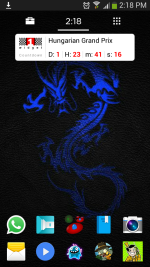
6. F1 Widget
7. Official F1 app (first time I havent bought it using the limited free version - R300 for a year sub was just to much for me)
8. Facebook
9. Flashlight
10. Galaxy Domination (one of my very first games on my first touch screen phone and I still play it)
11. Gloobies Lab
12. Google and its various apps
13. Greenify
14. Gridwatch
15. Inbox
16. Keep
17. Maps
18. Messenger (fb)
19. MX Player
20. My Files
21. Office Suite
22. Play Books
23. Pushbullet
24. PvZ2
25. Steam
26. Tapatalk
27. Twilight
28. Twitter
29. Unified Remote
30. VLC
31. Whatsapp
32. Whitenoise Concentration
33. Windfinder
34. Zedge
 
I did not make an App count either:

1. Chrome
2. Gmail - Inbox
3. Google Plus
4. Twitter
5. WhatsApp
6. GO Locker
7. Dropbox and Dropsync
8. QuickPic
9. MX Player
10. Grid Watch
11. Takealot
12. Rocket Player
13. Word Search
14. Go Weather
15. TouchPal Keyboard
16. Tomb Raider: Relic Hunt
17. Google Drive
18. One Touch Drawing
19. PicsArt
20. Dead Trigger
21. SwiftKey
 
Back
Top