



The ports we use to connect displays to our computers have changed rapidly in the last few years, with the current latest and greatest co-existing next to 25 year old technology. Below is a brief overview of how display ports have changed since the introduction of VGA 25 years ago.
VGA
The first mainstream display port on our list is the ever-present VGA port. Designed and produced in 1987, the VGA port supported a maximum resolution of 640 x 480 at 70Hz, using 24Mhz of signal bandwidth.
The connector was a three-row 15-pin DE-15 connector, also known as a D-sub connector, and often appeared in blue to differentiate itself from similarly-shaped COM ports of the 90s.
Later in its life, the VGA port supported resolutions of up to 2048×1536px at 85Hz, using the maximum 388Mhz of bandwidth provided by the bus.
VGA ports are still found on lower-end graphics cards and laptops today, allowing them to connect to legacy monitors. Some modern computer screens and televisions still support the port in addition to newer ports.

A typical VGA cable
DVI
The Digital Visual Interface (DVI) was designed and produced in 1999 to replace the aging VGA standard that had been around for over 10 years.
DVI cables came in single-link and dual-link forms – with the latter providing twice as much bandwidth as the former. The maximum resolutions each could display out to were 3,840 × 2,400 at 17Hz and 3,840 × 2,400 33Hz, respectively, though very few monitors at the time supported these resolutions.
DVI cables were also split into three more categories, DVI-A, DVI-D, and DVI-I.
- DVI-A referred to a port that outputted analogue signal only, and could be backwards compatible with the analogue VGA standard.
- DVI-D ports outputted only digital signal, and are not backwards compatible with VGA. They are however compatible with HDMI and DisplayPort.
- DVI-I works with both digital and analogue signal, and is compatible with analogue and digital interfaces including HDMI, VGA and DisplayPort.
DVI ports are still commonly found on graphics cards, as well as monitors and televisions. Even the latest high-end cards, such as the HD7970 from AMD, have a DVI port – 13 years after it was released.

A DVI cable, still found on the latest high-end graphics cards
HDMI
HDMI has been around for longer than most people think. Designed in late 2002, production started in 2003 – followed by mainstream availability in early 2004.
HDMI was different from its predecessors in that it could transport both video and audio over one cable. This was done to improve syncing between video and audio streams, as well as reduce cable clutter. There are more technical reasons too, read all about them here.
In version 1.4 released in May 2009, HDMI brought with it a range of interesting technologies, including 3D support. Other benefits of HDMI 1.4 include Ethernet over HDMI, and support for 4K resolutions as well as FullHD (1920 x 1080) at 120Hz.
A version of HDMI using a smaller port is known as mini-HDMI, and is commonly found on tablet PCs and smartphones, allowing them to output content to HD displays.
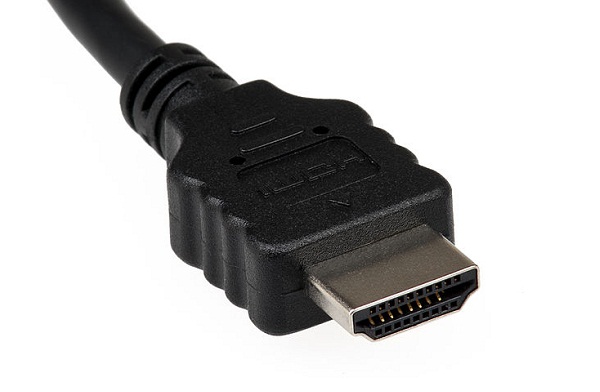
HDMI, first of the "modern" ports
DisplayPort
Designed in 2006, DisplayPort was never meant to replace HDMI, but instead offer a royalty-free alternative that could work alongside HDMI. Production only started in 2008 however, and mainstream device availability wasn’t very common until 2009.
The benefits of DisplayPort is that it can transport a wide range of data over the cable, rather than being limited to video or audio. It can also work with USB data, for example, and Ethernet in some cases.
DisplayPort can support 4k resolution monitors at 60Hz, though it is not limited to this standard resolution. The only thing limiting DisplayPort resolutions is the amount of available bandwidth. This is the reason why AMD has decided to incorporate the technology on modern graphics cards, as it works well with AMD Eyefinity 2.0 technology which you can read about here.
The other benefit of DisplayPort 1.2 is that it can handle multiple video streams over one port, allowing you to output separate data to two different displays.
Apple took the technology one step further and introduced miniDisplayPort using a smaller connector that integrated better with devices like the MacBook Pro. Interestingly, Apple decided to license the technology with no fee, allowing companies like AMD to implement it at no cost.
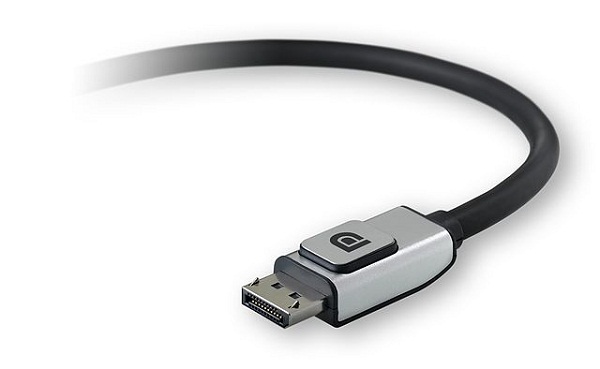
A modern DisplayPort cable
Thunderbolt
The most modern display technology, Thunderbolt was developed in 2010, while production started in 2011.
Primarily developed by Intel with assistance from Apple, Thunderbolt was originally known as Light Peak as it planned to use optical cables to transfer data. However, Intel found that copper would provide the desired speed at a lower cost, so the fibre technology idea was shelved for future use.
One of the benefits to having Apple as a partner, is that Thunderbolt uses the same connector as Mini DisplayPort, allowing for backwards compatibility in some scenarios.
The technology works by combining PCI Express data and DisplayPort data, allowing them to be carried over the same cable simultaneously. A single Thunderbolt port supports a hub system, allowing you to connect up to seven Thunderbolt devices. Two of these devices can be be high-resolution displays using DisplayPort technology.
The real beauty of Thunderbolt however, is that it is backwards compatible with VGA, DVI, HDMI, and DisplayPort technologies through an array of different adapters.
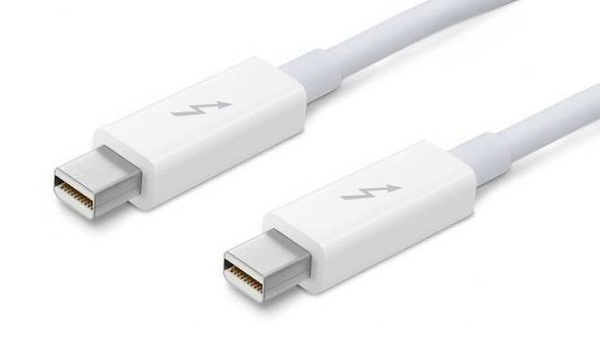
Latest technology, a Thunderbolt cable





 Loading ...

There’s nothing beautiful about thunderbolt. USB3 FTW!
But honestly, the Video+PCI-E link, allows for a display/Monitor to contain expansion ports, such as USB3 and other Ports-of-the-future directly linked to your PC.
Single cable link FTW! Thunderbolt? not a chance at Intel prices/Apple Tax