


Trying to figure out the best frame per second (FPS) output to match your monitor’s refresh rate (Hz) is confusing for many gamers.
The maximum refresh rates of modern monitors typically range from 60Hz up to 360Hz – but the actual frame rate you should target will vary based on the games you play, as well as your GPU.
Many South Africans have older GPUs and are just trying their best to get 30 FPS without sacrificing too much image quality for most games.
However, even gamers with weak GPUs should prioritise higher frame rates for certain games – even at the expense of texture sharpness.
If you have a stronger GPU, you can aim for anywhere from 60 FPS upwards, with the specific FPS target varying on a per-game basis.
All of this must also take into account factors like screen tearing, which can be jarring if you are not optimising your frame rate and refresh rate.
Therefore, whether you are looking to optimise your current rig without spending a cent, or you’re planning a full monitor and GPU upgrade, it pays to understand how these two metrics interact with one another.
Frame rate vs refresh rate
Comparing refresh rate and frame rate – or Frames Per Second (FPS) – is simple:
- FPS: The number of individual images (frames) your GPU renders every second.
- Refresh rate (Hz): How many times per second your monitor can update the screen to display a new image.
It stands to reason that there is little point having an FPS that exceeds your monitor’s refresh rate, as your monitor will not be able to display the additional frames your GPU is rendering.
For example, there is no point in having your GPU generate 120 frames per second if your monitor only refreshes 60 times per second.
This would mean that for every two frames your GPU is generating, one of them is not being shown, and is therefore wasting your GPU power.
Rather than generating these unnecessary frames, you should use this surplus GPU power to improve the quality of the frames you monitor will show.
The general rule of thumb is that your refresh rate should match or exceed your GPU’s FPS.
Sync technologies
The best case scenario is that your frame rate matches your refresh rate – as this means you are using both your GPU and your monitor optimally.
For example: If you have a 120Hz monitor, and your GPU can run the game at 120 FPS without sacrificing image quality, you are maximising both the refresh rate capability of your monitor, and your GPU’s full processing ability.
However, this is usually not possible or feasible, as your GPU and monitor are unlikely to perfectly align on every game.
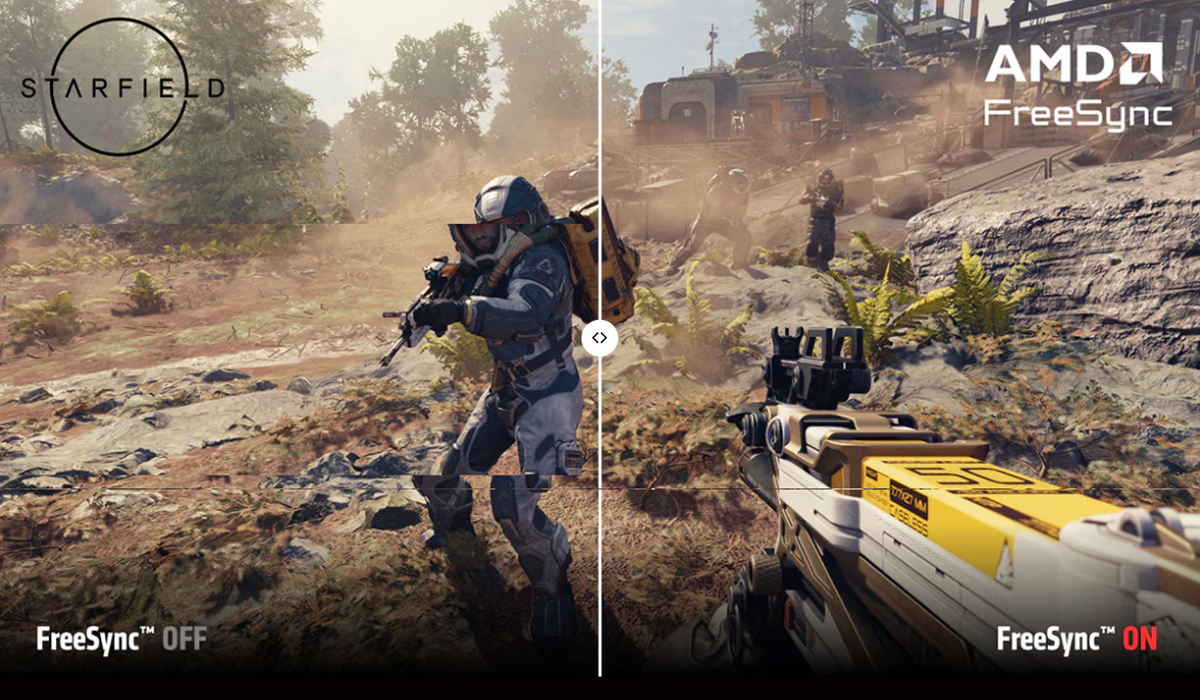
This is a problem, as when your FPS does not exactly match your monitor’s refresh rate, you end up with screen tearing.
Thankfully, there is a simple solution to this: synch technologies.
Synch technologies are available on almost every gaming monitor and reduce screen tearing or visual artefacts when your frame rates fluctuate.
The original synch technology, V-Sync, locks the framerate to the refresh rate – but since most monitors are at least 60Hz, it requires your framerate to be a minimum of 60 FPS to run well.
It essentially forces your GPU to wait until the monitor is ready for the next frame. This action eliminates screen tearing but comes at a cost – it introduces input lag and can cause stuttering if your FPS drops below your monitor’s refresh rate.
Nvidia’s G-Sync and AMD’s FreeSync technologies came after V-Sync, and are known as adaptive sync technologies, or Variable Refresh Rate (VRR) technologies.
They essentially do the inverse of V-Sync. Instead of forcing your GPU to wait for your monitor, they force the monitor to wait for the GPU.
If your GPU only outputs 85 FPS but your monitor is 100Hz, they sync the monitor to the GPU, effectively resulting in the monitor operating as if it was a 85Hz monitor.
This ensures a much smoother gameplay experience, free from screen tearing and with much lower input lag than V-Sync.
It is important to note that G-Sync requires that you have an Nvidia graphics card, whereas FreeSync is supported across both Nvidia and AMD cards.
Buying a monitor
When buying a gaming monitor, it is important to take all of the above into account.
You should also consider the types of games you want to play.
Online first-person shooter games require higher refresh rates, as a smoother image can be the difference between who shoots first, and who shoots second.
In contrast, for single-player AAA games, you may want to sacrifice some refresh rate for a sharper, more aesthetically pleasing image quality.
Your gaming monitor should meet the capabilities of your GPU, while taking into account the types of games you play.
- If you plan on primarily playing competitive online games, you may be willing to sacrifice display resolution for a higher refresh rate (Such as a 1080p, 240Hz gaming monitor).
- If you are a single-player game who cares more about graphics, you will want a higher-resolution monitor even if it means sacrificing refresh rate (such as a 4K, 100Hz gaming monitor).
- And if you plan to play a mixture of game types, your best option is to buy a monitor that finds a fair compromise (Such as a 1440p, 165Hz gaming monitor).






 Loading ...
