Android Root Thread

matt

Local caffeine junky
So this weekend I took the plunge and rooted my phone, and installed a custom ROM (Cyanogenmod 11) over the stock Samsung flavoured Android. It's way better, and I'm finally on 4.4.4 KitKat, where I was stuck on 4.2.1 JellyBean with the official updates, and I'm saving space and memory by not having all the bloatware manufacturers bundle in.

After some discussion in TK, it seems like it might be worth having a thread to discuss this sort of thing, because it it a bit daunting if you haven't done it before.

I'm using a Galaxy S3 Mini, which apparently isn't officially supported by Cyanogen, but I found an unofficial one here http://novafusion.pl/downloads/

I used Kingo Root to root the phone, and I tried both CWM and TWRP for custom recovery, both work well, both for backup and recovery of your existing software, and for installing the new software, but TWRP seems nicer, and has a touch interface.

I backed up all my apps and data using Titanium Backup beforehand, but when I started up, Google asked if I wanted to recover my apps, and it downloaded all my apps for me, so I didn't even bother with recovering them.
 
Cool beans. I'm at work now, so I'll post what I did and used to get my phone rooted at a later time.

Okay, so, I have the Galaxy S3. It has been extremely slow for the last month or so, up to a point where it would basically hang and I would remove the battery. So I decided to flash my phone to see if I can get some speed back. Didn't really care if it was a fresh Samsung OS or a Custom ROM.

In the end, I went with CyanogenMod 11. I downloaded the latest snapshot build for my phone, since the last stable build was more than a year old and was still CM 10.2, and I did not want to install a Nightly build and end up with stability issues. You can basically just Google "CyanogenMod" and then your phone name (Galaxy S4, for example) and you should get a download.cyanogenmod link.

Now, for the next part, I'll just post what I used. Just know that there is more than program that can be used.

Before starting this process, BACKUP!! Personally I forgot to sync my phone with Google before doing this, but I did make a physical backup on my PC of everything (contacts, messages, photos, apps, etc). After installation I only had to restore my contacts and messages, everything else was still available and did not get wiped (even though everything was on the phones' storage, I don't have an SD card).
Also copy the ROM zip file to somewhere on your phone, because you will install it from your phone. I also downloaded gapps (Google apps), it's a ROM that contains most of the standard Google apps (Play Store, Hangouts, etc).

I used Odin to install ClockworkMod (CWM) Touch Recovery. This link is specifically for the Galaxy S3 (it might also work for other Samsungs, but who knows) http://trueandroid.com/install-clockworkmod-recovery-6-0-4-4-on-galaxy-s3-gt-i9300-how-to/
One thing in this guide that screwed me over and caused me to take much longer to get the ROM installed was number 8 in the guide. It says to turn on Auto Reboot. What this means is that, after Odin has installed CWM, the phone would restart itself. Each time it restarted though, the phone flashed back to the stock recovery software.

After this is done and you manage to boot into CWM, the hard part is over. Here you simply wipe your phone, clear the cache and also under the advanced tab you clear your Delvik cache (or something like that). After you did that, you simply pick install from zip and browse to where the ROM zip file is and install. It took my phone about a minute to finish. After that, you can also install gapps the exact same way.

After you're done, you can restore your contacts (or if you synced it with Google beforehand, it should sync to your phone again once you link your Google account to your phone again).

I might have forgotten some things now, but this is everything I can remember right now. I also tried to condense it, as this is already quite a wall of text :3
 
Last edited:
I haven't felt the need to root since my HTC wildfire. I have the LG G3 and it's pretty perfect as is.
 
Rooted my Note4 on day1 after I bought it. Removed unused system apps and bloatware to free up memory and save battery. - Not that I really need it as the phone lasts 2 days average on a single charge.
 
Rooted my Note4 on day1 after I bought it. Removed unused system apps and bloatware to free up memory and save battery. - Not that I really need it as the phone lasts 2 days average on a single charge.

What ROM did you root it with? I was really considering getting a Note4, but 2 thing prevented me from getting it. The price and the size. I know the size I would probably get used to within a week, but meh.
I ended up buying an LG G3, hopefully it will be delivered later this week (bought it from orange) :)
 
What ROM did you root it with? I was really considering getting a Note4, but 2 thing prevented me from getting it. The price and the size. I know the size I would probably get used to within a week, but meh.
I ended up buying an LG G3, hopefully it will be delivered later this week (bought it from orange) :)
I was looking at a review of the
LG G3 the other day. Looks like an awesome phone
 
Oh my brother used to root my phones for me all the time (considering I got the hand me downs at least 2 years old :P) The best way to save sms's are to get sms backup and restore.
 
Ugh...

I rooted my S4, put CM on it and everything went fine for a bit. Then stuff stopped working and random Reboots happened. Battery started draining with some weird process called Gpsd.

Then I bricked it.

I then moved on to OmegaRom and the same happened there.

Eventually I found a stock Samsung Rom from Russia. Everything went well, until gpsd came back. I know have given up and charge my phone 3 times a day.

I've looked into gpsd and no advice seems to help. Any similar problems here?
 
Hey I have been running Carbon Rom on my S3 for ages now love it, the GPSD problem seems to be related to a specific app running on the device.

Switch back to a custom ROM :D looks like it only affects stock or stock based roms

edit:
looks like it might be samsung's remote location service , friend of mine is messing with his will let you know if it helps or if you would like to try yourself:

http://www.gadgethelpline.com/gpsd-s...-battery-life/
 
Last edited:
Ugh...

I rooted my S4, put CM on it and everything went fine for a bit. Then stuff stopped working and random Reboots happened. Battery started draining with some weird process called Gpsd.

Then I bricked it.

I then moved on to OmegaRom and the same happened there.

Eventually I found a stock Samsung Rom from Russia. Everything went well, until gpsd came back. I know have given up and charge my phone 3 times a day.

I've looked into gpsd and no advice seems to help. Any similar problems here?

What build of CM did you use? Did you use a Nightly build, or a Snapshot build?
 
Hey I have been running Carbon Rom on my S3 for ages now love it, the GPSD problem seems to be related to a specific app running on the device.

Switch back to a custom ROM :D looks like it only affects stock or stock based roms

edit:
looks like it might be samsung's remote location service , friend of mine is messing with his will let you know if it helps or if you would like to try yourself:

http://www.gadgethelpline.com/gpsd-s...-battery-life/
Yeah I've looked at the remote locations thing. Went away for 3 hours then came back
 
What ROM did you root it with? I was really considering getting a Note4, but 2 thing prevented me from getting it. The price and the size. I know the size I would probably get used to within a week, but meh.
I ended up buying an LG G3, hopefully it will be delivered later this week (bought it from orange) :)

Did not flash a new ROM..yet. Just rooted with something I found on the xda forum :)
 
What ROM did you root it with? I was really considering getting a Note4, but 2 thing prevented me from getting it. The price and the size. I know the size I would probably get used to within a week, but meh.
I ended up buying an LG G3, hopefully it will be delivered later this week (bought it from orange) :)
I got an s5 brand new for R4900. I don't mind touchwiz. The LG g3 looks great. One feature that would have finished it would have been water proofing. Was hoping to get the Sony xperia z2/ or z3. I like Samsung but am too scared to lose the warranty from rooting.

By the way you basically only have a warranty through orange. You just bought a grey phone. That means they've used different hardware and or is am import and does not have local warranties.
 
I installed Greenify last night, apparently it can make your battery last much longer
 
i rooted my galaxy tab 2 with cf auto root (was an easy process)

considering one of the custom kitkat roms but ive became so accustomed to the touchwiz interface from samsung
 
So this weekend I took the plunge and rooted my phone, and installed a custom ROM (Cyanogenmod 11) over the stock Samsung flavoured Android. It's way better, and I'm finally on 4.4.4 KitKat, where I was stuck on 4.2.1 JellyBean with the official updates, and I'm saving space and memory by not having all the bloatware manufacturers bundle in.

After some discussion in TK, it seems like it might be worth having a thread to discuss this sort of thing, because it it a bit daunting if you haven't done it before.

I'm using a Galaxy S3 Mini, which apparently isn't officially supported by Cyanogen, but I found an unofficial one here http://novafusion.pl/downloads/

I used Kingo Root to root the phone, and I tried both CWM and TWRP for custom recovery, both work well, both for backup and recovery of your existing software, and for installing the new software, but TWRP seems nicer, and has a touch interface.

I backed up all my apps and data using Titanium Backup beforehand, but when I started up, Google asked if I wanted to recover my apps, and it downloaded all my apps for me, so I didn't even bother with recovering them.
Exactly what I was looking for! I need to do this to a family members s3 mini. It keeps running out of memory with blarely any apps on it. bleh.
Thanks for the info!
 
I installed Greenify last night, apparently it can make your battery last much longer

It does indeed. hibernates some apps in the background.. thus saving CPU time and increases batterylife on a single charge. You can increase battery life and speed even further by disabling apps that starts up on boot
 
Exactly what I was looking for! I need to do this to a family members s3 mini. It keeps running out of memory with blarely any apps on it. bleh.
Thanks for the info!

Glad the thread is coming in handy. It's great so far, I was always running out of space before, but now I have loads of free space, even after reinstalling most of my apps, and the ability to move apps to an external SD card is fantastic (for the apps where the developer has enabled it). I'm also really enjoying the new operating system, although Samsung's contact manager was better than Google's People app, but I've now installed Contacts+, which looks pretty good.

The S3 mini isn't exactly a fantastic phone, so it's still a little slow at times, but the performance is definitely better than it was before I did this.

Just bear in mind that you will void the warranty when you root the phone, and make sure to make backups before you flash it. There is some risk of bricking the phone as well, but from what I understand, it's pretty safe these days, especially if you have backups, even if you don't, you can still download the Samsung ROM and flash that with Odin.


This is what worked for me with the S3 mini specifically. I am using an external SD card to save the install files and backups, should work on the phone memory but I don't know if you'll have space. I have an idea that wiping the system partition won't affect data, but I feel safer having it on an SD card. I also copied my backups to a PC just to be safe.


1. Enable developer options, and select USB Debugging. If you don't see Developer options in settings, go into Settings > About Phone, and tap the build number about 7 times, and it should give you developer options in the Settings menu.

2. Use Kingo Root to root the phone. It's a Windows app, but a nice one click root

3. Use TWP Manager to install TWRP as custom recovery. This will also make you install Busybox

4. Download CM11 and Google Apps zips from http://novafusion.pl/downloads/ and save them to the SD card. Get CM11 because CM12 is still in beta and so is likely not stable yet.

5. Use Titanium Backup to back up all your apps and app data. You can use it again to restore your apps and data after you've flashed the new ROM.

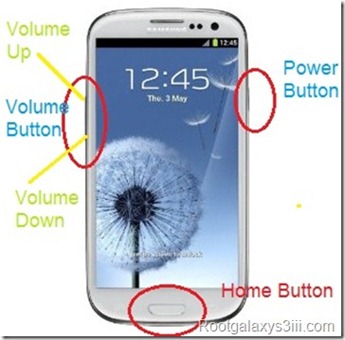
6. Press and hold Volume Up, Home and Power to boot into recovery mode. It should boot into TWRP (Team Win Recovery Project) instead of the stock recovery.

7_thumb.jpg


7. Make a full backup of your current system in TWRP. Change the backup save location to the external SD card if you have one. If you really want to be safe, reboot the phone normally and copy the backup to a PC, then boot back into recovery.

8. In TWRP, select wipe > advanced wipe, select System, Cache, and Dalvic cache. (I got stuck in a boot loop when I tried to install over the stock ROM, but it worked when I wiped the system partition first this way)

9. Once the wipe is complete, select Install, add the Cyanogenmod zip, then press Add more zips, and then select the GApps zip. Then swipe the slider to start the flash process

10. A Novafusion installer will run through installing CM11, I kept all the options on their defaults.

11. NB! At the end of the installer, make sure to uncheck the reboot your phone now option. You want to stay in TWRP so it can flash GApps.

12. Once GApps is finished flashing, there's an option to clear cache / dalvic, press that.

13. Once that has done, select reboot system to restart the phone

14. You should see a loader that looks like the image below. First boot takes a while so leave it for a few minutes and it should move onto a status message where it updates a bunch of apps, then it'll start up and go through the first run set up stuff. If it stays on the loader for a really long time, it might be stuck in a boot loop, you can then reboot back into recovery, and try a factory reset, or if all else fails, restore your backup from step 7.

cyanogenmod11loader.png


Anyway, after much trial and error, that's what worked for me. Hope it helps
 
Last edited:
I just used the installer on the Cyangenmod site, since the instructions for installing it on an S2 is actually wrong/out of date. The installer worked very easily. It even included the Google apps.
 
Back
Top