
PsychoFish
New member
Installed the 970 and new SSD last night. Its so much better then my 280X. Don't think I've seen it drop below 60fps with everything and everything set on ultra.


Installed the 970 and new SSD last night. Its so much better then my 280X. Don't think I've seen it drop below 60fps with everything and everything set on ultra.

Installed the 970 and new SSD last night. Its so much better then my 280X. Don't think I've seen it drop below 60fps with everything and everything set on ultra.

Just one thing that bugs me a little bit. Is it normal for the 2nd fan to spin up and then stop when you switch on the pc? I never checked if it runs during a game. I checked the GPU temps and it never went above 50.
Is it worth picking up another one for a SLI setup?
Yeah the fans will stop spinning if the card is cool enough, but only some of the brands do it. I don't think I've seen my Galax do it.

Yeah, don't think my Galax 970 HoF does that, though it does have a "turbo" button which enables the boeing sound effects.
Yeah, don't think my Galax 970 HoF does that, though it does have a "turbo" button which enables the boeing sound effects.

The GTX 9xx cards have the ability to switch fans on and off as well as adjusting fan speeds, however the manufacturers are left to decide if they want to implement all the fancy stuff. My 980 just adjusts the fan speed preemptively if the load increases (which will cause the temperature to spike), etc etc etc... You can (if your card has fan speed control) manually override it through the nVidia control panel.

Just one thing that bugs me a little bit. Is it normal for the 2nd fan to spin up and then stop when you switch on the pc? I never checked if it runs during a game. I checked the GPU temps and it never went above 50.
Is it worth picking up another one for a SLI setup?
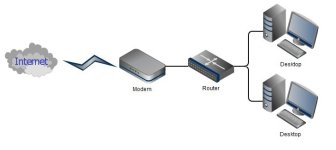
I have a network related question/issue (because I suck with networks).
View attachment 20126
This is my setup at the moment. My modem is upstairs where the phone jack is, and then I have a LAN cable running downstairs to my router. Then the 2 PC's and the XBOX are connected to the router.
Both of the PC's are connected to the router with CAT5e cables, the router has gigabit ports and so do our PC's, yet the copy speed between the PC's does not go above 10 MB/s. Should I do more cable swapping to see if it is a cable or can something else cause this?
I think my modem currently has DHCP on and my router's is off (not sure if this is relevant). My modem only has 100Mbps LAN ports.

Question, and I have to ask you to clarify... You say your copy speed is 10 Megabytes per second on a 100 Megabit per second link? That's 80% link utilization right there... 10MB/s = 80Mbps
Yeah as Murfle said. The 100Mbps is on my modem (which only my router connects to). My router has gigabit ports (which the 2 pc's are connected to).Question, and I have to ask you to clarify... You say your copy speed is 10 Megabytes per second on a 100 Megabit per second link? That's 80% link utilization right there... 10MB/s = 80Mbps
Sorry Murfle, but you'll have to clarify protocol for me. :/He said gigabit. The 100mbit is only on the modem, which is fine for (presumably) ADSL.
[MENTION=6280]Blazzok[/MENTION], what protocol are you using for transfers? I find windows shares to be unreasonably slow compared to others...
Yeah as Murfle said. The 100Mbps is on my modem (which only my router connects to). My router has gigabit ports (which the 2 pc's are connected to).
Sorry Murfle, but you'll have to clarify protocol for me. :/
I copy using Tera Copy; I don't use something like Total commander for file exploring and copying, if that is what you're asking. Even so, purely windows copy shouldn't limit me this much.Are you just copying over shared folders using Windows Explorer?
I'll have to check that when I get home.And the connected speed is 1Gbps full duplex?
I copy using Tera Copy; I don't use something like Total commander for file exploring and copying, if that is what you're asking. Even so, purely windows copy shouldn't limit me this much.
I'll have to check that when I get home.
Ok, Teracopy will use the same type of shares as explorer, so ya... sounds like normal windows shares. Still should be faster than that...
How fast does something copy on the local machines? Ie, copying a large file on PC1 from one directory to another. How about on PC2? Doubt its a hard drive limitation, but I don't know the state of your machine, so just throwing out ideas.
Go into your network and sharing center, and click 'ethernet' to see the speed. Check both computers. Now even if you get 1.0 Gbps, a bad cable can still limit you. If you have spares, I'd recommend checking swapping them out to check.
