IE 9 and Chrome doing really weird things on my bosses PC HELP!!!

Mattt

New member
Ok so, just to get things straight, This is not an attempt to earn more points. It's a genuine cry for help.

A little while ago my boss complained that he could not access his internet banking he could get into the banks site add in his profile number and then it would freeze when he tried to put in his password. Using this as an excuse to get him off IE9 I installed Chrome which worked perfectly.

Two days ago, however, Chrome decided to stop working as well. It opens up and after a quarter turn of the grey working dial it freezes. All you can do is close the window. Nothing else on the laptop is behaving this way.

I tried re installing chrome and it made no difference.

Can anyone offer any advice on how to go about fixing this?
 
Have you tried with FF?

Also maybe uninstall Java since I had a similar issue a couple months back and reinstalled which sorted my issue out.

EDIT: Disable any unnecessary extensions in the browsers, as they tend to conflict some times.
 
Have you tried with FF?

Also maybe uninstall Java since I had a similar issue a couple months back and reinstalled which sorted my issue out.

EDIT: Disable any unnecessary extensions in the browsers, as they tend to conflict some times.

I haven't tried FF yet. I'm in the process of uninstalling IE and reinstalling to see if it makes a difference but I think the Java story seems to be the way to go.
 
OK so, Uninstalling Java didn't do anything, neither did reinstalling it. Any other suggestions?
 
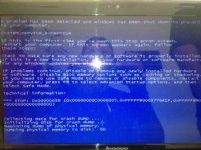
Ok so FF is working fine. When going to the IE tab to close it I got a blue screen of death. tried to get a picture but wasn't quick enough.
 
I think it is related to the Java.

Go to Control Panel - Programs - Java

Under the Security Tab you should see a bar, move this down to Medium, also add the URL for standardbank into the edit site list and apply.

Hope this helps.

PS: If you dont see the bar in the security tab then update to the latest version of Java.
 
Why not try upgrading to IE10? Or removing IE completely? Could be this that's causing it?

Yeah I uninstalled and reinstalled IE10. Didn't make a difference. I'm going to remove it completely now.

I think it is related to the Java.

Go to Control Panel - Programs - Java

Under the Security Tab you should see a bar, move this down to Medium, also add the URL for standardbank into the edit site list and apply.

Hope this helps.

PS: If you dont see the bar in the security tab then update to the latest version of Java.

I will have a look at those settings.

I am trying to run a spyware scan but I keep getting blue screens as per the attachment

Blue screen.jpg
 
Is he banking with more than one bank and does he have all their security things installed? I know SB uses Rapport, FNB uses WebRoot and some other bank uses PrevX but having them all installed causes conflicts and issues so it may be best to use only one.
 
I think it is related to the Java.

Go to Control Panel - Programs - Java

Under the Security Tab you should see a bar, move this down to Medium, also add the URL for standardbank into the edit site list and apply.

Hope this helps.

PS: If you dont see the bar in the security tab then update to the latest version of Java.

Websites don't really use Java Applets anymore...And as far as I know none of the banking sites use it either. I doubt the issue is with Java.

Sounds more like a virus/spyware. Try install Avira Free Antivirus and give it a scan.
 
Is he banking with more than one bank and does he have all their security things installed? I know SB uses Rapport, FNB uses WebRoot and some other bank uses PrevX but having them all installed causes conflicts and issues so it may be best to use only one.

He only uses SB. I don't think he has any other bank security thingys.

Websites don't really use Java Applets anymore...And as far as I know none of the banking sites use it either. I doubt the issue is with Java.

Sounds more like a virus/spyware. Try install Avira Free Antivirus and give it a scan.

I'm running a scan with Malwarebytes right now. Would I achieve better results with Avira?
 
Right so it picked up 60 PUP's I removed them all and restarted. Anything I can be doing to prevent this happening again. If that's the cause of the problem that is.

Avast has been running the whole time so i'm not sure whats happened there.
 
Back
Top