Spring Cleaning Time

B1nary

New member
So Its about that time again,time to crack out some air and clean out the dust bunnies.

unfortunately I no longer have easy access to a blower to clean my rig so I was wondering what you guys use / have used, was thinking about getting myself one of those cans of compressed air but not so sure how effective or how far its going to go in the cleaning process before its empty.

Spoke to a guy today who uses a vacuum and I was like Heeeellll no, STATIC....bad

any suggestions or past experiences to relate?
 
I'd rather use a vacuum and small nozzle to suck out than blow compressed air into my case.
 
Yeah, stay away from compressed air, it contains moisture!
Never tried a vacuum before, but thankfully not much static here on the coast. A simple paintbrush, toothbrush (for the fans), eraser and blower (hair dryer in your case) is what I would suggest.

Could also go as far as getting some mineral water and washing the board down if it's that dirty.
 
Some people say it's ok to use a leaf/workshop blower as long as you hold down the fans and blow only in small bursts. The problem with blowing/vacuuming is that by moving the dust particles over the components you create friction > static, and there's a risk that you'll blow a few dust particles into the tiny nooks and crannies that they wouldn't normally end up.

However, the risk is very small with compressed air, blower or vacuum as long as you take care. If you're using water then you really need to take care :P

Most people would favour compressed air. Just don't turn on your machine for a few hours after...

Oh and I suspect you shouldn't use a hair dryer. Something about how it channels the airflow in such a way as to create max friction or something. Can't remember where I read it or if it was reliable.
 
There was an extensive thread on this already. Conclusion was that using compressed air can is best, vacuum cleaner etc is not recommend for components dear to your heart.

Personally I think the risk is minimal either way as long as you don't make contact with anything.

Yeah, stay away from compressed air, it contains moisture!
Nope. Though it might cause condensation.
 
I personally ground myself to the case and remove fluff with my fingers. Otherwise, I remove components and gently wipe them down using tissue paper - it gets the job done.
 
There was an extensive thread on this already. Conclusion was that using compressed air can is best, vacuum cleaner etc is not recommend for components dear to your heart.

Personally I think the risk is minimal either way as long as you don't make contact with anything.

Nope. Though it might cause condensation.

I disagree! I have sprayed my hand with compressed air and it genuinely feels wet(ish) after?
(granted, I know you get canned compressed air that states that it doesn't contain any, but obviously I'm not referring to that).
 
Our house needs some proper spring cleaning. After moving into the new place 2 months ago we realised how much crap we actually have that we don't use. Parents are coming for a looong visit next month, so wr should get cracking on cleaning out the cupboards.

Oh, this thread is about dirty PCs only? Mine's too new to be dirty... :D
 
I disagree! I have sprayed my hand with compressed air and it genuinely feels wet(ish) after?
(granted, I know you get canned compressed air that states that it doesn't contain any, but obviously I'm not referring to that).

You have a serious problem if there is moisture inside your can of compressed air.

Funny thing with compressed gas, when you compress air into a cylinder it generates heat, on the converse when you release the pressure it gets colder. Thus when you releasing compressed gas that moisture your feeling is condensation from the air around the compressed gas.

Short bursts of air will prevent said condensation effect on your hardware.
 
Compressed air remains the best option. You can buy them at some photography stores. And they are definitely not supposed to contain moisture.

My pc is also crazy dirty. I should go look for some too.
 
I usually just go with a toothbrush / toothpicks for the small parts that collect dust.

Juyst cleaned my PC out after getting a new Sound card + Graphics card.
 
Bought a blower for work purposes and haven't looked back. I must agree with the "hold down fans" otherwise you can really mess them up. i stick a twig/thin screwdriver into the psu fan to stop it when i blow that baby to pieces.
Otherwise a roll of kitchen towel paper (think loo paper for giants) and a toothbrush...and...erm, well this is awkward. I got a set of the little brushes that you use for pap smears (perks of having a doctor in the house) which is PERFECT for cleaning fans and hard to reach places the toothbrush just cant do ^_^
 
Once again I say steal the girl friend or wifes blush make up brush - it is the easiest and best way to clean a pc. I do use compressed air first, then with the make up brush I clean the last bit out. I do this every month since my case has to stand open to a degree otherwise my SSD and HDD refuses to boot - the box pushes against the power cables.
 
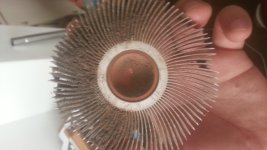
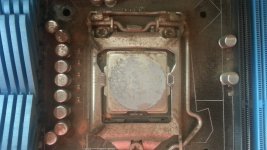
My cpu was over heating about 2-3 weeks ago so I had to take my cpu fan off and clean it out and re paste my cpu... A paint brush and a vacuum, with the narrow attachment on, works well. Got the mrs to hold the vacuum and I brush all the dust offView attachment 12495View attachment 12497
 

Attachments

  • IMG-20140819-WA0004.jpeg
    IMG-20140819-WA0004.jpeg
    123.3 KB · Views: 44
  • IMG-20140819-WA0002.jpeg
    IMG-20140819-WA0002.jpeg
    159 KB · Views: 42
Last edited:
Just blown most of the dust out my case 2 days ago with the compressor.(short burst) Never had any problems I do always secure my fans with toothpicks and then after that uses a paintbrush on the grills and dust filters.
 
hmm...maybe I should have a shot at summarizing this story.

1) First prize: Disconnect PC completely (as in unplug) and use a can of compressed air to clean things. Wait a bit...canned air causes condensation issues...not a problem if you let it chill a bit.

2) Second prize: Connect PC to power plug but switch off power at wall socket. Use blower/vacuum cleaner. Do not make contact with PC components. Not you...and especially not cleaner nozzle. Ground yourself against a bathroom tap before and after.

3) As per others...avoid over spinning fans. The fans can take 2000rpm+ so that isn't really an issue...its more you apply air pressure at a fkd up angle that is. So maybe (carefully with a non-conducting object) block that fan as suggested).

(Also...please don't stick anything into a PSU without consulting someone knowledgeable).

And finally...its not the cleaning technique that will screw you over...its that nylon tracksuit generating static electricity that will ruin your day. So...wear jeans and cotton tshirt whilst being a tech ninja. ;)
 
Last edited:
hmm...maybe I should have a shot at summarizing this story.

1) First prize: Disconnect PC completely (as in unplug) and use a can of compressed air to clean things. Wait a bit...canned air causes condensation issues...not a problem if you let it chill a bit.

2) Second prize: Connect PC to power plug but switch off power at wall socket. Use blower/vacuum cleaner. Do not make contact with PC components. Not you...and especially not cleaner nozzle. Ground yourself against a bathroom tap before and after.

3) As per others...avoid over spinning fans. The fans can take 2000rpm+ so that isn't really an issue...its more you apply air pressure at a fkd up angle that is. So maybe (carefully with a non-conducting object) block that fan as suggested).

(Also...please don't stick anything into a PSU without consulting someone knowledgeable).

And finally...its not the cleaning technique that will screw you over...its that nylon tracksuit generating static electricity that will ruin your day. So...wear jeans and cotton tshirt whilst being a tech ninja. ;)

I'm usually in a jeans, tee and sneaks when working inside my case. Though, I am grounded (using strap). The inside of my case is generally clean, actually. There's a fan mounted near to the front panel for air induction; it keeps the case generally clean, since most of the dirt plaks (sits) onto the fan blades, this, allowing for a cleaner inside.
 
At the risk of sounding stupid, (I am an idiot when it comes to electric stuff) I clean my PC with a Ryobi Blower, for years now. BUT, I always hold the fans down, CPU GPU and case fans.
Once when I was cleaning and I by accident wasnt holding down a case fan and becuase it had an coloured LED, I could see the LED light up.

I'm thinking the fans acts like a Dynamo and lit the LEDs. But, if you dont hold down the fans and let go, can the spinning fan create a strong enough current to push current into your mobo and possibly damage it?

Always wondered about that.
 
Last edited:
At the risk of sounding stupid, (I am an idiot when it comes to electric stuff) I clean my PC with a Ryobi Blower, for years now. BUT, I always hold the fans down, CPU GPU and case fans.
Once when I was cleaning and I by accident wasnt holding down a case fan and becuase it had an coloured LED, I could see the LED light up.

I'm thinking the fans acts like a Dynamo and lit the LEDs. But, if you dont hold down the fans and let go, can the spinning fan create a strong enough current to push current into your mobo and possibly damage it?

Always wondered about that.

 
Back
Top