AMD To Attack Performance Desktop Market With RYZEN

it's done, just waiting for final approval and then I'll post it.
Was it ever approved? Just sent you mail re possible upgrade to the Ryzen 7 and am well keen to read your review.
[MENTION=2132]Xiphan[/MENTION] How's your Ryzen build doing? Any thoughts yet?
 
Was it ever approved? Just sent you mail re possible upgrade to the Ryzen 7 and am well keen to read your review.

[MENTION=2132]Xiphan[/MENTION] How's your Ryzen build doing? Any thoughts yet?

I did get your mail bud.
Will get back to you a little later. Yeah all is sorted with the review, I just struggled getting it to publish to pdf.
Had a set back where the creators update for Windows 10 corrupted and messed up my pc (Locked out of windows, couldn't get into safe mode), so lost some data ect which pushed it back even further. I'll post it here sometime today tomorrow. Probably late tonight when the forum is quiet, so I can do it without people posting in the thread.

Did you post this somewhere or still waiting for red tape ?

It'll be up later bud.

I was fairly harsh on AMD though, so be warned lol. I do feel the way they handled the launch was poor.
 
I did get your mail bud.
Will get back to you a little later. Yeah all is sorted with the review, I just struggled getting it to publish to pdf.
Had a set back where the creators update for Windows 10 corrupted and messed up my pc (Locked out of windows, couldn't get into safe mode), so lost some data ect which pushed it back even further. I'll post it here sometime today tomorrow. Probably late tonight when the forum is quiet, so I can do it without people posting in the thread.


It'll be up later bud.

I was fairly harsh on AMD though, so be warned lol. I do feel the way they handled the launch was poor.

awesome news
 
I did get your mail bud.
Will get back to you a little later. Yeah all is sorted with the review, I just struggled getting it to publish to pdf.
Had a set back where the creators update for Windows 10 corrupted and messed up my pc (Locked out of windows, couldn't get into safe mode), so lost some data ect which pushed it back even further. I'll post it here sometime today tomorrow. Probably late tonight when the forum is quiet, so I can do it without people posting in the thread.


It'll be up later bud.

I was fairly harsh on AMD though, so be warned lol. I do feel the way they handled the launch was poor.

The only Ryzen build I have done was before the little update to fix the multi-threading bug. My feelings around Ryzen is still mixed. Did you find the same slightly offish performance in that it's fast when you don't expect it to be and oddly sluggish when you don't.
 
The only Ryzen build I have done was before the little update to fix the multi-threading bug. My feelings around Ryzen is still mixed. Did you find the same slightly offish performance in that it's fast when you don't expect it to be and oddly sluggish when you don't.

My experience was not a pleasant one at first, In fact I hated it so much I sent back my personal Ryzen rig.
Unfortunately the review was done during that period of constant bios updates, and fixes ect. I do have a friend running an 1800X and Msi Titanium and it's running really well now, but also had quite a few teething problems. I do mention it in the review as well.
 
Anyone here running their Ryzen rig with a GeForce and if so do you own Wolfenstein: The New Order? I'm trying to determine if the abysmal performance I am getting in this game is because of my GPU or my CPU. For example this is what happens on my rig with the game running on low settings:


As you can see I get incredible FPS drops, whereas a friend of mine managed to play the game on his laptop with a 980M without any issue.

You are not alone in this, it happened to a few people at launch.

Have you disabled Vsync in game, and in Nvidia control panel? Are you running multiple monitors? (if you running multiple monitors, try unplugging them)

Double check that AA is disabled.

If you are running GeForce experience, disable it's 'optimisations' because they normally suck.

Load into a level, open up the console (ctrl + ~) and type: jobs_numthreads 1

Rename the WolfNewOrder_x64 exe to WolfNewOrder_x32
 
Sorry, I meant I wanted to know if people with GeForce cards have this issue as well because I am currently running a Fury X and the above was recorded on my new Ryzen system while running the game at 1080p on low settings! :wtf:

I think I did try those fixes but they didn't help. There are sections of the first level where the FPS seems fine but then I will get FPS drops in other places which are immensely noticeable, distracting and/ or jarring :(
I do know the game is/was frame locked to 60fps, due to it running ID Tech 5. Performance was also hit and miss across a massive range of systems. Also because of this, it uses the mega-texture system, which sadly is plagued with problems. Most likely whey ID Tech 6 was created.

Sadly the only other thing I can think of is using task manager to set the new order to run on "High" priority.
 
Morning all

Got my upgrade done late last week (serious shout out of Thanks! to Rune and Jonathan at [MENTION=12410]Rebel Tech[/MENTION] who sorted me out very quickly, and of course to [MENTION=21]The Joker[/MENTION] who gave me a ton of advice and support along the way.)

Unfortunately didn't have a huge amount of time on the weekend to check things out - hope you all did the right thing and lavished the Mothers in your life with heaps of love and appreciation too!

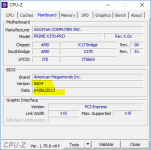
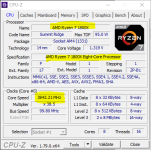
Having a look around this morning though and just one odd thing that I see: the Ryzen 7 1700 that was installed is being identified by the ASUS board as a Ryzen 7 1800X. Initially I though it may be a BIOS issue as the install was using the previous BIOS version, but updating it to the latest version has not made a difference. Searched online for a long while, but can't find any other mention of the same issue.

r1.PNG r2.PNG

What's worrying me is the clock speed difference between the 1800X and the 1700. CPU-Z shows the core at over 3800Mhz (3.8GHz), but the 1700 officially has a base clock speed of only 3GHz, and a max turbo core speed of 3.7GHz (not that I know how to activate Turbo settings yet...)

I'm no expert, but I don't think running the CPU at over it's highest rated clock speed from day 1 is going to keep it running for it's expected life. Any ideas on how I can fix this? Or am I being overly concerned? Spent a fair bit of money on this upgrade, and really don't want to screw it up in the first week just because the CPU is being misidentified.
 
Last edited:
As lame as this sound how Sure are you that its not a 1800x, have you seen the CPU ? perhaps a mistake was made ?
 
What do you see if you run AMD Ryzen Master?
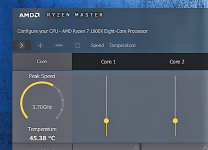
Same thing:
2017-05-15 (1).png
Manged to step down the clock multiplier using AI Suite (?) tool from 3.85 to 3.00 as a temporary measure in the meantime.

As lame as this sound how Sure are you that its not a 1800x, have you seen the CPU ? perhaps a mistake was made ?
Not lame at all - in fact, that was my very first thought as well. And no, I never saw the actual CPU before it went in. While I can't be 100% certain without removing the fan and heatsink assembly, I am fairly sure it's a 1700 CPU. The packing that came with it is definitely for the 1700. The seal confirms this, and the 1700 is the only one that comes included with a heatsink and stock AMD Wraith fan. The fan and heatsink packaging, and the fan in my case look exactly like ones I saw in an unboxing video. (They're separate buys for the 1700X and 1800X and I sure didn't pony up for them.)

All that besides the probability that I'd imagine the good folk over at [MENTION=12410]Rebel Tech[/MENTION] would have picked up on it while they did the build.
 
Not lame at all - in fact, that was my very first thought as well. And no, I never saw the actual CPU before it went in. While I can't be 100% certain without removing the fan and heatsink assembly, I am fairly sure it's a 1700 CPU. The packing that came with it is definitely for the 1700. The seal confirms this, and the 1700 is the only one that comes included with a heatsink and stock AMD Wraith fan. The fan and heatsink packaging, and the fan in my case look exactly like ones I saw in an unboxing video. (They're separate buys for the 1700X and 1800X and I sure didn't pony up for them.)

All that besides the probability that I'd imagine the good folk over at [MENTION=12410]Rebel Tech[/MENTION] would have picked up on it while they did the build.

It's very, very possible that the factory placed the wrong CPU in the box? Probably a one in a million+ but still possible. Otherwise, I would say get some free time and actually physically look at the CPU. If it is a 1700, then re-seat it, that should reset it and hopefully fix it.
 
Ryzen Beast.jpg

1800X
ASRock X370 Taichi
Corsair H110i GTX (Swapped to an air cooler for the time being, waiting on the new EK aio to launch)
G.skill TridentZ RGB 16GB@3200C14
Aorus GTX1080 Ti
Corsair Neutron XT 480GB
Coolermaster V1200
Corsair Air 740
LG 34UC79G LED 144Hz
Logitech G933
Corsair K95 Platinum
Razer DeathAdder Elite
 
Last edited:
So I'm now the proud owner of a Ryzen 1600, paired with an Asus RoG B350-F and 2x8GB Corsair Vengeance @2933MHz.

It's early days yet, but so far any CPU related benchmark is up by over 100% compared to my old FX6300. I'm loving it :D
 
Ryzen 3 should be out by the end of the month, eager to see performance on those! We getting 4/4 Quad chips for the price of a i3? Sign me right up!
 
Ryzen 3 should be out by the end of the month, eager to see performance on those! We getting 4/4 Quad chips for the price of a i3? Sign me right up!

I would have held out for Ryzen 3, but decided to rather invest in something a bit more future-proof. The 1600 is just fantastic value for money.

Having said that, AM4 mobo's are very well priced, and given that the socket is brand new and will be supported for a few years, you can always drop in a new CPU later down the line.
 
Back
Top