GregRedd
New member
I need help MyGamers! From the hardware gurus especially. (Yeah, I'm looking at you [MENTION=21]The Joker[/MENTION] !)
This message started popping up on my PC this evening:
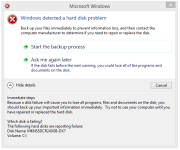
It keeps popping up every 10-15 minutes now.
Then notice an ominous yellow ! on the Intel RST icon, and checked in there too:
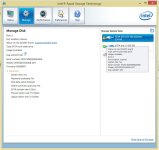
The SSD is my boot drive, is about 6 months old, and has "91,6GB free of 206GB" according to the info under my devices.
Assuming that Windows and Intel are not making the error state up just to irritate and annoy me, I want to try an avoid losing my C:/ drive and the use of the machine in the near future.
Rather than wait for the drive to fail completely, I want to be a little proactive about things and try to keep my machine up and running (and myself gaming of course ) while having the SSD checked and repaired if needed.
So, here's what I'm thinking of doing:
Does that sound about right? And please help with suggested tools/programmes - preferably cheap/free - I could use to do this. (I have an old, old, old copy of PartitionMagic, but it won't run on Win8.1 at all.)
Right now I'm too kak scared to do anything else with the machine until I have my backup clone in place, but once I've successfully cloned the C:/ drive I'd be happy to try run a disk recovery/repair tool or two before making the switch, if you have suggestions for that as well.
"Help me Obi Wan Kenobi MyGamers - you're my only hope!"
This message started popping up on my PC this evening:
It keeps popping up every 10-15 minutes now.
Then notice an ominous yellow ! on the Intel RST icon, and checked in there too:
The SSD is my boot drive, is about 6 months old, and has "91,6GB free of 206GB" according to the info under my devices.
Assuming that Windows and Intel are not making the error state up just to irritate and annoy me, I want to try an avoid losing my C:/ drive and the use of the machine in the near future.
Rather than wait for the drive to fail completely, I want to be a little proactive about things and try to keep my machine up and running (and myself gaming of course
) while having the SSD checked and repaired if needed.So, here's what I'm thinking of doing:
- Create a new partition on my secondary drive (a 2TB HDD with more than half of it empty atm)
- Clone a copy of the SSD to the new partition
- Remove the SSD and send it away for a good solid slapping!
- Designated the HDD as the primary drive
- Rename the new partition as C:/ and boot directly to it
- Continue to function and retain my sanity
Does that sound about right? And please help with suggested tools/programmes - preferably cheap/free - I could use to do this. (I have an old, old, old copy of PartitionMagic, but it won't run on Win8.1 at all.)
Right now I'm too kak scared to do anything else with the machine until I have my backup clone in place, but once I've successfully cloned the C:/ drive I'd be happy to try run a disk recovery/repair tool or two before making the switch, if you have suggestions for that as well.
"Help me Obi Wan Kenobi MyGamers - you're my only hope!"