New range of MSI notebooks

GS30 Shadow and Gaming Dock internals

The GS30 Shadow is a light, slim machine with a high-powered, high-voltage Intel Core i7 CPU and the usual stuff you find in an MSI Gaming notebook. One thing it does lack though, is a dedicated graphics card, instead it comes with a PCI-E 3.0 x16 connector and a sizeable dock, the Gaming Dock, in which you’ll be able to fit a full desktop graphics card and a few other goodies.
gs30.png
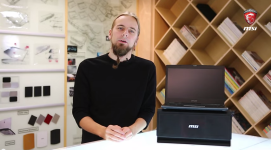
To tell you more about the GS30 Shadow and the Gaming Dock, we’ve created a little video to walk you through the combo and what you can expect hardware-wise.
 
GeForce GTX 900M series – specifications

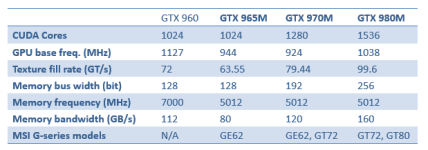
With the launch of GTX 965M, which will be built into the GE62, NVIDIA has a full lineup of high-end mobile graphics in place. As we exclusively use NVIDIA graphics, we figured we’d take a moment and try to highlight the differences in specs on the GTX 900M series, and also compare it to the new GTX 960 desktop graphics card.


900m_specifications.png

With these specifications, we can discern that the GTX 965M is not too far off the desktop GTX 960 in terms of theoretical performance, while the GTX 970M is actually better than the mid-range desktop graphics card. The GTX 980M absolutely outclasses it on paper (and in real life as well, we assure you), with its 1536 CUDA cores and 256 bit memory bus. In fact, the GTX 980M comes pretty close to rivaling the desktop GTX 970 – at a fraction of the power consumption.
 
GT80 Titan SLI testimonials and awards

If we were to liken the MSI Gaming notebook lineup to weapons, the GE62 would probably be a SCAR, the GT72 a Minimi while the GT80 Titan would probably best be represented by an M1 Abrams tank.

Despite the war related talk, our relations with media when talking to the GT80 Titan has been very calm and peaceful – maybe thanks to all the nice things they keep saying about it once they’ve gotten their hands on it. Below follows a few excerpts from GT80 reviews around the world.

“We’ve never laid eyes (or fingers) on a gaming laptop quite like the GT80. With awesome SLI gaming power, a huge screen, and a true mechanical keyboard, this mega-machine sets a new standard of dream machine—so long as you don’t have to carry it very far.” – Computer Shopper http://www.computershopper.com/laptops/reviews/msi-gt80-titan-sli/(page)/5#product-review

“With its face-melting performance, a fantastic mechanical keyboard and upgrade-friendly chassis, the MSI GT80 Titan SLI is the gaming laptop to beat.”
- Laptop Magazine
http://www.laptopmag.com/reviews/laptops/msi-gt80-titan-sli-gaming-laptop

“It’s easy to see why we’re so impressed; GT80 Titan SLI is outstanding in many ways, it pushes the boundaries for all-out mobile performance and achieves this while delivering a catalogue of innovative features.”
- Vortez
http://www.vortez.net/articles_pages/msi_gt80_titan_sli_review,12.html

“Want the best gaming laptop money can buy? The GT80 Titan will not disappoint.”
- Kitguru
http://www.kitguru.net/laptops/zardon/msi-gt80-titan-review-2x-gtx980m-023uk/
 
I see sanity has prevailed and the trackpad on the gaming laptop is no longer where the wrist goes for the WASD. :D

Anyway. Interesting concept to split out the gfx
 
I see sanity has prevailed and the trackpad on the gaming laptop is no longer where the wrist goes for the WASD.

Anyway. Interesting concept to split out the gfx
Yea I'm guessing that's a thermal thing.


GT80 Titan SLI unboxing

We love to rave on about the GT80 Titan SLI, and today, we’re doing it for you in video format. Enjoy our 12-minute video guide into what you hopefully want to know about the 18.4” leviathan.

 
Shortcut Manager

Have you heard about Shortcut Manager? In brief, it’s a tool to make your life easier on the workstation series of notebooks. You can launch applications with a simple key press, or record and run more advanced macros and/or commands, all customized by you for the applications you use.

You can create fully portable profiles, transferable to other systems with Shortcut Manager. Each profile can hold up to 8 hotkeys, each with its specific feature. You’re also able to customize the time between keypresses, as well as which speed they’re executed at.

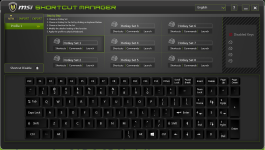
The main window – where you choose your profile keys:

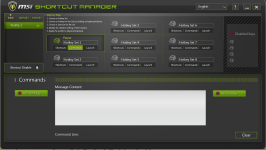
mainwindow.png

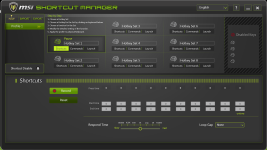
The ”Shortcuts” window – record a succession of keys to be launched by pressing the key you chose in the main window.

shortcuts.png

The Commands screen – input any key combo to be run at any given time.

commands.png

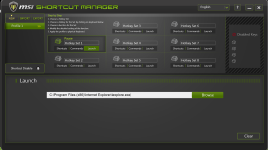
Lastly – the Launch key – choose an application to be launched at the press of your key of choice.

launch.png
 
GTX 950M/960M 3DMark Performance

Performance figures are pretty abundant when it comes to the higher end of mobile graphics, but have you ever been curious about how the GeForce GTX 950M and 960M compare to, say, the 850M/860M? No? Well, that’s fine, because you’ll get the figures anyway.

We present you – our own performance results, comparing the mid-range graphics in 3DMark Fire Strike. Emphasis on the newly launched 950M and the 960M (pink and bronze in the graph below).

RQ12vzb.png


If you want more performance comparisons, please let us know, and we’ll do our best to post more like this for the future.
 
Useless Gamer: Assetto Corsa

Our Useless Gamer concept might be familiar to you by now – we’ve done a few videos of gameplay, where we frankly play the games rather badly, in order to show you some basic gameplay as well as prove that the game runs just fine on our systems.

Our Useless Gamer concept might be familiar to you by now – we’ve done a few videos of gameplay, where we frankly play the games rather badly, in order to show you some basic gameplay as well as prove that the game runs just fine on our systems.

 
Useless Gamer: GTA V

With the launch of GTA V we figured another one of our “Useless Gamer” videos was in order. We basically set out on a mission as the highly lovable Canadian-in-denial Trevor and decided to check what sort of framerates the GT72 and its GTX 980M delivers. Hint: we’re running at “Very High” settings with no issues.

gta_v.jpg

Link to the video:

 
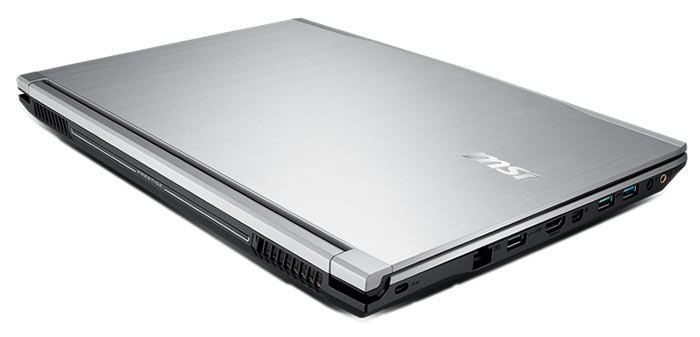
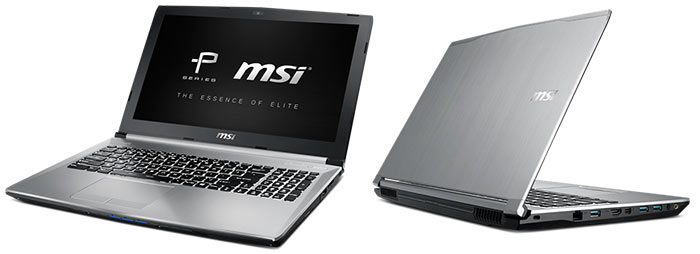
On Wednesday (I know I'm late...) MSI let out a new series of notebooks that it's added to its range - the P series, for Prestige. These notebooks combine elegant professional design with close to 100% sRBG gamut screens and gaming level graphics cards.

http://www.msi.com/product/nb/PE70-2QE.html#hero-overview

e7d5346a-5b7e-4163-851e-8008b27a5df2.jpg

a7a43e46-74a5-45d7-a25d-56b1b17518d2.jpg


The two models being made available are the PE60 (15.6") and the PE70 (17"). Both come with the following set of premium grade features:

- True Colour Technology: extensive factory calibration to bring each panel as close to perfectly accurate on the sRBG spectrum as possible. The True Colour software enables designers to save colour profiles across devices, ensuring that every notebook using MSI True Colour displays exactly the same colour on screen.

- Advanced Nvidia GPUs: with a choice of either the 950m or 960m mobile GPUs you can run full-scale games and manage intensive video editing.
chart_PS.png


- MSI's Cooler Boost 3: the same cooling design that featured in the GT72, which uses 3 heatpipes for the GPU and 1 for the processor, has been included in the PE notebooks, ensuring quiet cool performance under any conditions.
chart_cooling.png


- Nahimic Audio Enhancer: Nahimic's software provides immersive 360 degree crystal clear audio, together with Dynaudio speakers.


Pricing, local availability and all the rest of it will be released as I know more.
 
MSI PE70: Introduction and Features

It’s not every day we introduce an all-new series of notebooks, but it does happen. This time, it’s a system not aimed at gamers, but rather a system that sits beneath our Workstation lineup on the professional side of things – the Prestige series, or P series.

With its 100% sRGB panel, high-performance CPU and NVIDIA GeForce GTX 950M or 960M graphics, it promises to be a great fit for professional editors around the world. Have a look at our introductory video below and see what we’re on about.

PE70.png

 
MSI Exclusive Technology – Audio Boost and Audio Boost 2

Both MSI Audio Boost and Audio Boost 2 feature Gold flash audio jack.

The Gold Flash Audio Jack advantages :

1. Authentic Audio Output
2. Stable Sound Transmission
3. Reduce Obstruction
4. Low Noise
5. Low Distortion

899aba38_l.jpeg


Only MSI Audio Boost 2 supports real 7.1 channel output, and rivals the desktop audio output with line-in/line-out.

3ea6d6e4_l.jpeg


Audio Boost and Audio Boost 2 both enhance audio output by 30%. And both of them provides built-in AMP(amplifier) to boost low-power audio signals (you do not need an extra audio amplifier)!

d4dcad0a_l.jpeg
 
Metal Gear Solid V: The Phantom Pain bundle

Metal Gear Solid V: The Phantom Pain is a game that nobody wants to miss this fall, and its launch date for PC is set for September 1. However, with the help of NVIDIA and the Game Like A Boss campaign, you will be able to get your hands on the game with a purchase of any MSI Gaming notebook with GTX 970M or GTX 980M graphics card from an eligible reseller.

The Kojima stealth-adventure epic is set to be more than a little bit dark, judging from the trailer we’ve handily placed below for you to watch:


With a qualifying purchase made from one of the eligible resellers between July 23rd and September 1st, you will get a free game code, valid until October 1st, 2015. The game itself will be made available on launch, which is currently set to September 15th for PC.
 
Use the latest Afterburner to boost up MSI notebooks’ GPU 3D performance!

Caution: All of the overclock actions is not under warranty protection, so please use this freely but carefully. You can only overclock with this Afterburner tool on systems with GTX800M series or GTX900M series graphics. Users can’t use this tool to adjust AMD graphics or UMA graphics. Furthermore, due to limitations of the graphics driver, clocks of some notebooks can’t be adjusted.

Some power users may have already known that MSI VGA bundles with the best GPU overclock software, called “Afterburner”. This application has existed for years on MSI VGA. It’s a very good tool to overclock the core clock and memory clock of the VGA’s GPU. For some special designs, Afterburner can even add more Core Voltage and extend Power Limit %. Moreover, it’s a good tool to monitor your GPU status in detail. Users can define over 20 items for real-time monitoring.

e8e2fd78_o.jpeg


Afterburner V4.1.0 for GTX900M series mobile GPU

Afterburner works fine on mobile platform, yet, not 100% on all GPUs.

Afterburner works smoothly on most of the MSI Gaming series notebooks (with GTX900M series and GTX800M series graphics). The suitable software version for users to overclock with is V4.1.0 with which users may adjust settings on GTX980M, GTX970M, GTX865M, GTX950M graphics easily.

Let’s now take a look at the example of GE62 which has Intel Core i7 4710HQ and GTX965M graphics. The default clock is 924MHz and the GPU Boost can rise to 950MHz when playing games.

With GPU-Z, we can see the GPU details easily. GTX965M comes with 5000MHz GDDR5, which is further divided into 1250MHz x4 base clock. The memory clock of GDDR5 is x4. Yet if it’s a DDR3, there will be only x2 multiple.

How to overclock the GPU and Memory clock

Afterburner is very simple to perform overclocking. Just follow what we show you in this article and you can try to do this yourself.
Once you turn on the Afterburner, you shall see a window pop-up as below picture. You shall see there are only two columns available for overclocking, the GPU clock and the Memory clock. This limitation is due to the mobile GPU design which locks up Core Voltage, Power limit and Fan Speed and only permits users to adjust these two variables.

GPU clock’s add on range is only up to 135MHz. Memory clock can be adjusted to over 1000MHz (but it will be impossible to work safely if the system is pushed to its limits). Here we just make an example and slightly overclock both variables to 120MHz. Don’t forget to press “Apply‘’ to confirm the settings.

We then need to check real performance to see if this overclocking setup works or not. We use here 3D Mark 11 to test the result. It’s the easiest way to see the difference before and after overclocking.

Before starting the 3D Mark 11 performance test, here is a trick to save your overclocking settings. You need to first change the variables you want to overclock the system with. Here we adjust both GPU clock and Memory clock to 120MHz and apply the settings. Next, choose profile 1 and press “safe” to save the settings. As you may see in the below picture, four profiles can be saved in the software. Next time when you want to use the same settings to overclock your system, just select one of the profiles.

bb192402_o.png


Now, let’s take a look at the result. Under 3D Mark 11 Performance test, the system runs smoother, scoring P7728 when both GPU clock and Memory clock are tuned to 120MHz. On the DirectX11 3D benchmarks, the 3D performance boosts up over 8% at P mode.

Overclocking also works for gaming experience improvement

We then take a look at the heavy loading game title, Call of Duty: Advanced Warfare. It’s a very popular, has more advanced weapons and is selected as the best of 2014 FPS game. In the beginning, we can see the FPS rate is around 43.4 FPS, a FPS rate smooth enough for combat battle.

91a6df91_l.jpeg


Now we use the Afterburner to overclock the system’s GPU and Memory clock to 120MHz. After doing so, we come back to check the FPS rate of the same theme. We can see that the FPS rate now boosts up to 50.1 FPS, 15% faster than standard clock setting.

As obvious as it is shown, overclocking does benefit and boost the system performance. If you are an advanced user, you can not only try and use Afterburner to tweak the system a little bit, but also monitor GPU, memory and FPS status during gameplay and make screen shots easily.

787c2c4e_l.jpeg


Conclusion of overclock with Afterburner

The overclock range may differ on different combinations and regions of the gaming notebooks. However, it is workable for most of the gaming notebooks to overclock over 100MHz on both GPU and memory, let along MSI notebooks. Compared with other brands, overclocking is going to be easier of cake on MSI notebooks thanks to the better thermal cooling design.

Anyway, it’s a simple way to boost up your graphics performance with a 8%~15% improvement on different 3D usage. It’s a really good benefit for gamers and power users without causing any problem on the notebook stability.
Time to overclock your GPU for faster gaming experience now!
 
So [MENTION=760]jasong[/MENTION], I seem to be struggling to find stock of the MSI GS60 Ghost Pro (with 970M) locally. Any idea of local pricing and availability?
 
Back
Top